Log In

Flecty-Muncher - Tool to Reveal Harshness in Mixes
If you mixed and mastered something at home and excited as a kid on Christmas-eve patiently waiting for the DJ to drop it in the club and when he finally does, with the volume cranked up to 11, it sound like someone hitting a hammer on a anvil and you see people with bleeding ears everywhere, then you might need this…
How and Why it Works
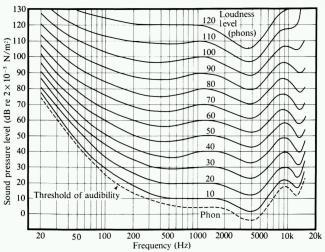
Fletcher and Munson measured the human ears frequency response on different levels and created an average curve from a test with many subjects. They concluded, roughly speaking, that the mid range is more prominent at lower levels and the response flattens out at higher levels.
At low monitoring levels you will hear the mids clearly but you will miss the high and low-end. That’s why we often see a smile curve on EQ’s and if you listen to a bedroom produced track they almost always have too much low-end and are slightly too bright. All that excessive low- and high-end mask the mid area and when you get rid of that excessive high and low-end you have a mid sharp as a knife. Fletchy-Muncher exaggerate the ears frequency response and make us aware of the mids in a badly balanced mix.
How to Use
Put it last in your chain and slowly start to move the knob against the ‘Default’ position. A good blanaced mix/master should survive all the way to ‘Default’ with just a little increase in harshness. If you find your mix too harsh halfway through you’ll have to go back to the mix/master and use EQ, MB compression or other tools to soften it a bit. Remember to put the plugin at ‘Flat’, bypass it or remove it before bounce your new mix/master.
Please Note: You only need to use the graph below if your mixes/masters are too harsh when played elsewhere than in your studio. If that’s not the case this method might cause more damage than good to your tracks.
Features:
- Added Bypass LED so that you know when it’s safely bypassed
- Added real annoying white strobe thing (turned off by default) to make sure you don’t forget to turn it off prior to mix down.
System Requirements:
- For Windows 32Bit hosts (or bridged in 64bit hosts)