


 Log In

Free gifts available with your purchase
Shakers and Tambourines for Kontakt
If you need great shakers and tambourines then you need Sharine. 8 shakers and 4 tambourines recorded with 3 mic positions.
Sharine is the first percussion library that fully retains the pre-roll (also called pre-shift) of each sample while keeping the grooves in sync with your DAW. You get the best of both worlds, ultra-realistic sound with rock-solid timing.
With a wide variety of sounds, unique types of shakers and tambourines and innovative features, Sharine is your new go-to library for creating realistic patterns with shakers and tambourines that will give life, energy and groove to your tracks.
Overview
Sharine is all you’ll ever need to create any type of tambourine/shaker tracks. A wide diversity of instruments, bi-directional shakes, hits, sticks and rolls articulations, pristine recordings and an advanced script make this library unbeatable. This library of shakers and tambourines has more variety than you can shake a stick at!
Mixer
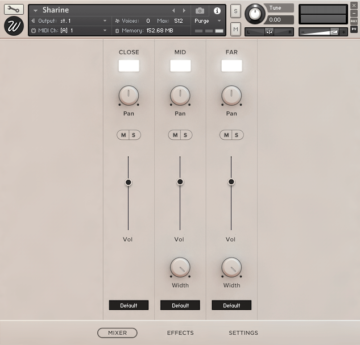
Sharine features a full mixer with which you can control the three mic positions separately:
- Close: recorded with a mono Royer microphone next to the instrument.
- Mid: recorded with two Neumann TLM 103 placed at a mid distance.
- Far: recorded with a binaural Neumann KU100 placed at the back of the room.
With a load/purge switch for each channel, pan, volume, mute/solo, stereo width from 100% stereo to mono and output selector for mixing the different channels on your DAW.
Sequencer / Settings
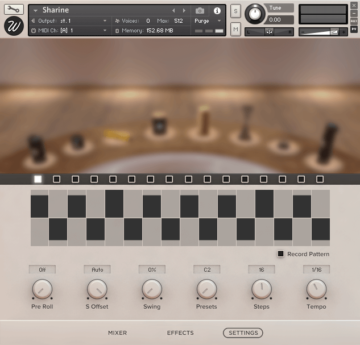
Play one of the predefined patterns or create your own. Apply the advanced pre-roll script with just a turn of a knob, or use the sample start offset for a more traditional approach. Usual features like beat duration, swing and number of steps are also available.
Authentic Pre-roll
Shakers and tambourines travel through the air before the main hit. That pre-roll sound is crucial for the realism of sample libraries. The majority of libraries ignore this fact and some try by getting rid of the pre-roll time (start offset), which obviously doesn’t sound good. Sharine is the only instrument that completely fixes this issue by anticipating the notes by the perfect amount of time per sample… it’s magic.
System Requirements

Important Notes:
- The FULL version of Native Instruments Kontakt 5.7.3 or above is required to run this software.
- This software will not function in full within the FREE Kontakt Player engine and will only be available in DEMO mode.


