/ Kontakt Instrument / Oscillation Strings
Ben Osterhouse

Oscillation Strings

5.0 (13 Reviews)
$99.00
Ben Osterhouse Oscillation Strings - UI
Oscillation Strings // Walkthrough // Kontakt // Ben Osterhouse gallery thumbnail
Oscillation Strings // Legato Samples Walkthrough // Kontakt // Ben Osterhouse gallery thumbnail
Oscillation Strings // Vocalise Demo // Kontakt // Ben Osterhouse gallery thumbnail
Oscillation Strings // Carefree Demo // Kontakt // Ben Osterhouse gallery thumbnail
Oscillation Strings // Oscillation Demo // Kontakt // Ben Osterhouse gallery thumbnail
Oscillation Strings // Bittersweet Demo // Kontakt // Ben Osterhouse gallery thumbnail
Buy Now
Product information

Oscillation Strings is a Kontakt library which specializes in gentle repeated note swells.

Instruments

For all of the articulations, you can choose between violin, viola, cello, or bass. Everything has been recorded dry, close-mic'd, and is doubled (two instances layered together). It's easy to achieve a realistic chamber strings sound this way.

Two Different Types of Legato Samples

Note Change shifts land decisively as a bow change happens during the note-change. Portamento shifts provide a more gliss-y and romantic note-change.

Purge Unused Samples

If all the samples are loaded at once, it takes up a hefty chunk of memory! To lighten the load, there are options to purge (unload from RAM) unused Rhythms, unused Swells or unused Instruments.

Rhythms

  • Energetic eighth notes
  • Medium Quarter notes recorded at two different speeds: 90 and 120bpm.
  • Broad, expressive half notes

Double or Halve time-stretching

Everything tempo-syncs, so if the project bpm is too fast or slow, samples may get overstretched and sound un-natural. The interface includes options to halve or double the speed of everything, to avoid this overstretching.

Swells

Similar to a synth, Oscillation Strings has an attack and decay knob. What's different is that each position in the knobs triggers a whole different set of samples. This opens up a lot of phrasing possibilities.

Custom Swells

If swells aren't your thing, you can just switch over to “Expression” and use the modwheel to make your own phrasing.

Compression

The compression brings up the volume of the soft parts of the swell. They can be a bit dramatic, and it's nice to be able to mellow them out. Because it's compressing the sample for each individual note, it's more natural sounding. You wouldn't be able to get the same effect by just slapping a compressor on after Kontakt.

Polyphonic Legato

The legato in Oscillation Strings is one of the most unique features. Depending on where in the swell overlapping notes are played, a different legato sample will be chosen, and it's sample offset, volume, length, and fade-in time are all automatically adjusted by the script to fit. It's easier to describe by showing, so check out the Oscillation Strings Legato In-depth video for a more detailed explanation of how this works.

Features

  • Instruments - violin, viola, cello, or bass
  • Rhythms - Energetic eighth notes - Medium Quarter notes - Broad expressive half notes
  • Swells
  • Custom Compression System
  • Custom Swells
  • Polyphonic Legato
  • Two different types of legato samples
  • Double or half time-stretching
  • Purge unused samples
  • 11427 Samples .ncw compressed

System Requirements

  • 4.1GB available HD space
  • Kontakt Full Version 6.3.1 or later

Important Notes:

  • The FULL Version of Kontakt 6.3.1+ is required in order to use this instrument.
  • You will be stuck in DEMO MODE if trying to use this instrument in the FREE Kontakt Player.

Installation Instructions

Please Note:

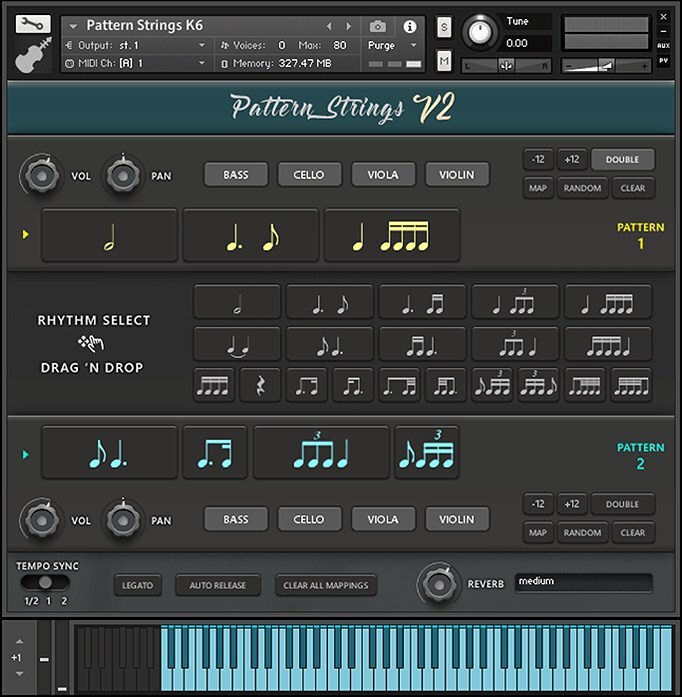
  • Pattern Strings is used as an example.
  • Pulse Downloader is used to download the software and must be installed.

Mac

1. Download and extract the 'Pulse_Downloader_Mac_X.X.X.zip' folder from within your My Account, open the file and run the installer 'Pulse-XX.X.X.dmg'.

2. Drag 'Pulse' to 'Applications'.

3. Log in to your Pulse account, or create a new account by clicking 'Register' at the bottom of the window.

4. If registering, input your email and password, agree to the terms of use and click 'Register'.

5. Click the '+ Add a Product' button located in the top right-hand corner of the window.

6. Copy and paste your serial number from your My Account page, click 'Install Now', then click 'Redeem'.

7. Select a location for Pulse to download the software by clicking the file icon on the right-hand side of the window.

8. Select the location you would like your software to download and install to.

9. Click 'Download and Install'.

10. The instrument is now downloading.

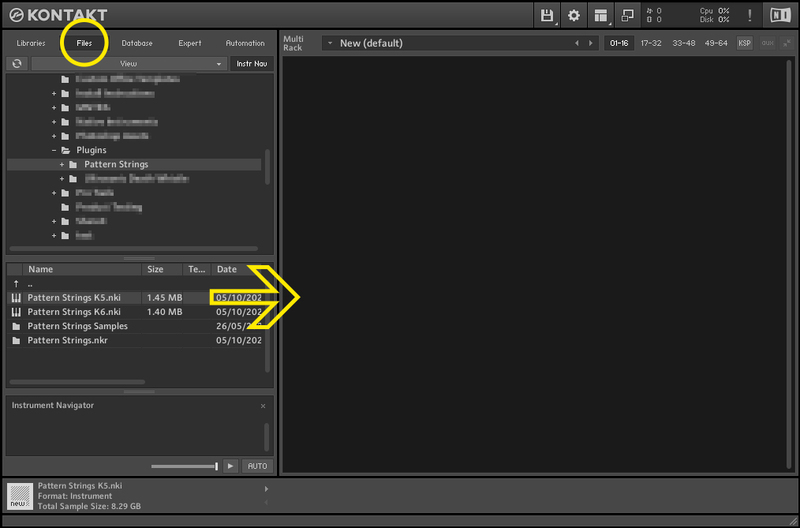
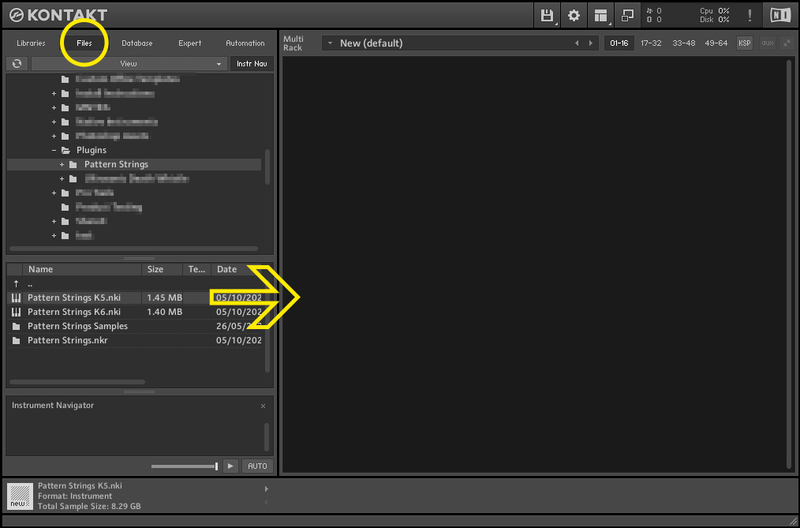
11. Once the instrument has finished downloading, open Kontakt, then open the 'Files' tab and navigate to the location that you downloaded the Kontakt Library to. Then click and drag the .nki file into the empty window.

Your Kontakt instrument is now installed and ready to use.

Windows

1. Download and extract the 'Pulse_Downloader_Windows_X.X.X.zip' folder from within your My Account page, open the file and run the installer 'Pulse Web Setup X.X.X.exe'.

2. Log in to your Pulse account, or create a new account by clicking 'Register' at the bottom of the window.

3. If registering, input your email and password, agree to the terms of use and click 'Register'.

4. Click the '+ Add a Product' button located in the top right-hand corner of the window.

5. Copy and paste your serial number from your My Account page, click 'Install Now', then click 'Redeem'.

6. Select a location for Pulse to download the software by clicking the file icon on the right-hand side of the window.

7. Select the location you would like your software to download and install to.

8. Click 'Download and Install'.

9. The instrument is now downloading.

10. Once the instrument has finished downloading, open Kontakt, then open the 'Files' tab and navigate to the location that you downloaded the Kontakt Library to. Then click and drag the .nki file into the empty window.

Your Kontakt instrument is now installed and ready to use.

Plugin Boutique Rewards

Discover the most rewarding loyalty programme among all plugin retailers.

  • Free Loopmasters Samplepacks
  • Discounts on products and courses
  • Extra Virtual Cash claimed immediately at checkout
Find out more

Follow us:

X (Twitter) Facebook YouTube Instagram
Logo Logo

Plugin Boutique Limited, Part of the Beatport Group LLC.

Copyright © 2011-2025 Plugin Boutique. All rights reserved