


 Log In

Free gifts available with your purchase
Master your track like a pro
Don't let bad limiter settings un-do hours of hard mixing work... LIMITER is a great-sounding, smart mastering plugin that analyses your audio and suggests the best settings for your music. Avoid the hassle and create incredible sounding masters in less time with LIMITER.
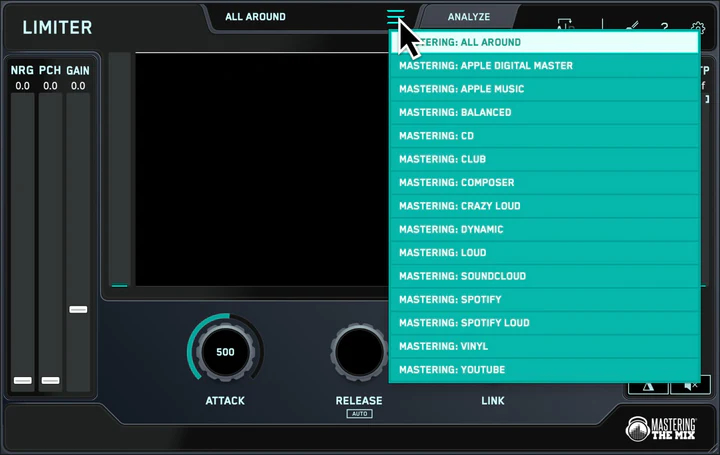
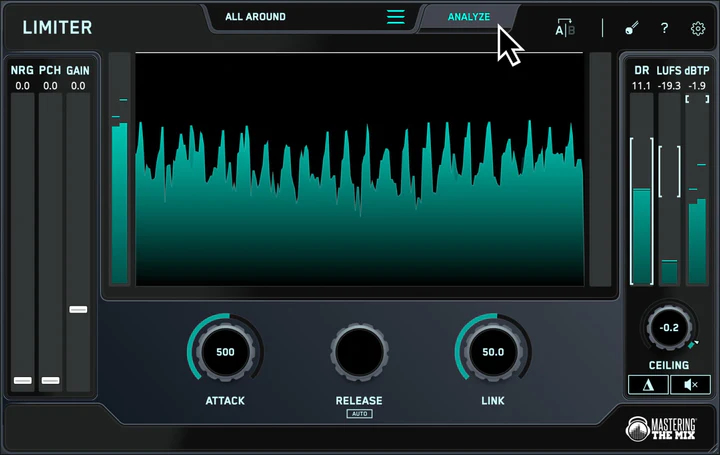
Load up an instance of LIMITER on your master channel and select your preset (i.e Loud, Spotify, Apple Music, etc). Monitor the loudest section of your track, and click analyze. You’ll see a target range on the input gain slider showing you what gain adjustment is needed to achieve your sonic goal. You’ll also see target arrows on the other controls to help you optimize your sound.
You can dial in rich harmonic distortion using the NRG slider, and enhance your transients with the PCH slider. This drives more perceived loudness and punch to help mitigate the effects of limiting.
LIMITER provides great sounding limiting that gives you incredible transparency and clarity (especially in the low-end), even when mastering loud!
Great sounding masters in 3 steps
Step 1.
Load up an instance of LIMITER on your master channel and select your preset, such as Loud, Spotify, or Apple Music.
Step 2.
Monitor the loudest section of your track, and click analyze. You’ll see a target range highlighted on the input gain slider showing you what gain adjustment is suggested to achieve your sonic goal. You’ll also see target arrows on the attack, release, link, and ceiling knobs, helping you optimize those settings to suit your music.
Step 3.
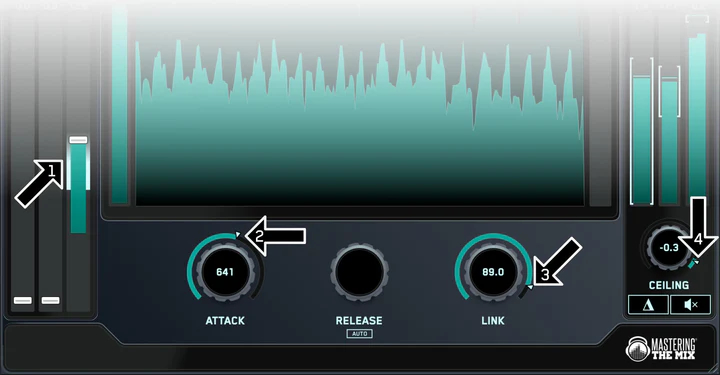
Set the gain slider¹ within the highlighted target range, then adjust the attack², link³, and ceiling⁴ knobs to match the suggestions based on LIMITER's analysis. We recommend leaving ‘Release’ on auto for the most musical result.
Hear The Difference
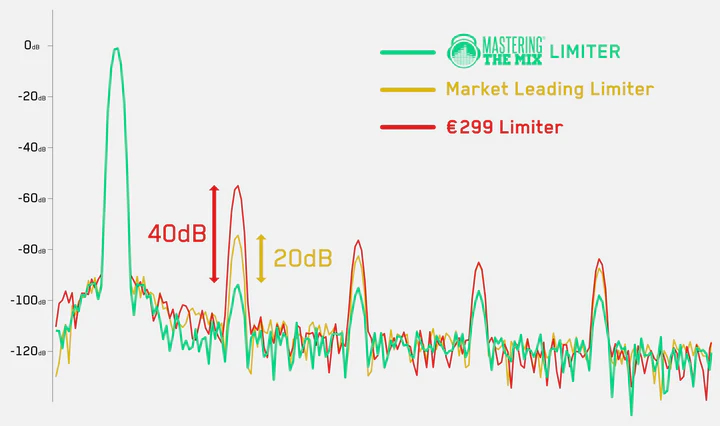
LIMITER gives your masters dramatically improved clarity in the low-end compared to other limiters. When running a 100Hz sine wave through LIMITER, a market-leading limiter, and a €299 limiter, we can see that Mastering The Mix's LIMITER produces considerably less harmonic distortion. In this test the harmonic distortion was 20dB to 40dB less, giving an audibly cleaner sound.
System Requirements
Mac:
- OS X 10.15 or higher.
- 64-bit AU, VST3 or AAX host. Apple Silicon Native (64-bit only)
Windows:
- Windows 10 or higher
- 64-bit VST3 or 64-bit AAX host (64-bit only)
Please note: AAX compatible with Pro Tools 11 and later only.
Important note: When accessing this software via a Rent to Own plan or the Beatport Studio membership, it's installed and run through the Beatport Access portal. An internet connection is required every 30 days to validate your license.
Reviews Summary
While it aims to provide a helpful overview, it may not capture every perspective or detail. We encourage you to read individual reviews to make an informed decision.
Users widely praise LIMITER by Mastering The Mix for its exceptional transparency, fast and beginner-friendly workflow, and intelligent track analysis that provides loud yet clean masters without crushing dynamics. However, a few users noted issues with LUFS target accuracy compared to other tools or suggested using it primarily for mid-chain treatment rather than final limiting.


