


 Log In

Free gifts available with your purchase
TSAR-1R Reverb is the little sibling of the more adjustable TSAR-1 Reverb. They share exactly the same high end reverb algorithm, but TSAR-1R offers extreme ease of use for a fast and intuitive workflow.
Essentially, TSAR-1R is operated with a single control—the Time slider. Add depth and dimension to any sound with short and controlled room sounds, or slide it up towards hall settings for large, dramatic spaces. It really is as easy as that, and it always sounds stellar.
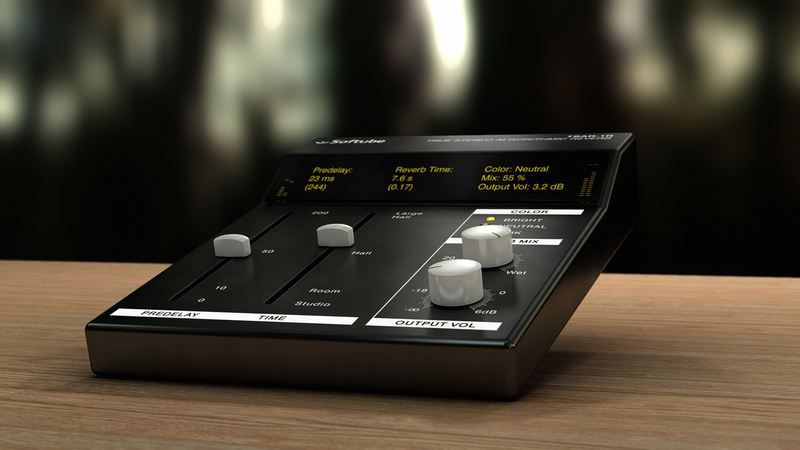
The True Stereo Algorithm inside the TSAR-1R Reverb and the more adjustable TSAR-1 Reverb is what gives them their magic. The strength lies in the sophisticated sound and versatility, no matter whether they are used on strings and brass or rock drums and lead vocals, they always shine. All this while still having a comprehensive and easy-to-use interface that is unparallelled in other high-end reverb products.
Features
- Predelay - Perfect for getting that small gap between the vocals and the reverb tail
- Time - One fader to rule them all. The Time control changes the Density, Diffusion, Early Reflections, Reverb Time, etc. Almost like a continous swipe through all the best presets.
- Color - Need a bright or a dark reverb?
- True Stereo Algorithm - Same as in TSAR-1 Reverb
- Extremely easy to use
- Modern and powerful high-end Reverb
Fast and easy, yet powerful. Apart from Mix and Volume, there's only three parameters in TSAR-1R. Don't let that fool you though, it has never before been this easy to dial in a great reverb sound.
System Requirements
- macOS Big Sur 11, Monterey 12, Ventura 13
- Windows 10 (64-bit), Windows 11
- Softube account
- iLok account
- Computer with AU, VST, VST3, and/or AAX-compatible DAW host software
- Internet access (for downloading installers and managing licenses)
Supported CPU Families
- Apple macOS computers with Intel Core i3/i5/i7 or Apple silicon (M1 or newer) CPU. Apple silicon is supported natively.
- Windows computers with quad-core Intel Core i3/i5/i7 or AMD quad-core processors with SSE 4.2 support.
- Other Intel processors (Celeron, Pentium, and Xeon) are compatible if they support SSE 4.2 instructions.
Supported Host Software (DAW)
Any 64-bit VST, VST3, AU, or AAX (Pro Tools 11.0.2 or higher) compatible host application should work. However, due to plug-in host differences between DAWs—and our rigorous standards—Softube only officially test their plug-ins and instruments in the most recent versions of Pro Tools, Logic Pro, Cubase, Ableton Live, Studio One, and Reaper. Softube plug-ins are not tested regularly in non-listed systems. They will likely work if the system requirements are met. However, the manufacturer cannot guarantee a solution for issues in unsupported systems.
Softube strongly recommend using VST3, as some of their plug-ins have features that are not present in the older VST format. Supported sample rates: 44.1, 48, 88.2, 96, 176.4, and 192 kHz, in both mono and stereo. The most recent maintenance release of your DAW application is recommended. AAX DSP is not currently in active development. TDM/VENUE/RTAS are no longer supported. See Legacy Installers.
Important Note: Make sure that you always use the latest iLok License Manager. It is not included in the Softube installer but can be downloaded from www.ilok.com
Fabian Marasciullo
Mixer for Lil' Wayne, The Neptunes, etc.
"Man!!!!!! Incredible incredible incredible!!!!! Just mixed Lil' Waynes new single How to Love and so sweeeet my TSAR-1 Reverbs are sounding right now. If I had four hands I'd give four thumbs up!"
Fab Dupont
Producer/Mixer Jennifer Lopez, Toots and the Maytals, Marc Ronson and many more.
"I put the TSAR-1 on one track of a song 'just to see if I liked it, and I ended up using it exclusively for the rest of the mix."
Chuck Zwicky
Prince, Soul Asylum, Dead Prez, and Jeff Beck.
"I can't imagine anything simpler or more flexible than the TSAR-1R, five basic sliders that can take you from the past to the future..."


