Log In
.jpg)
Free gifts available with your purchase

Start Thinking of Delay as Part of Your Arrangement
Enter the Delay Matrix
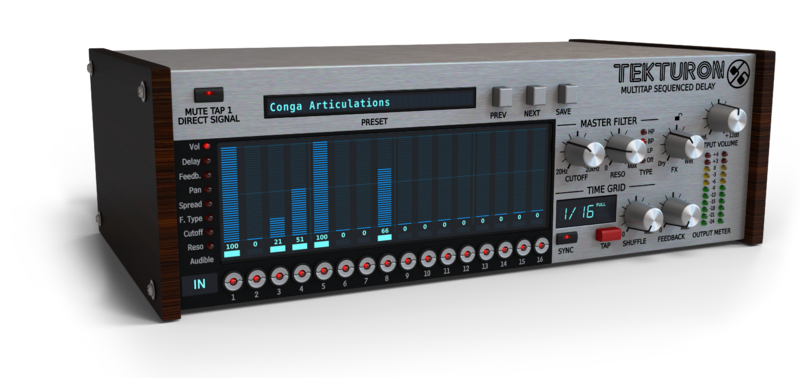
Tekturon is a multitap-delay effect with 16 independent, high-quality delay lines. What really sets it apart from other, similar products, however, is the way it’s controlled and the unique topology into which the taps are arranged: The Delay Matrix. In fact, Tekuron can't be thought of as a tap-delay effect in the strictest sense, but more of a sequence of taps equally delayed from each other, whereby working with the plugin strongly resembles using a step sequencer. This rather unusual design should give your creativity just the kick it needs!
Inspired by Ergonomics
Each and every aspect of the plugin’s workflow is presented in a visually clear and intuitive way, allowing for quick and precise control of every facet of the device, as well as the ability to easily tame all 16 delay lines it contains with global controls. The ability to visually grasp the entire layout with minimal effort allows you to achieve even the most complex results with extraordinary speed.
Fully-Featured Delay Lines
Despite the imposed, fixed topology, each of the 16 delay lines has its own independent set of parameters providing complete control over:
- Delay loop
- Panning
- Stereo spread
- Post-tap multi-mode filter
Despite its superficially simple appearance, in the right hands, Tekturon can be a very powerful production tool, indeed!
Quick-Access Mute Buttons
You’ll certainly appreciate these for live performance situations, among others: conveniently placed, always accessible, and MIDI-assignable mute buttons for selectively suppressing individual delay lines. Invigorate your arrangements, bring some life to your production, and have fun!
Two-Tiered Control
Tekturon provides the ability to control some aspects of the processing globally (adjusting parameters of all 16 delay lines at once) or locally (individually per delay line), thus making it possible to exert both fine-grained and convenient, 'one-knob' control over your performance!
Features
- 16 delay lines arranged in a sequence of taps equally delayed from each other
- Quick-access Mute buttons for selectively suppressing lines’ outputs
- Globally controlled (all 16 delay lines at once):
- Time Grid - The delay between subsequent taps and base delay time for all 16 feedback loops:
- Optional host tempo synchronization
- Feedback base value
- Shuffle (swing)
- Master filter's settings
-
Locally (per delay line):
- Feedback relative to the base value
- Delay time as multiple of Time grid
- Local filter's settings
- Stereo Panorama
- Stereo Spread
- Output volume with level indication
Other Key Features:
- Ultra-low digital aliasing output
- Tag-based preset browser
- MIDI-learn functionality
- 64-bit internal processing
System Requirements
Windows
- Windows 7 - 10 (32 or 64-bit)
- CPU - Single-core 2.8 GHz SSE (Multi-core 3.2 GHz SSE recommended)
- RAM - 8 GB (16 GB Recommended)
- Plugin Formats - VST2, VST3, AAX
Mac
- macOS 10.13 - macOS 12 Monterey (64-bit only)
- CPU - Intel 1.8 GHz / Apple M1 (Intel 2.4 GHz / Apple M1 recommended)
- RAM - 8 GB (16 GB Recommended)
- Plugin Formats - VST2, VST3, AU, AAX
Please Note: This is not a standalone program - a host application (DAW) is required to use it.