Log In

Free gifts available with your purchase
Oberheim OB-X – Beautifully Classic Yet Resolutely Modern
GForce’s Oberheim OB-X is the world’s first officially endorsed emulation of this famous 80s synth. Yet it sounds modern and lends itself superbly to Electronica, EDM, Drum and Bass, Ambient, Rock, Prog Rock, Hip Hop and more. The original synth was used by immense artists and groups such as Japan, Ultravox, BBC Radiophonic Workshop, Chick Corea, Herbie Hancock, Depeche Mode, Queen, Larry Dunn, Youth, Chris Franke, Styx and many more. GForce’s OB-X preserves the sound everybody loves and has been upgraded to offer new sonic possibilities.
An Authentic OB-X With Vast Sound Design Possibilities
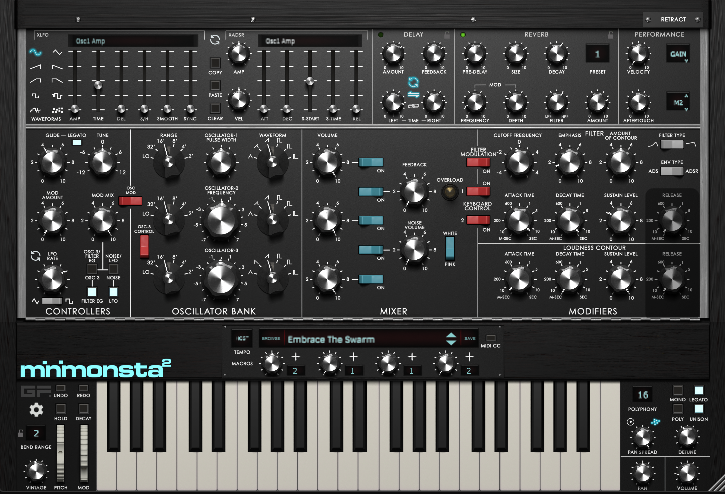
Oberheim OB-X provides an authentic experience but has been enhanced with powerful features designed for the modern setup. GForce’s OB-X features up to 16 voice polyphony, a vintage control for adding subtle analogue imperfections, four programmable Macros, new intro, retrigger, phase and smoothing features for the LFO, new level destination for the LFO, separate PWM1 and 2, discrete levels, discreet tracking, an arpeggiator, a chord mode with scaler, Chorus, Stereo Delay and Reverb effects, and more. Finally, GForce’s OB-X has been augmented with X-Modifiers, dedicated LFOs and ADSRs for almost all parameters that take OB-X to the next level of sound design.
Create Hugely Complex, Yet Musical, Sounds With X-modifier Technology
Using GForce's unique X-Modifier technology, the scope of sound modulation possibilities is immense. The intuitive X-LFO and X-ADSR section enables you to work faster without having to set up modulation paths; they’re already set up for you. X-Mods provide you with the ability to create extensive modulations of almost every parameter, allowing you to create hugely complex, yet musical, sounds. So, while the tone and character at the heart of the synth remain authentic to the original, the additional features turn it into a true sonic canvas.
Inspiration At The Speed Of Sound
OB-X, with its fully resizable UI, a powerful new Preset Browser, and over 400 brand new production-ready presets from top-level sound designers, is fully ready for modern production.
Oberheim OB-X features a new, highly flexible preset browser, giving you the power to organise your sounds in a way that suits your workflow. With extensive tagging, sorting and search possibilities, it’s quick and easy to find the presets you want. The GForce team have included more than 400+ brand new production-ready presets. They’ve enlisted an array of diverse sound designers and artists including Light Bath, GEOsynth, Christian Lafitte, Richard Veenstra and Ramon Kerstens (K/V), Tontario, Stuart Thomas, Zardonic, Drew Schlesinger, Drew Neumann, Noyzlab, Dave Spiers, Tom Wolfe, Graeme Rawson and more. The patches range from resolutely modern to passionately classic with a lot of recreation you might have heard on more than one hit.
Features
- An authentic sounding emulation of the Oberheim® OB-X
- Fully-scalable UI
- Powerful Preset Browser
- Over 400 presets
- Vintage knob for authentic analog imperfections
- Augmented with vast modulation options via X-Modifiers
- Chord mode with scales
- Arpeggiator
- Chorus, Delay and Reverb effects
- Four programmable Macros for easy manipulation of sounds
- Monophonic, polyphonic, legato and unison trigger modes
- Per-voice-pan for wide stereo sounds
- Programmable Aftertouch and expanded Velocity controls for extra playability
System Requirements
Mac
Oberheim OB-X is a virtual instrument in the following formats:
- Intel & Apple Silicon Native.
- Standalone Application
- AudioUnit
- AAX
- VST2
- VST3
The Minimum System Requirements are as follows:
- Intel or Apple Silicon Mac
- macOS 10.13 or above
Windows
Oberheim OB-X is a virtual instrument in the following formats:
- Standalone Application
- VST
- VST3
- AAX
The Minimum System Requirements are as follows:
- 2GHz CPU with 2GB RAM
- Windows 7 and above