/ Compressor / Richter
Klevgrand

Richter

4.5 (937 Reviews)
$69.99
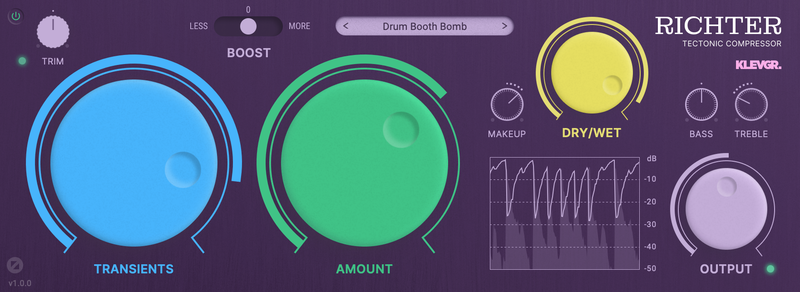
Klevgrand Richter - GUI
Richter – Tectonic Compressor gallery thumbnail
Buy Now
Product information

Tectonic Compressor

A compressor beyond the ordinary

Richter is a tectonic compressor, designed to achieve heavy compression with a minimal amount of artifacts. It is the result of many years of experimenting in the Klevgrand labs. Normally a heavily compressed audio signal gets distorted, often with a nasty "zipper noise" artifact because of how the internal envelope followers are engineered. The experiments led to a brand new approach resulting in a compressor that empowers you to squeeze every bit of sonic perfection out of your tracks. Use it for meaty mixes, punchy drums or smooth, transparent vocal tracks.

Due to how the algorithm is designed, there are a few unconventional controls to tame Richter. First of all: one single parameter controls how much compression will get applied. The other (important) parameter controls how the internal envelope follower will react to transients vs continuous/lasting sounds. These two parameters make Richter a highly intuitive compressor where the user quickly will be able to dial in the wanted sound. On top of that there’s a boost switch that literally makes the amount span go to eleven. And, as the name suggests, earthquake levels are possible.

Features

  • Superheavy compression with minimal unwanted artifacts
  • Intuitive Transients and Amount dials
  • Real time graph visualization
  • Tonal control
  • Three-step boost switch
  • Input trim control
  • Makeup gain, Dry/Wet mix and Output control

System Requirements

  • macOS 10.10 or later (optimized for the M1-processor)
  • Windows 7 (SP1) or later
  • AU, VST or AAX compatible 64-bit host

Installation Instructions

Please Note: Pana is used as the example:

Mac

License Redemption

1. Navigate to https://klevgrand.com/redeem > Paste your 16 digit redemption code found in your Plugin Boutique User Account > Click 'Submit!'.

2. Your redemption code has been accepted > Scroll down to Step 2.

3. Click either 'Sign in' if you already have a Klevgrand account, or 'Create new account' if you do not > Fill in your personal details > Click 'I'm ready'.

4. Your account has now been created.

5. Navigate to your email inbox and locate the activation email that you should have received from Klevgrand > Click 'Let me in!' to activate your account.

6. Create a password for your account > Click 'Enter Klevgrand'.

7. Your software and serial number is now available within your Klevgrand account > Click the Apple logo to download the installer file.

Installation

1. Launch the pana_x_x_x_macOS.dmg installer file.

2. Double click the KLEVGR. logo to launch the installer.

3. Click 'Continue'.

4. Click 'Continue'.

5. Click 'Agree'.

6. Click 'Install'.

7. Enter your system password > Click 'Install Software'.

8. Click 'Close'.

9. Navigate back to your Klevgrand My Account page > Click on the serial number to copy it to your clipboard.

10. Launch your DAW > Create a new audio track > Insert Pana onto the channel > Paste your serial number into the box.

Your software is now activated and ready to use within your DAW

Windows

License Redemption

1. Navigate to https://klevgrand.com/redeem > Paste your 16 digit redemption code found in your Plugin Boutique User Account > Click 'Submit!'.

2. Your redemption code has been accepted > Scroll down to Step 2.

3. Click either 'Sign in' if you already have a Klevgrand account, or 'Create new account' if you do not > Fill in your personal details > Click 'I'm ready'.

4. Your account has now been created.

5. Navigate to your email inbox and locate the activation email that you should have received from Klevgrand > Click 'Let me in!' to activate your account.

6. Create a password for your account > Click 'Enter Klevgrand'.

7. Your software and serial number is now available within your Klevgrand account > Click the Windows logo to download the installer file.

Installation

1. Unpack the pana_x_x_x_win.zip installer file > Launch the pana_x_x_x_win.exe file.

2. Click 'I accept the agreement' > Click 'Next'.

3. Click 'Next'.

4. Click 'Next'.

5. Click 'Next'.

6. Click 'Install'.

7. Click 'Finish'.

8. Navigate back to your Klevgrand My Account page > Click on the serial number to copy it to your clipboard.

9. Launch your DAW > Create a new audio track > Insert Pana onto the channel > Paste your serial number into the box.

Your software is now activated and ready to use within your DAW

Bundle & Save

Klevgrand Cyber Week Mega Bundle
$49.99
$229.96 (78% off)

Plugin Boutique Rewards

Discover the most rewarding loyalty programme among all plugin retailers.

  • Free Loopmasters Samplepacks
  • Discounts on products and courses
  • Extra Virtual Cash claimed immediately at checkout
Find out more

Follow us:

X (Twitter) Facebook YouTube Instagram
Logo Logo

Plugin Boutique Limited, Part of the Beatport Group LLC.

Copyright © 2011-2025 Plugin Boutique. All rights reserved