


 Log In
.png)
Free gifts available with your purchase
Product information
Eddie Kramer Signature Series

Classic Sounds from the Godfather of Classic Rock
Only a legendary engineer/producer like Eddie Kramer can boast a portfolio that includes iconic artists such as Jimi Hendrix, Led Zeppelin, the Beatles, the Rolling Stones, Kiss, and many others. The Eddie Kramer Signature Series distills his timeless production secrets into five exceptional plugins.
Now you can infuse Eddie’s unparalleled expertise and profound sonic insights into your own productions. Whether you're seeking the sound, sass, and soul of classic rock albums, Eddie Kramer's plugins offer an indispensable addition to your mixing toolkit.
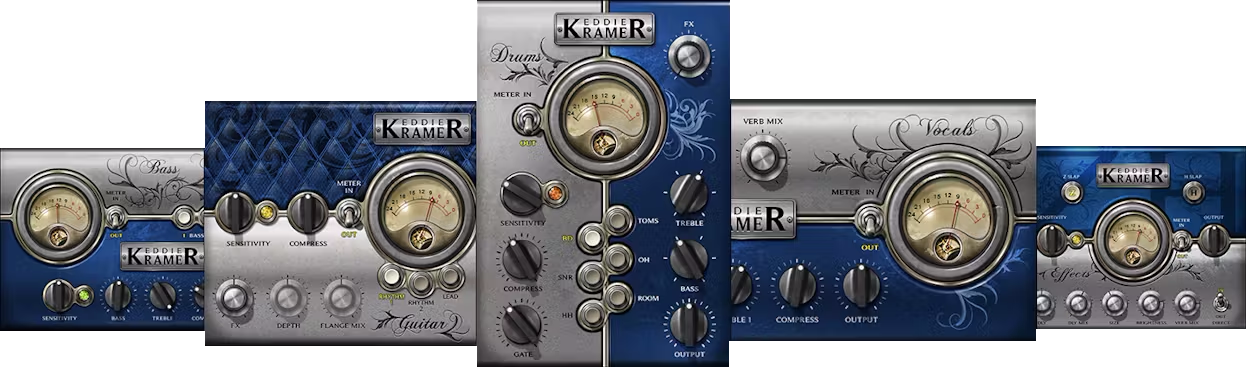
Included plugins:
- Bass Channel
- Guitar Channel
- Vocal Channel
- Effects Channel
- Drum Channel
Features
- Created with legendary producer/engineer Eddie Kramer
- Reproduce classic vocal, guitar, bass and drum sounds
- Bring rich analog tube sound into your DAW
- Complete mix chains distilled into a few well-chosen knobs
System Requirements
Mac
- macOS Monterey 12, Ventura 13, Sonoma 14, Sequoia 15
- VST / AU / AAX
PC
- Windows 10+
- VST / AAX
Installation Instructions














