


 Log In

Free gifts available with your purchase
Post Production Super Bundle (inc. Sonnox Restore)
Sonnox Post is an uncompromising plug-in solution for audio post-production. It includes the award-winning Sonnox Restore suite which features the DeClicker, DeBuzzer and DeNoiser audio restoration plug-ins, along with the classic Oxford EQ and Dynamics algorithms from the OXF-R3 digital console. Also included are the versatile Oxford Reverb, Limiter and SuprEsser dynamic EQ - making Sonnox Post the ultimate post-production super bundle.
With the plug-ins' detailed visual feedback, Sonnox Post will help get the job done faster!
Oxford EQ
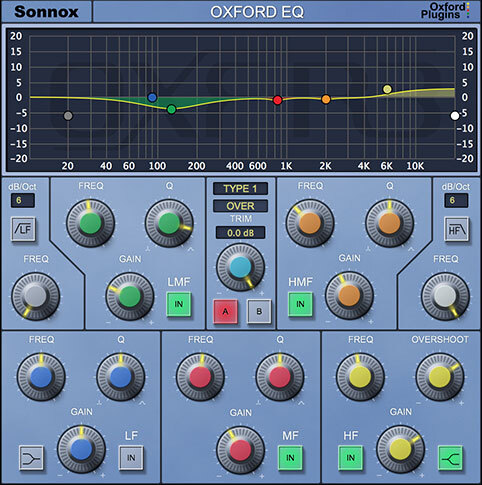
A great sounding EQ is essential to any mix. Which EQ to use can vary depending on the artistic requirements, but quality and flexibility are both critical at all times. What if there was one Plug-In with four distinct EQ types – from surgical to musical – with a track record of being used to mix the biggest hits, films, and live shows?
Enter our flagship Oxford EQ, a Plug-In that traces its heritage to the original EQ section on the acclaimed Sony OXF-R3 digital console. Hallmark sonic transparency meets a simple and interactive interface – resulting in quick, confident and great sounding mix decisions.
Features
- 5-band parametric EQ with variable-slope HP/LP filters
- Four completely different sounding EQ types
- Clinical EQ similar to the SSL4000 E series
- Tighter ‘cut’ for removing problem frequencies
- Classic EQ similar to Neve and SSL G series curves
- Wide and gentle curves perfect for mastering
- Automatable A/B compare button toggles EQ settings
- Ultra low noise and distortion
Learn more about Oxford EQ.
Oxford Dynamics
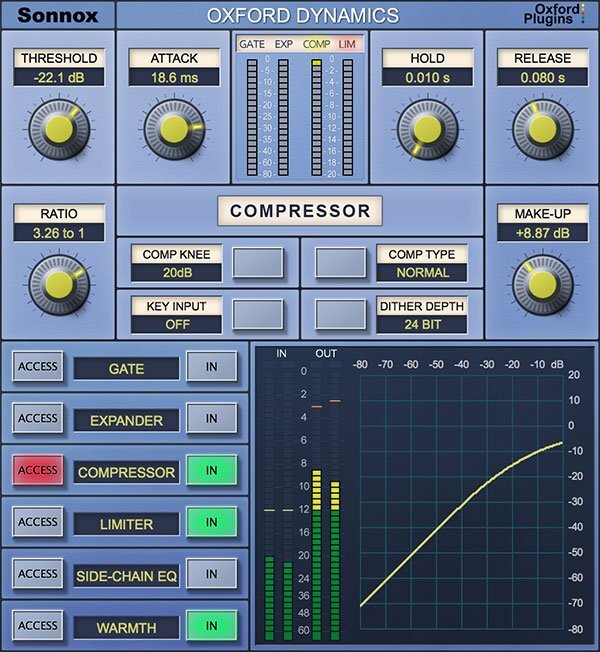
A powerhouse of dynamic control in a single Plug-In that features six independent processes for precision dynamic sculpting of your tracks. From subtle control of a vocal to a pumping side-chained effect; from lightning-fast gating and precision expansion to peak level limiting of single tracks and buses alike. Sonic clarity at all times – with the option of tube-like harmonic saturation when you need it.
We’d love to talk about our use of feed-forward architecture with logarithmic processing, but maybe it’s better to quote some of our users instead:
"Musical-sounding and intuitive," "Transparent" and "Versatile."
General
The Oxford Dynamics plug-in is a highly sophisticated device with comprehensive control of many parameters. Therefore, to aid operation, there is a separate page of controls for each process, since it would not be feasible to have all controls and displays available on a single page. Although there are four gain level controlling processes, Gate, Expander, Compressor and Limiter in the mono and stereo plug-ins, their control signals are all derived from a single side-chain detector, operating on a single gain control element. The amount of processing necessary to allow a detector for each process would be far too great for current processor capabilities if done correctly.
The 5.1 Buss Compressor does not include gating and expansion but has an additional Sub Filter section.
Feed-Forward Architecture
The type of architecture in Oxford Dynamics uses feed-forward techniques. In this case, a tiny delay is introduced into the signal path. (The amount of delay is virtually insignificant, and can be compensated for, in order that all signal paths are aligned, in any case.) This delay allows time for the side-chain control signal to be generated so that it can coincide exactly with the signal it will control. This technique allows very accurate control of the audio levels by generating totally precise control signals, thus preserving audio quality.
Features
- Gate, Expander, Compressor, Limiter & 2-band side-chain EQ
- Warmth for extra presence and tube-like saturation
- 3 different compressor types; Normal, Classic and Linear
- Variable soft knee; 0 dBr to –20 dBr in 5 dB steps
- Surround bus compressor & limiter (HD-HDX only)
- Ultra low noise and distortion
- The dynamics section from the acclaimed Sony OXF-R3 console
Learn more about Dynamics.
Oxford Reverb
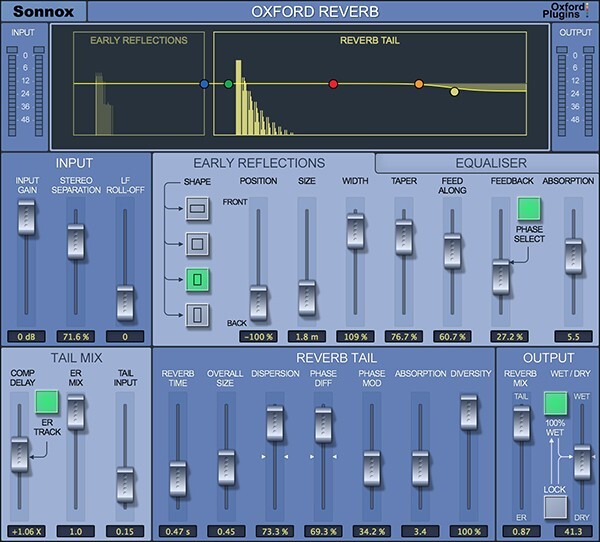
The Oxford Reverb plug-in is a highly flexible stereo reverberation generator, designed to complement existing Sonnox Oxford applications in providing the user with the highest technical and sonic performance coupled with artistic and creative facilities. As well as providing stunning presets, the user has full control over all of its many parameters, including a very comprehensive early reflections section, and integrated 5-band EQ. The Sonnox Oxford Reverb allows the powerful facility to create virtual spaces freely, depending on artistic need, ranging from dry reflection ambiences, room and hall simulations, sound effects, all the way to wide open reverberant spaces with a very large range of possible texture and spatial character.
Features
- 64-bit compliant (AAX / AU / VST)
- Extremely flexible stereo modelling reverb
- Full control over all of its many parameters
- Independent control of early reflections and reverb tail
- Integrated 5-band EQ
- Over 100 invaluable presets for music and post-production
Oxford Limiter
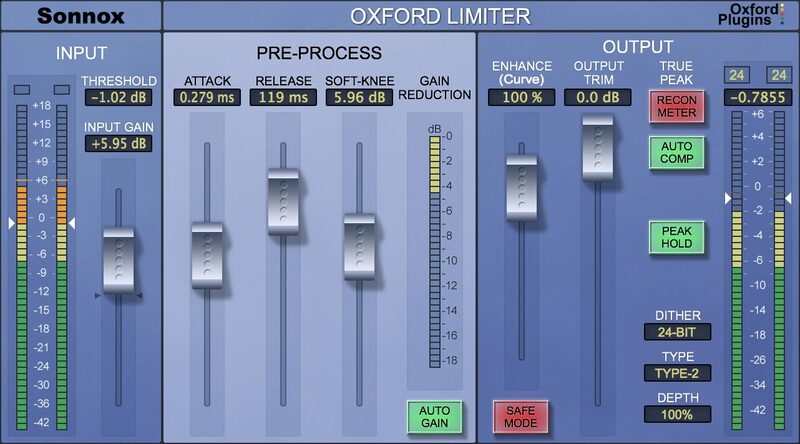
The Oxford Limiter has been developed from decades of professional audio experience to provide a very high degree of quality and facility in programme loudness control and limiting functions. By employing highly accurate logarithmic side chain processing, along with innovative adaptive timing functionality using look-ahead signal acquisition, the limiter provides exemplary performance, whether one is seeking general transparent level control, programme loudness maximisation or heavily applied artistic sound effects.
Features
- Fully 64-bit compliant
- Enhance section to increase perceived loudness
- Reconstruction meter shows ‘actual’ signal rather than sampled signal
- Auto compensate feature corrects recon errors without losing overall programme loudness
- Attack, release and variable soft knee controls
- Comprehensive dither and noise shaping
- Complete with many factory presets
Oxford SuprEsser
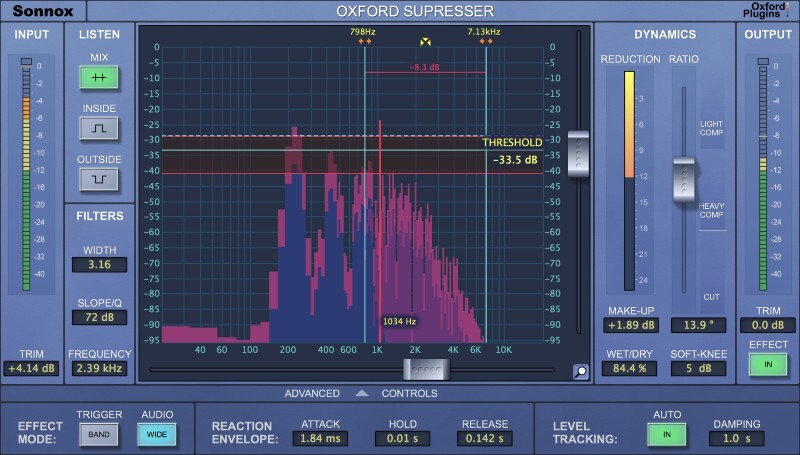
The Oxford SuprEsser is both a very highly-featured professional De-Esser and a Dynamic EQ. There is a simple mode for quick fixes, but also an advanced mode for increased functionality and fine-tuning. The combination of an intuitive FFT display and three listen modes enables the user to easily see and hear exactly where the problem frequencies are, allowing the rapid reduction or removal of the offending audio. As well as being able to trigger the full band compression, only the offending frequencies can be carefully carved out. Since the SuprEsser can operate at all frequencies, ‘plosives’ and other annoyances can also be removed effortlessly, making it more than a simple De-Esser. Additional features include Automatic Level Tracking, Linear Phase Filtering and a Wet/Dry blend control for final balancing.
Features
- 64-bit compliant (AAX / AU / VST)
- Highly featured professional De-Esser
- Linear Phase Dynamic EQ
- Transparently controls aggressive frequencies
- Automatic Level Tracking follows energy levels (no need to automate threshold)
- Large intuitive graphic display makes finding frequencies very easy
- Full Spectrum Operation (20Hz -20KHz)
- Three different 'Listen' modes
- Very easy to use
- Advanced Mode for ultimate control of the Dynamic EQ
- Many creative as well as corrective uses
- Presets giving good starting points
Restore
Sonnox Restore is a suite of three plug-ins - Oxford DeClicker, Oxford DeBuzzer and Oxford DeNoiser - designed to accurately restore audio recordings that are impaired. Restore represents a quantum leap beyond previous restoration plug-in technology with its advanced algorithms and novel features that allow fast and extremely effective removal of pops, clicks, crackles, scratches, hum, buzzes and extraneous background noise from virtually any recording.
Capable of exceptionally high-quality audio repairs, the three plug-ins are intuitive and easy to use, with each interface providing detailed graphical feedback, benefiting the user by saving time which of course is critical in the post-production process.
Features
DeClicker
- Three sections with individual thresholds and controls: DePop, DeClick and DeCrackle
- Event display gives intuitive visual feedback of energy and duration of detected events
- 'Exclude Box' to select events that should not be repaired
DeBuzzer
- High-performance hum and buzz removal using advanced algorithms
- Separate Detect and Remove Sections for intuitive workflow
- Scalable high-resolution FFT of input signal shows strongest harmonics and removal filter
DeNoiser
- High-performance noise removal using advanced algorithms
- Separate DeHisser, Detect and Remove Sections for intuitive workflow
- High-resolution FFT of input signal showing noise profile
System Requirements
macOS
- OS X 10.12 or later (Intel / M1 Apple Silicon supported) (64-bit only)
- Formats: AAX, AU, VST3.
- Supported hosts: Pro Tools 11 and above, Logic Pro X 10.2, Logic 8 & 9, Digital Performer, Nuendo, Cubase, Ableton Live, Studio One
- iLok 2, iLok 3 USB key OR an iLok account with an active internet connection.
Windows
- Windows 7 or later.
- Formats: AAX, VST2 & VST3.
- Pro Tools 11 and above, Nuendo, Cubase, Ableton Live, Samplitude, Sequoia, Pyramix, Studio One.
- iLok 2, iLok 3 USB key OR an iLok account with an active internet connection.
Please note: This product supports iLok Cloud Authorisation. An iLok USB Dongle OR an active internet connection is required in order to activate and use this product.


