/ Compressor / Drawmer S73 Intelligent Master Processor
Softube

Drawmer S73 Intelligent Master Processor

4.7 (632 Reviews)
$89.00
Softube Drawmer S73 Intelligent Master Processor User Interface
Drawmer S73 Intelligent Mastering Plugin By Softube - Show & Reveal gallery thumbnail
Softube Drawmer S73 Intelligent Master Processor gallery thumbnail
Drawmer S73 Softube mastering demo on EDM track gallery thumbnail
Softube Drawmer S73 Intelligent Master Processor gallery thumbnail
Review -Softube Drawmer S73 Intelligent Master Processor gallery thumbnail
Review - The Drawmer S73 By Softube gallery thumbnail
Softube Drawmer S73 - Mixing With Mike Plugin of the Week gallery thumbnail
Drawmer S73 Promo Image
Buy Now
Product information

For the mastering engineer, a multi-band compressor is a powerful tool. But as Spiderman's uncle Ben famously says: with great power comes great responsibility. A multi-band compressor that is not used diligently may create more problems than it solves. This is why Softube created Drawmer S73 Intelligent Master Processor (IMP).

Multiband Compression For Your Mix

Drawmer S73 features an enhanced multi-band compressor sound design, fine-tuned to improve your mix with a minimum of tweaking. The S73 does most of the job for you by making the choices a mastering engineer would make. Simply use the Style parameter to switch between ready made mastering processing techniques to quickly find the sound that suits your mix the best.
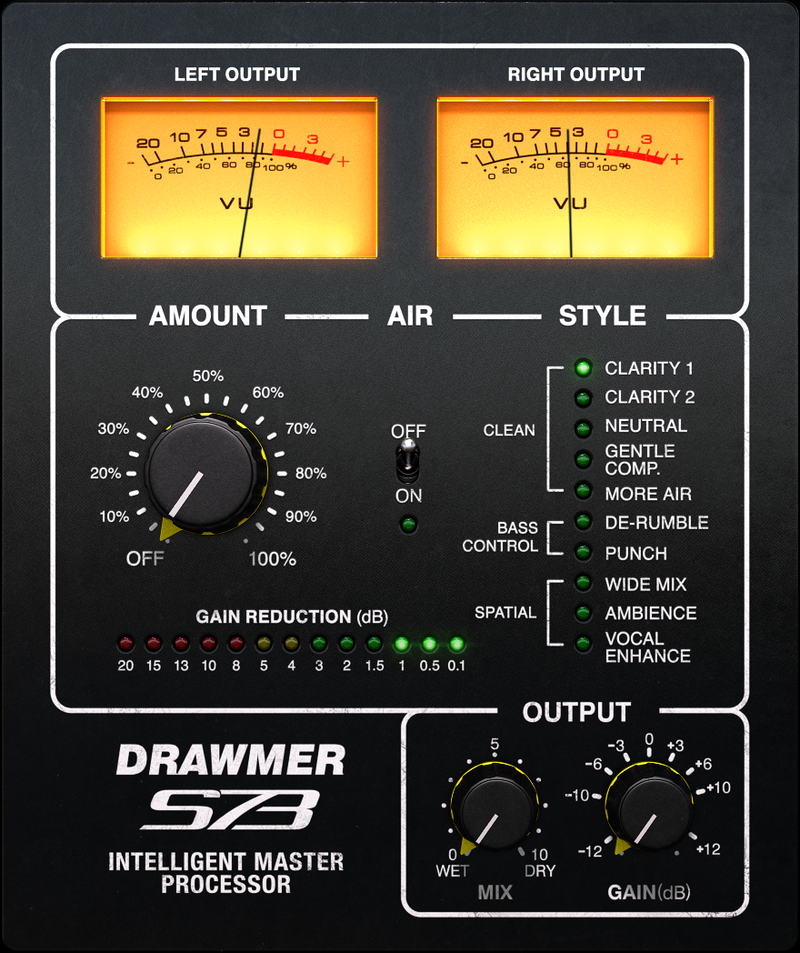
Softube Drawmer S73 at Plugin Boutique

Clarity and Definition 

Under the hood, the S73 is based on technology created by Drawmer for the 1973 Three Band FET Stereo Compressor. This is an award winning multi-band analog compressor design famous for its precision and flexibility. Softube has carefully modeled all the characteristics of the original analog hardware, and have taken the concept a step further by adding mastering sound design to create the Drawmer S73 IMP. The unit offers the perfect way to balance and shape your mix, and get great analog sound in no time.

Features:

  • Built-in mastering processing techniques.
  • Lifts your mixes to the next level.
  • Great Drawmer compressor analog sound.
  • Parallel compression.
  • No USB iLok key required

System Requirements

  • macOS Big Sur 11, Monterey 12, Ventura 13
  • Windows 10 (64-bit), Windows 11
  • Softube account
  • iLok account
  • Computer with AU, VST, VST3, and/or AAX-compatible DAW host software
  • Internet access (for downloading installers and managing licenses)

Supported CPU Families 

  • Apple macOS computers with Intel Core i3/i5/i7 or Apple silicon (M1 or newer) CPU. Apple silicon is supported natively. 
  • Windows computers with quad-core Intel Core i3/i5/i7 or AMD quad-core processors with SSE 4.2 support.
  • Other Intel processors (Celeron, Pentium, and Xeon) are compatible if they support SSE 4.2 instructions. 

Supported Host Software (DAW)  

Any 64-bit VST, VST3, AU, or AAX (Pro Tools 11.0.2 or higher) compatible host application should work. However, due to plug-in host differences between DAWs—and our rigorous standards—Softube only officially test their plug-ins and instruments in the most recent versions of Pro Tools, Logic Pro, Cubase, Ableton Live, Studio One, and Reaper. Softube plug-ins are not tested regularly in non-listed systems. They will likely work if the system requirements are met. However, the manufacturer cannot guarantee a solution for issues in unsupported systems. 
  
Softube strongly recommend using VST3, as some of their plug-ins have features that are not present in the older VST format. Supported sample rates: 44.1, 48, 88.2, 96, 176.4, and 192 kHz, in both mono and stereo. The most recent maintenance release of your DAW application is recommended. AAX DSP is not currently in active development. TDM/VENUE/RTAS are no longer supported. See Legacy Installers.

Important Note: Make sure that you always use the latest iLok License Manager. It is not included in the Softube installer but can be downloaded from www.ilok.com​

Testimonials

Maor Appelbaum

"It has a grainy vibe to it that I like."

Arjan Rietvink

"The Drawmer S73 can do great things with the dynamics of your tracks. Is a great tool to glue a mix together or for adding some air or punch to single instruments"

Ron Harris

"I've done multiple mixes with the S73 now and still can't believe the ease of use for getting the punch, clarity and width."

Installation Instructions

Important Note: Spring Reverb is used as the example

Installation Video

Note: Before starting the installation, you are required to create a FREE iLok user ID and install the iLok License Manager.

Please take a look at this Help Centre Guide for more information.

Registration

1. Click 'DOWNLOAD' in your Plugin Boutique Account. This will direct you to the Softube login page.

2. Enter your details > tick the Privacy Policy box > click 'Sign up' to create an account. (If you already have a Softube account, please log in and skip to step 5).

3. Go to your email account > find the Softube registration email > click 'ACTIVATE MY ACCOUNT'. (Your account has now been successfully created)

4. Go back to www.softube.com (you should now be logged in) > click 'MY ACCOUNT'.

5. Click 'REGISTER LICENSE'.

6. Enter the License Code (referred to as serial number on our site) found in your Plugin Boutique User Account > click 'REGISTER LICENSE'.

7. Click 'GO FOR IT!'.

Your product is now registered.

Mac

1. On the My Products page, click 'MAC' > you will be directed to the Mac Installation page. 

2. Click 'HERE (highlighted in orange) to start downloading Softube Central.

3. Once it has downloaded, open the Softube Central PKG file > click 'Continue'.

4. Read through the Software License Agreement > click 'Continue'.

5. Click 'Agree'.

6. Click 'Install'.

7. Enter your password > click 'Install Software'.

8. Click 'Close'.

9. Open Softube Central > click 'INSTALL' to install all the necessary iLok licensing components. (This may take a few minutes)

10. Sign in to your Softube account.

11. Your product will now be displayed in Softube Central.

Please note: if it says 'DISCONNECTED' at the top of the window, please go to the settings and click 'RESTART', close Softube Central and then open it again.

Your software is now activated and ready for use within your DAW.

Windows

1. On the My Products page, click 'WINDOWS' > you will be directed to the Windows Installation page. 

2. Click 'here' (highlighted in orange) to start downloading Softube Central.

3. Once it has downloaded, open the Softube Central download > click 'Yes'.

4. Read through the Software License Agreement > click 'I Agree'.

5. Softube Central will now open > click 'Install' to download the necessary iLok licensing components.

6. Please wait for the iLok licensing components to download. (This may take up to 5 minutes).

7. Click 'Yes' > the Softube Installer Helper Setup will now run.

8. Click 'Next >'.

9. Read through the License Agreement > click 'I Agree'.

10. Click 'Next >'.

11. Choose the VST file path (we recommend the default location) > click 'Install'.

12. Click 'Finish'.

13. Softube Central has now been successfully installed > click 'START'.

14. Sign in to your Softube account.

15. Click 'INSTALL'.

Your software is now activated and ready for use within your DAW.

Plugin Boutique Rewards

Discover the most rewarding loyalty programme among all plugin retailers.

  • Free Loopmasters Samplepacks
  • Discounts on products and courses
  • Extra Virtual Cash claimed immediately at checkout
Find out more

Follow us:

X (Twitter) Facebook YouTube Instagram
Logo Logo

Plugin Boutique Limited, Part of the Beatport Group LLC.

Copyright © 2011-2025 Plugin Boutique. All rights reserved