/ Expansion Packs / XO Expansion: Pastel Punch
XLN Audio

XO Expansion: Pastel Punch

4.7 (101 Reviews)
$19.00 $39.00

51% off until Dec 08

XLN Audio XOpak: Pastel Punch
Buy Now
Product information

Punchy Starter Beats for Poppy Club Tracks.

With these punching drum beats that positively ooze freshness, you get Rachel K Collier's full signature sound built up from house-based electronic grooves driven by beefy kicks and snares, punctuated with idiosyncratic one-shots and organic distorted percussion.

If you've ever seen Rachel perform, you'll already have a good idea of the sort of sonic goodies you'll be getting in this XO Expansion. Rachel K Collier's live performances are more like mini studio masterclasses than simple songs. Each part is sung, sampled, or played, building up layer upon layer until the individual pieces seem to find their final form almost by magic as a perfectly balanced club banger is born.

These infectious, perfectly balanced grooves come fully formed with vocal samples and delicately constructed percussion and drum tracks. Great to use as a starting point in your productions, and thanks to XO's inbuilt sequencer and the infinite hot-swapping capabilities of the software, each one is ultimately customizable. Wonky Woo sounds pretty heavy right out the box, but those toms can just as quickly become synth stabs, or why not swap them out for kettle drums, and you're ready to set the dance floor alight! With XO, the possibilities are literally endless.
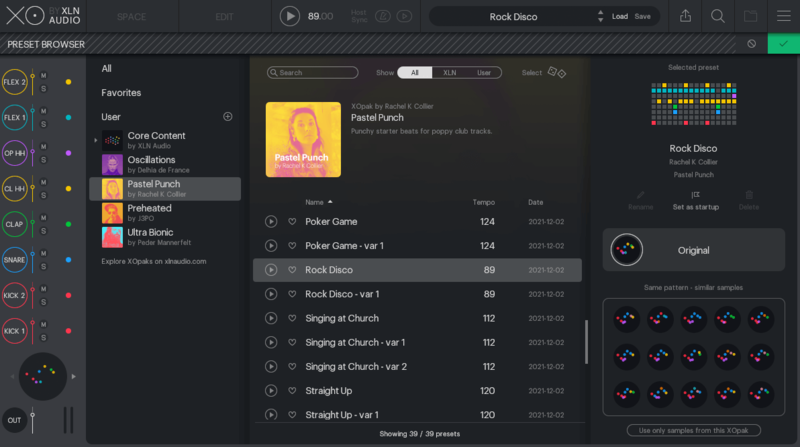
What does an XO Expansion do?

  • XO Expansions are editable beat & sample expansions for XO.
  • XO Expansions contain curated beats & samples that you build your sound upon by using XO and your samples & grooves.

Features

  • Beefy beats and drum samples.
  • Electronic, organic & gritty.
  • 39 presets & 155 one-shot samples.

System Requirements

  • XLN Audio's XO is required in order to use this expansion pack.
Installation Instructions

Please Note: XOpak: Preheated is used as an example.

Account Registration

(If you have already created an XLN Audio account previously, please skip this part).

1. Go to the XLN Audio registration page (where you can now register for an account, and register your product key at the same time).

2. Enter your details, click 'I have a product key to register' and enter the code found in your Plugin Boutique account (displayed as Serial Number).

3. Click 'I agree to the Terms & Conditions' and then click REGISTER.

XLN Audio RC-20 Account Registration

You have now created an XLN Audio account and registered your product key.

Product Registration

(If you registered your product earlier when creating an account, skip this part).

1. Log in to your XLN Audio account.

2. Hover over My Account and select Register Product Key.

3. Enter the product key found in your Plugin Boutique account and click REGISTER PRODUCT KEY.

Your product has now been added to your XLN Audio account.

Mac

XLN Online Installer Installation

1. Download the Mac XLN Online Installer from your Plugin Boutique account and open it.

2. Double-click to install the XLN Online Installer.

3. Click Open (depending on your version of macOS, you may not encounter this security message).

4. Enter your password and click OK.

5. Click Open to finalise the security prompt.

6. Log in to your XLN Audio account. 

7. Enter a name for your Mac and click Register Computer.

The XLN Online Installer is now installed.

Product Installation

1. Make sure your new product is selected and click 'Click to start - Install: 1'.

2. Your software will now install.

3. Open your DAW and launch XO > click 'Show Presets'.

Your XOpak is now ready for use!

Windows

Online Installer Installation

1. Download the Windows XLN Audio Online Installer from your Plugin Boutique account and open it.

2. Click Yes to allow the application to run.

3. Log into your XLN Audio account. 

4. Enter a name for your computer and click Register Computer.

The XLN Online Installer is now installed.

Product Installation

1. Make sure your new product is selected and click 'Click to start - Install: 1'.

2. Your software will now install.

3. Open your DAW and launch XO > click 'Show Presets'.

Your XOpak is now ready for use!

Plugin Boutique Rewards

Discover the most rewarding loyalty programme among all plugin retailers.

  • Free Loopmasters Samplepacks
  • Discounts on products and courses
  • Extra Virtual Cash claimed immediately at checkout
Find out more

Follow us:

X (Twitter) Facebook YouTube Instagram
Logo Logo

Plugin Boutique Limited, Part of the Beatport Group LLC.

Copyright © 2011-2025 Plugin Boutique. All rights reserved