


 Log In

Free gifts available with your purchase
Welcome to the tone orchard of your dreams
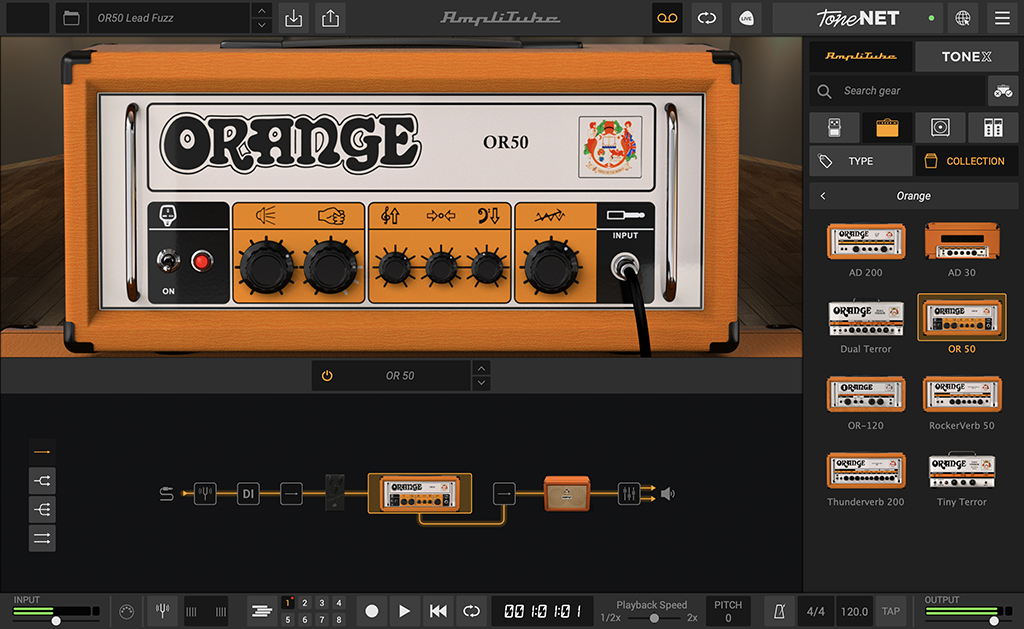
AmpliTube Orange begins 50 years ago during the swinging London music scene of the late ‘60s where you'll find a young Cliff Cooper contemplating the creation of amplification of a different sort — amplification that wouldn't just stand out tonally, but visually, too. Cliff saw opportunity and decided enough was enough — thus Orange Amplifiers were born. Now the best of Orange can be yours.
Orange groove
Orange amplifiers are used by professional musicians around the globe, from legendary players like Jimmy Page and Geddy Lee, to relative newcomers like Mastodon, Deception Theory and My Chemical Romance. Whatever style you play, you'll find your tone inside AmpliTube Orange. IK worked closely with Orange to capture every detail of the gear included in AmpliTube Orange. Hear for yourself.
Gear available in AmpliTube Orange
From a light squeeze of overdrive to a full-on screwdriver of distortion, and everything in between, AmpliTube Orange delivers. Get faithful “true to the original” models of some of Orange’s vintage and current dream machines. AmpliTube Orange includes 8 amp models and 9 matching configurable speaker cabinets. It is the definitive collection of Orange gear that every guitarist, engineer and producer should have.
8 Amplifiers
- AD 200
- AD 30
- Dual Terror
- OR 50
- OR-120
- RockerVerb 50
- Thunderverb 200
- Tiny Terror
9 Cabinets
- 1x12 PPC 112
- 1x12 Tiny Terror
- 1x15 OBC 115
- 2x12 AD-30
- 2x12 PPC 212
- 2x12 PPC OB
- 4x10 OBC 410
- 4x12 PPC 412
- 8x10 OBC 810
Orange crushing tone
Orange amplifiers have been around the music world for over 50 years, providing straight-ahead rock ‘n roll tone. And they’ve always looked “different,” which makes them the visual stage-amp of choice for musicians around the globe. Now your DAW or computer will sport the famous Orange look every time you want to rock out.
If you love the sound of Orange amps, you’ll love AmpliTube Orange, which gives you all the juice you need to fuel your recordings with sweet vintage styled Orange tone.
Features
- Gear collection for AmpliTube Custom Shop
- 8 officially certified Orange amps and 9 matching cabs
- Powered by IK's award-winning DSM™ technology
- Sound-certified and approved by Orange
- No previous version of AmpliTube required
- Works seamlessly with the new Custom Shop updates
System Requirements
Mac®
- Minimal: Apple M1 or Intel® Core i5 Processor, 8 GB of RAM, macOS® 10.15 or newer (macOS 11 or newer required for Apple Silicon Processors). 3 GB of hard drive space.
- Requires an OpenGL 2 compatible graphics adapter.
- Supported Plug-in formats (64-bit): Audio Units, VST 3, AAX.
Windows®
- Minimal: Intel® Core i5 Processor or equivalent, 8 GB of RAM, Windows 10 (64 bit) or newer. 3 GB of hard drive space.
- Requires an ASIO compatible sound card.
- Requires an OpenGL 2 compatible graphics adapter.
- Supported Plug-in formats (64-bit): VST 3, AAX.
Important note: Internet connection is required to authorise the application and access ToneNET.


