


 Log In
Free gifts available with your purchase
A low-end legend’s new chapter
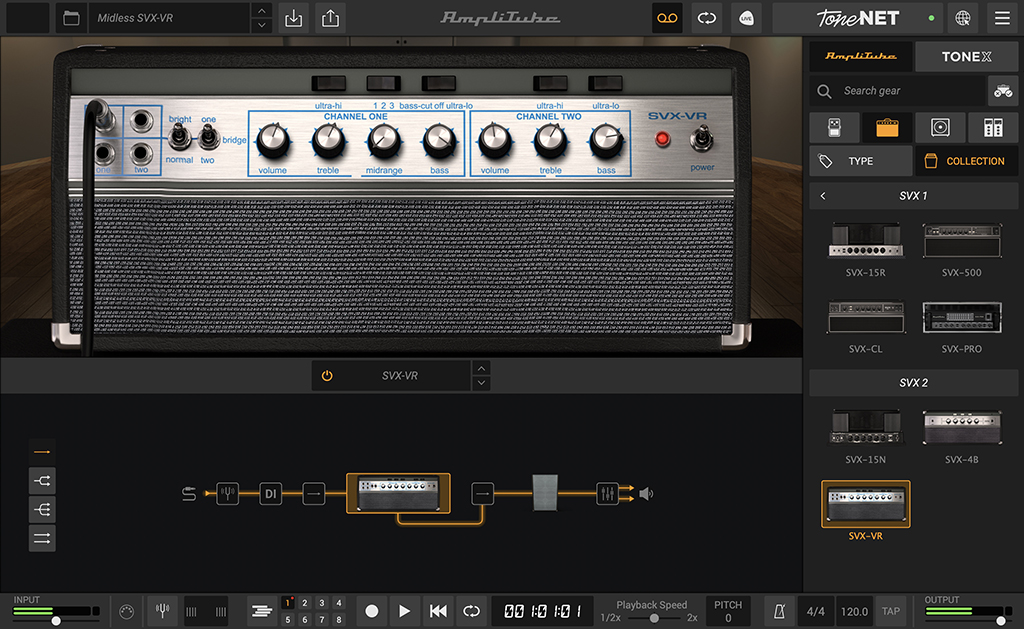
AmpliTube SVX 2 is an updated collection of essential gear for bass players. IK was the first to bring the legendary tone of some of the most iconic bass amps and cabinets ever to the software world with our acclaimed AmpliTube SVX collection. Now AmpliTube SVX 2 raises the bar once again for unprecedented sonic authenticity. AmpliTube SVX 2 carefully replicates 3 new amps and matching cabs, offering you their unmistakable vibe and dynamics down to the finest nuances.
Bringing the lows to new heights
There's a special place in our hearts for this bass gear. AmpliTube SVX was our first opportunity to actually work and communicate directly with the engineers at a company making the gear we were modeling, helping bring our software to an all-new level. You'll be blown away by the incredible fidelity in the second collection that highlights just what makes these amps so special.
Gear available in AmpliTube SVX 2
AmpliTube SVX 2 features 3 amps with matching cabinets, all modeled using our most state-of-the-art technology for a new level of realism, detail and most importantly: tone.
3 Amplifiers
- SVX-15N
- SVX-4B
- SVX-VR
3 Cabinets
- 1x15 SVX-115
- 2x12 SVX-212AV
- 8x10 SVX-810A
AmpliTube SVX 2 gives you more iconic bass gear with the same sound (and feel) you'd get from the real gear. You won't believe your ears – turn it up and you'll feel it in your chest, too.
Features
- Gear collection for AmpliTube Custom Shop
- 3 meticulously recreated amps and matching cabs
- Breakthrough DIM™ technology for unparalleled realism
- Sound-certified and approved by bassists
- No previous version of AmpliTube required
- Works seemlessly with the new Custom Shop updates
System Requirements
Mac®
- Minimal: Apple M1 or Intel® Core i5 Processor, 8 GB of RAM, macOS® 10.15 or newer (macOS 11 or newer required for Apple Silicon Processors). 3 GB of hard drive space.
- Requires an OpenGL 2 compatible graphics adapter.
- Supported Plug-in formats (64-bit): Audio Units, VST 3, AAX.
Windows®
- Minimal: Intel® Core i5 Processor or equivalent, 8 GB of RAM, Windows 10 (64 bit) or newer. 3 GB of hard drive space.
- Requires an ASIO compatible sound card.
- Requires an OpenGL 2 compatible graphics adapter.
- Supported Plug-in formats (64-bit): VST 3, AAX.
Important note: Internet connection is required to authorise the application and access ToneNET.


