/ Synth Presets / AZS Transcend for Diva
Resonance Sound

AZS Transcend for Diva

4.7 (25 Reviews)
$15.00 $30.00

50% off until Dec 07

Transcend for Diva image 1
Transcend for Diva video gallery thumbnail
Transcend for Diva image 2
Buy Now
Product information

Aiyn Zahev Sounds presents Transcend for u-he Diva. Featuring 351 Diva patches, 70 MIDI loops & 70 Audio files. This massive bank takes inspiration from melodic trance and techno typical of Afterlife releases, Tale Of Us, Bodzin, ARTBAT, and others

The sound design explores the analog & organic side of Diva, making careful use of all the filter and oscillator choices available. There’s a wide range of sounds on offer, strong mono basses as well as wide lush unison patches, organic leads with soft attacks, and a long release as well as harder more cutting leads. Pads cover vintage to spacious, ambient & ethereal. The chord category uses Diva’s ability to stack and tune individual voices to deliver huge chords at the press of a button, perfect for a touch of old-school sampled chord sounds. Transcend also features plenty of plucks, arps and other synth sounds to give you inspiration, all tagged and organized into their own folders for easy access.

Aiyn Zahev Sounds Transcend also includes 70 MIDI files which have also been rendered to audio. You can find and audition a suitable sound quickly and easily by matching the MIDI files to suggested presets. Transcend will make for an excellent foundation for your next progressive trance or melodic techno track, but It’s well suited to any production that relies on modern analog sounds.

Patches are tagged and labelled, with modwheel assignments on most presets. This bank also includes the new drag and drop installer format. 

Features

  • 351 Diva Patches
    • 36 Arp
    • 37 Bass Long
    • 36 Bass Short
    • 10 Chord
    • 16 Drum
    • 20 FX
    • 56 Leads
    • 50 Pad
    • 33 Pluck
    • 22 Sequence
    • 35 Synth
  • 70 MIDI & Audio files
System Requirements:

Please note: u-he Diva Synthesizer – version 1.4.5 or above is needed to use these presets

Installation Instructions

Please Note: AZS Transitions Vol.1 is used as an example.

Mac

1. Download the preset pack from within your Plugin Boutique User Account > double-click the .zip file to extract the contents.

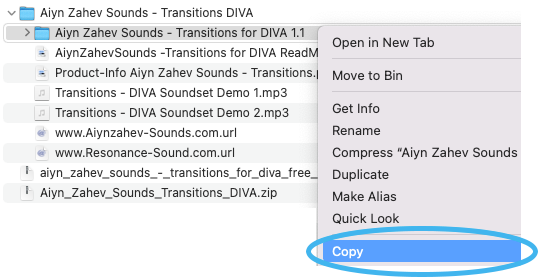
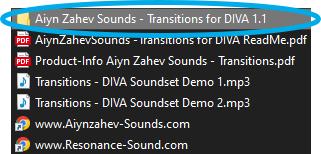
2. Locate the extracted folder that contains the .h2p files > Right-click the folder and click 'Copy'.

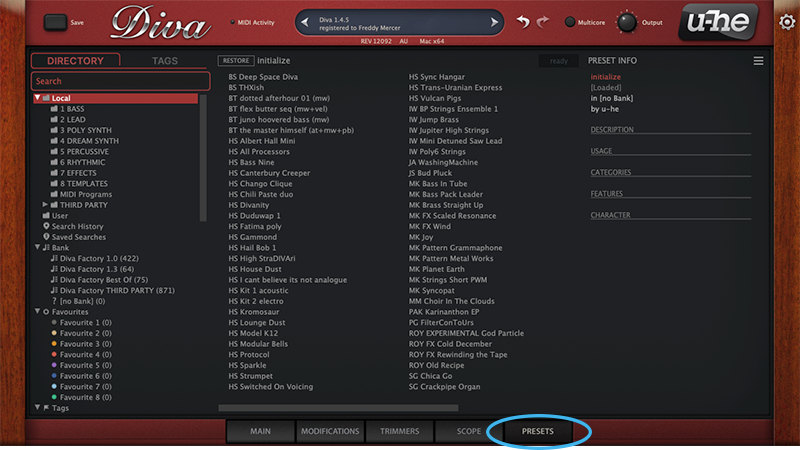
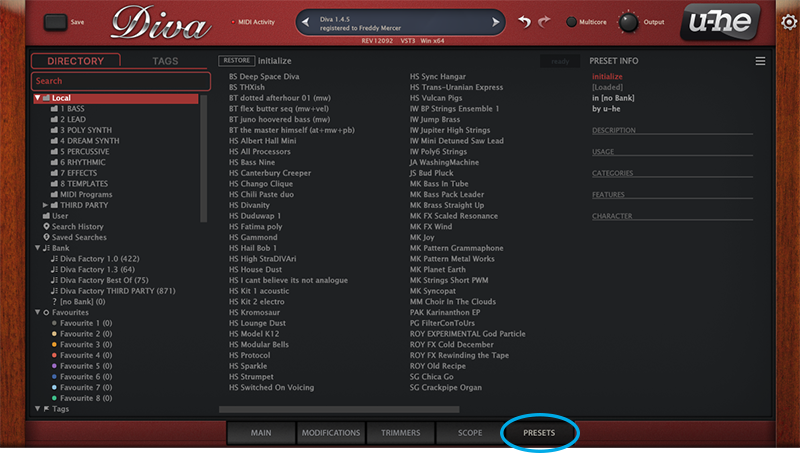
3. Open your DAW > Launch DIVA > Click the 'PRESETS' tab.

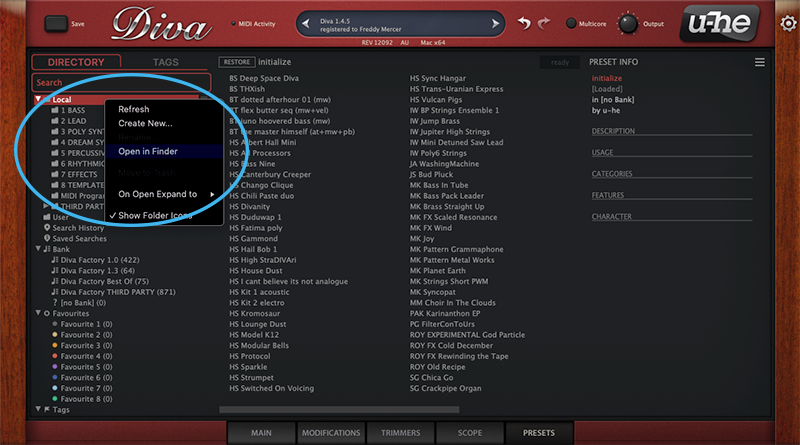
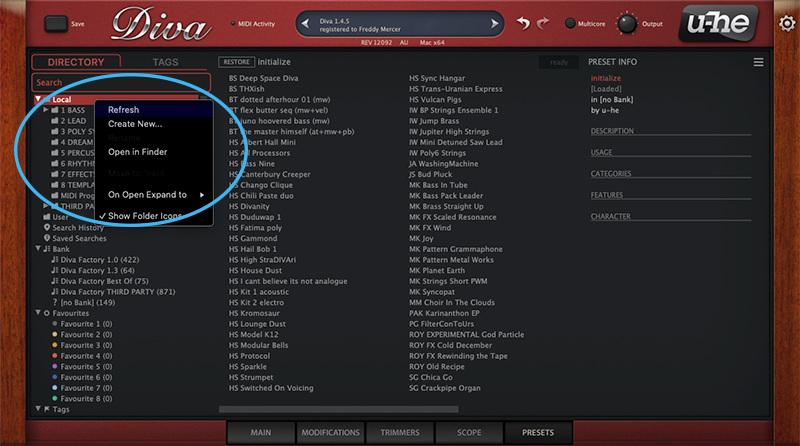
4. Navigate to 'Local' > Right-click the folder > Click 'Open in finder'.

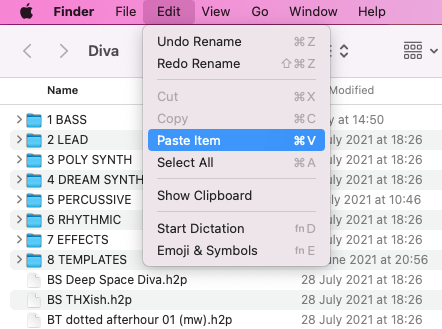
5. The presets folder will be automatically opened > Click 'Edit' from the toolbar > Select 'Paste Item'.

6. Navigate back to DIVA > Right-click 'Local' > Select 'Refresh'.

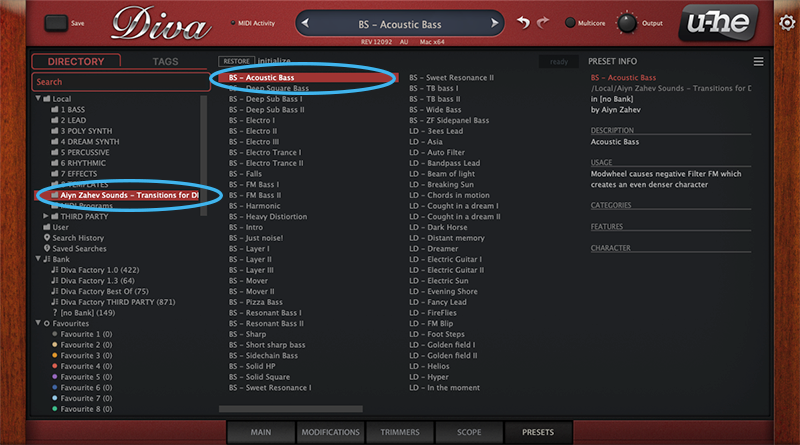
7. The preset pack is now installed > Select the preset pack folder from the left-hand menu > Select your desired patch.

Your presets are now installed and ready to use.

Windows

1. Download the preset pack from within your Plugin Boutique User Account > double-click the .zip file to extract the contents.

2. Locate the extracted folder that contains the .h2p files > Right-click the folder and click 'Copy'.

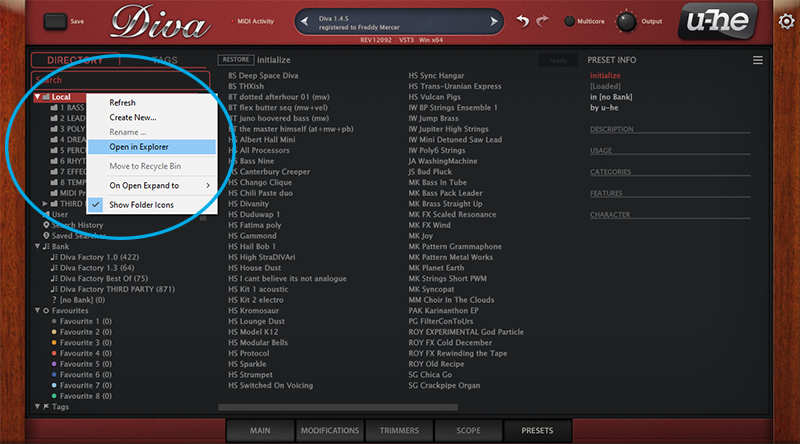
3. Open your DAW > Launch DIVA > Click the 'PRESETS' tab.

4. Navigate to 'Local' > Right-click the folder > Click 'Open in explorer'.

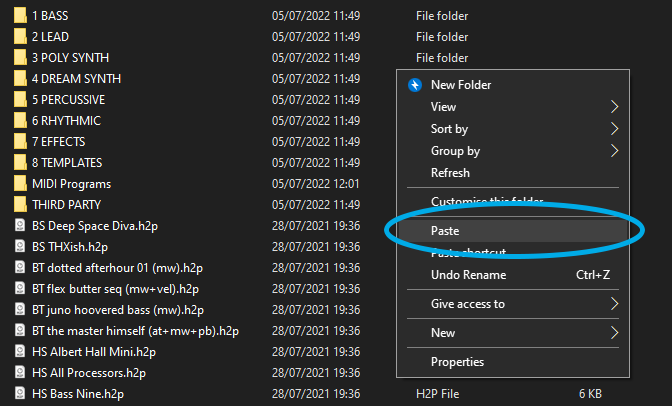
5. The presets folder will be automatically opened > Right-click and select 'Paste'.

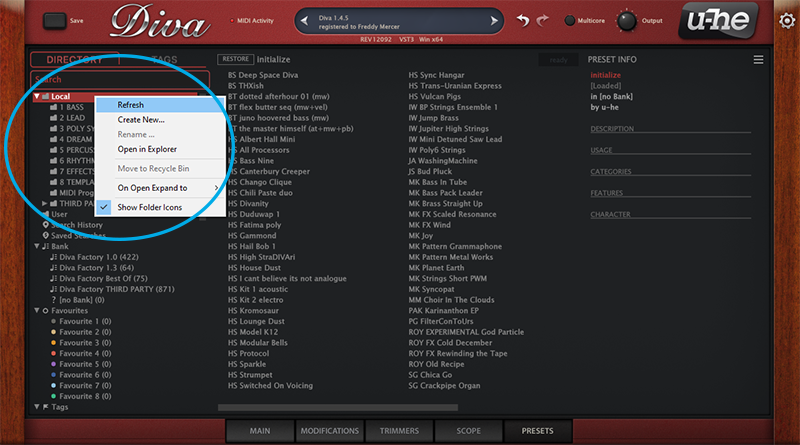
6. Navigate back to DIVA > Right-click 'Local' > Select 'Refresh'.

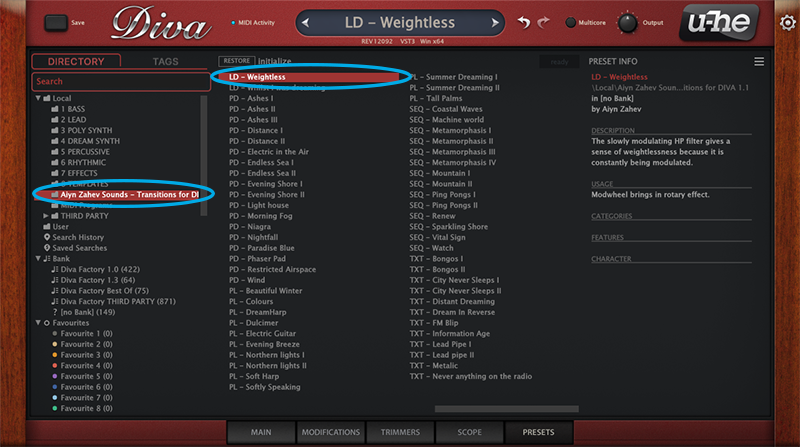
7. The preset pack is now installed > Select the preset pack folder from the left-hand menu > Select your desired patch.

Your presets are now installed and ready to use.

Plugin Boutique Rewards

Discover the most rewarding loyalty programme among all plugin retailers.

  • Free Loopmasters Samplepacks
  • Discounts on products and courses
  • Extra Virtual Cash claimed immediately at checkout
Find out more

Follow us:

X (Twitter) Facebook YouTube Instagram
Logo Logo

Plugin Boutique Limited, Part of the Beatport Group LLC.

Copyright © 2011-2025 Plugin Boutique. All rights reserved