Buy Opal Morphing Synth, get a free gift with purchase:
The Infinite, Larger-Than-Life Synth That Always Sounds Like A Record
Now compatible with any soundcard on Mac and PC
Opal is the epic-sounding flagship synth that's perfect for producers, sound designers, and musicians. This analog-meets-wavetable synth gives you huge-sounding morphing filters and powerful UA effects — yet always keeps you close to album-ready sounds, no matter how deep you explore.
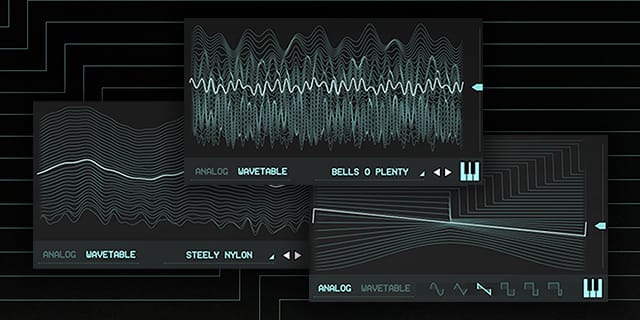
Fire Up a Super Synth
Opal's unique analog-meets-wavetable synth engine lets you create epic sounds and craft songs within minutes. With morphing filters, oscillators, LFOs, and noise, Opal is a modern soundscape maker with deep analog roots.
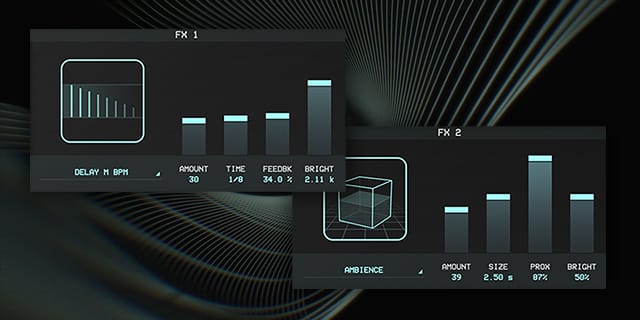
Create with World-Class UA Effects
With onboard studio-quality UA effects like ambience and vintage spring reverbs, tape delay, modulation, and authentic 1176 audio compression, Opal makes any production fuller, and more professional sounding.
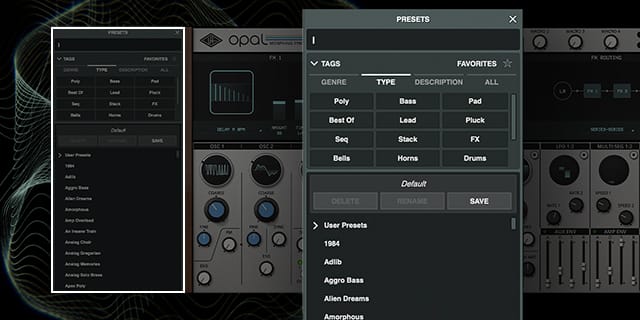
Find Inspiration Fast with Album‑Ready Presets
Get just the right sound using Opal's gorgeous presets, lovingly crafted by the synth geeks deep within the halls of UA. Curated for fast use across genres, Opal's presets ensure you'll capture inspiration the moment it strikes.
Features
- Get giant, inspiring sounds from the world's best-sounding analog‑meets‑wavetable super synth
- Use morphing filters, oscillators, LFOs, and noise to unlock new creative paths
- Add studio-quality UA effects like vintage spring reverb, tape delay, modulation, and authentic 1176 compression
- Go deep into synthesis without getting lost, thanks to impeccably crafted presets
Versions Included with your Purchase
- UAD Native: Runs on your Mac or PC without any UA hardware
System Requirements
- macOS 10.15 Catalina, 11 Big Sur, 12 Monterey, 13 Ventura
- Windows 10 or Windows 11 (64-bit only Editions)
- Intel, AMD, or Apple silicon processor
- Internet connection to download software and authorize UADx plug-ins
- Free iLok account with iLok Cloud or iLok USB (2nd generation or higher)
- A physical iLok dongle is NOT required to activate this product
DAW Compatibility
- Pro Tools 2022 (AAX)
- Logic Pro (Audio Units)
- Ableton Live 11 (VST 3, Audio Units)
- Cubase 12 (VST 3)
- Studio One 5 (VST 3)
- LUNA Recording System
You can activate this software on an online system (using iLok Cloud) or an offline system (using an iLok USB):
-
Online: an active internet connection and a FREE iLok account are required to authorise UAD Plug-ins using iLok Cloud
-
Offline: you will need a physical iLok USB (2nd generation or higher) to authorise this software
Important note: UAD plugins do not work in Apple's Garageband DAW
Registration
1. Click the Download button in your Plugin Boutique account or go to https://www.uaudio.com/my/account/redeem/.
2. Enter your email and the serial code found in your Plugin Boutique User Account > Click 'Get my Plug-in'.

3. Enter the details required to create your Universal Audio account > Click 'Create Account'.

4. Download UA Connect by clicking either 'macOS' or 'Windows' depending on the system you are using.

Windows Installation
1. Once the download is complete, extract and open the ZIP folder you just downloaded > Open the PC folder > Double-click the UA Connect.exe installer file.
2. Read the terms of agreement > Click 'I Agree'.

3. The installation of PACE License Support will now begin > Click 'Next >'.

4. Read the license agreement > Click 'Yes'.

5. Click 'Install'.

6. Click 'Finish'.

7. Locate and open UA Connect > Enter the email address and password of your Universal Audio account.

8. Click 'GET STARTED'.

9. Select the option that is relevant to you - either 'I Already Have an iLok Account' or 'Create an iLok Account For Me'.

10. Enter your iLok account User ID then click 'LINK ACCOUNT'
.
11. Enter the password for you iLok account and click 'Authorize'.

12. Locate the plugin you wish to install > Click 'DOWNLOAD'.

13. Once the plugin has been installed, open your DAW and then the newly installed plugin.
Your software is now activated and ready to use in your DAW!

Mac Installation
1. Once the download is complete, double-click the UA Connect.dmg installer file.
2. Drag UA Connect into your Applications folder.

3. Locate and open UA Connect > Enter the email address and password of your Universal Audio account.

4. Click 'GET STARTED'.

5. Select the option that is relevant to you - either 'I Already Have an iLok Account' or 'Create an iLok Account For Me'.

6. Enter your iLok account User ID then click 'LINK ACCOUNT'
.
7. Enter the password for you iLok account and click 'Authorize'.

8. Locate the plugin you wish to install > Click 'DOWNLOAD'.

9. Once the plugin has been installed, open your DAW and then the newly installed plugin.
Your software is now activated and ready to use in your DAW!
