


 Log In

Free gifts available with your purchase
Important Note: This is an upgrade path for existing owners of the original W. A. Production Babylon. The standard purchase path is also available here.
 Wavetable Synthesizer
A few years ago, W. A. Production created the original one-page wonder; Babylon. The sound and simplicity of this synth was an instant hit with users and after receiving so much positive feedback, they couldn't wait to dive back into development - adding bigger and better features. Now, after a complete overhaul, Babylon is back, baby!
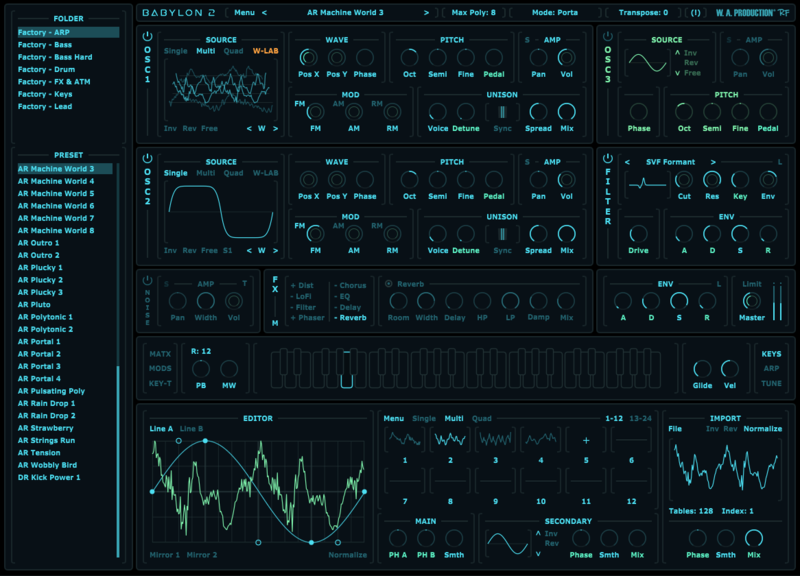
Babylon 2 offers all of the single-page simplicity as its predecessor, but now with a renewed focus on multi-voice oscillators and morphing wavetables. The W. A. team have added enhanced filters and renewed effects, plus unprecedented control over modulation, arpeggiation, tuning and much more. Babylon 2 has grown from its humble beginnings to become a beast… the multi-purpose power synth you've been waiting for.
What's New In Babylon 2.2?
- Wavetable Editor:
- Doubled the maximum number of tables
- WAV Import: Auto detect number of cycles
- WAV Import: Auto map cycles to tables
- New Option: Auto transition parameters between tables
- New Option: Copy parameters to all tables
- New Option: Shift cycles and trim tables
- UI improvements
- Minor bug fixes and improvements
New Ways to Play With Sound
The multi-voice oscillators of Babylon 2 feature not only traditional stereo unison and detuning capabilities but also brand-new modes. Dive into the depths of sound creation offering seamless waveform blending with Multi mode and live morphing with Quad mode. No longer confined to pre-defined waveforms, the new W-Lab wavetable editor helps you craft unique tones and mutating timbres. Easily create, modify, or even import your own WAV files, giving you unparalleled creative freedom to explore uncharted sonic territories.
Unleash New Filters & Effects
Expand your sonic palette with Babylon 2's extensive range of filter types, for the first time including SVF, IIR, and Bi-quad filters, as well as classic and more experimental options. Experience the richness of improved reverb, delay, distortion, and a newly added effect for brain-scrambling tempo-synced phasing.
Dynamic Control: Limitless Possibilities
Take charge of your sound’s dynamics with Babylon 2's intuitive curve editor for envelope modulators, making it simple to create evolving sounds. Version 2 of Babylon offers additional envelope followers and two new key-track modulators, each featuring precise line editors. Of course, the previous LFO, vibrato and envelope modulators are still as effective as ever.
Tune Every Note
Explore out-of-this-world scales and tuning with Babylon 2's innovative microtonal tuning section. New to version 2, you can now tune every individual note of 11 octaves in cents. The Scale Bank contains 23 standard scales and 34 additional scales from far-flung places - some using quarter tones for exotic musical moments.
Rhythm of Life
Add a rhythmic pulse to your music with Babylon 2's powerful new Arpeggiator. Create intricate patterns with ease, thanks to its intelligent pattern generator and customizable parameters; population and complexity.
More to Explore
Discover a wealth of additional features, including eight new noise types, extended detune modes with extended range, a customizable pitch pedal parameter, improved legato and portamento, increased polyphony, and a stereo ping-pong effect for added spatial depth.
Presets for Days
With hundreds of high-resolution waveforms, from formants to digital instruments, you’re sure to find the perfect starting point for your own sounds. Alongside many variants of the classic oscillator shapes, there are a host of more unusual waveforms, all fully morphable using the new oscillator modes. The fantastic preset sounds have been expertly programmed and are catalogued within the onboard browser so you can easily find what you need in a hurry.
W. A. Production are real-life producers making creative plugins to help you achieve studio quality processing quickly and easily. Enjoy!
Features
- Completely rejuvenated one-page synth programming
- NEW Oscillation modes featuring Multi & Quad modes
- NEW Wavetable Editor
- NEW Scale & per-note Microtonal options
- NEW Intelligent Arpeggiator
- NEW Filter Types
- NEW & Reprogrammed FX
- NEW Modulators & Matrix
- 858 Factory Presets
- 200+ high-resolution waveforms
- All the original Babylon features retained
- Full PDF Manual & Tutorial video
System Requirements
Windows
- Windows 8 and later
- VST, AAX
Mac
- macOS 10.13 and later
- VST, AU, AAX
.jpg?t=1791718077)
Ape Drums
Producer and DJ
"I love it, it has all the clean, simple presets that a lot of plugins have steered far away from!"
.jpg?t=1791718077)
Synthet
Music production YouTuber
"Babylon 2 is a fantastic synth covering A LOT. It's highly customizable, while remaining intuitive. And easy to navigate. Well crafted."


