/ Synth / Synthx V
Arturia

Synthx V

5.0 (1 Reviews)
$149.00
Main Image
Main Image
SYNTHX - Main Image
Synthx V | Multitimbral Analog Synthesizer | ARTURIA gallery thumbnail
Tutorials | Synthx V - Overview gallery thumbnail
Advanced
FX
Function
Macros
Multi-arp
Sequencer
Buy Now
Product information

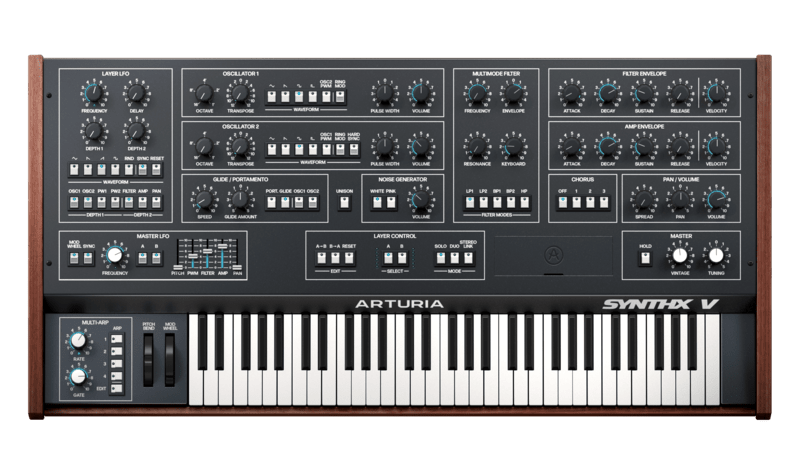
Synthx V represents the ultimate blend of analog elegance and modern innovation. With state-of-the-art circuit modeling, it captures the multi-timbral magnificence of the all-in-one 80’s classic, from the versatile digitally-controlled oscillators to the famed multimode filter. Going above and beyond the original design, we’ve added a deeply creative suite of advanced features including a Multi-Arp, FX rack, expressive keyboard controls and drag-and-drop modulation that put its sound design capabilities on par with the most powerful polysynths around today. 

Best-in-class recreation

Building on decades of DSP expertise and state-of-the-art emulation techniques, Synthx V captures the Elka Synthex in unprecedented detail, mirroring its beautifully rich and wide sound, faithfully recreating its design and augmenting its feature-set for limitless sound design possibilities. 

Perfect for wide multi-timbral sounds

With Synthx V’s dual-layer architecture and multi-arp, musicians can craft evolving, richly textured sounds with ease. Its simple yet powerful design unlocks new levels of creative freedom allowing you to traverse between utterly unmistakable and wondrously experimental sounds effortlessly.   

Elevated with advanced modulation & FX

Discover powerful drag & drop modulation, a comprehensive FX suite and expressive keyboard controls that takes the sound of the vintage Italian icon to completely new heights. Modulate any parameter with inventive non-linearity or stack up to 4 FX for endlessly creative composition textures.

Features

  • Bi-timbral architecture
    • Solo or Duo (stacked) modes
    • Stereo Link for extra wide hard panned, cloned layers
    • Up to 16 voices of polyphony (8 per layer) and Mono mode
  • Two virtual analog DCOs
    • Selectable waveform (Saw, Triangle, Square & Pulse)
    • Pulse Width Cross Modulation & Ring Modulation
    • Oscillator 2 Hard Sync
    • Unison mode per layer
  • Multimode filter
    • Curtis CEM3320 emulation 
    • 24dB & latent 12dB Low Pass, 6 & 12dB Bandpass, and 12dB High pass modes
  • Noise generator
    • White & pink
  • BBD-based Chorus with 3 modes
  • Per-layer LFO with extended routing, additional random waveform and Syncable rate, as well as Mono or Poly modes
  • New Master LFO with Modwheel side-chain
  • Innovative Multi-Arp
    • Create complex counterpoints and generative music with 4 stacked arp layers
    • Send arp patterns independently to each layer, or both. 
    • Browse and save Multi-Arp settings
    • 30 arp modes with up to 16 steps rhythms, with a continuous octave parameter, note repeat, multiple retrig options and more.
  • Powerful Effects rack
    • 4 drag-and-drop FX slots
    • Modulable parameters
    • 17 effects including Super Unison, MultiBand Compressor, Chorus JUN-6 and more.
  • Advanced drag-and-drop modulation
    • Drag-and-drop assign, hover-over adjustment
    • 3 Modulations slots
    • Choose from ADSR envelope, Random and Step modulators or our infinitely shapeable Function generator
  • Accessible keyboard & macro controls
    • Freely assignable keyboard velocity, release velocity, keyboard tracking, aftertouch, MPE slide and modwheel sources
    • Dedicated window for customizing macro settings
  • Faithful GUI
    • Colour-coded parameter levels
    • A/B layer switch
    • Integrated advanced panel
  • Extensive library of 200 presets
  • MTS-ESP microtuning compatibility
  • MPE compatibility
  • NKS controller compatible

System Requirements

Windows - VST/AAX

  • Win 10+ (64bit)
  • 4 GB RAM
  • 4 cores CPU, 3.4 GHz (4.0 GHz Turbo-boost)
  • 32GB free hard disk space
  • OpenGL 2.0 compatible GPU

* ARM processors not supported on Windows

macOS - VST/AAX

  • Mac OS 10.13+
  • 4 GB RAM
  • 4 cores CPU, 3.4 GHz (4.0 GHz Turbo-boost) or Apple Silicon CPU
  • 32GB free hard disk space
  • OpenGL 2.0 compatible GPU

Formats

  • Works in Standalone, VST, AAX, Audio Unit, NKS-Ready* (64-bit DAWs only)
Installation Instructions

Please note: Pigments is used as the example. The process is identical for all Arturia products.

Registration

1. Go to the Arturia login page. You will be prompted to create an account or log in (if you already have an Arturia account, please log in and skip to Step 4 of the registration process).

2. Click 'Create an account'.

3. Enter your details and click 'I'm not a robot'. Choose your marketing preferences and then click 'Create'.

4. You should have received an email to activate your account. Click the link that has been sent to you and login into your account by entering your personal details.

5.  You will be redirected to your Arturia account area, where you can click the 'Register New Product' option.

6. Enter the Serial Number from your Plugin Boutique account (the 16-digit code that consists of 16 numbers), e.g. 1234-5678-9012-0000 and then enter your Unlock Code (the 8-digit code that consists of letters and numbers), e.g. C5GM00N9 > Click 'Register'.

Please note: Your Arturia codes will either be separated by a comma, e.g. 1234-5678-9012-0000,C5GM00N9 or by the letters 'Uc:', e.g. 1234-5678-9012-0000 Uc:C5GM00N9.

Your product is now registered!

Mac Installation

Note: Pigments is used as an example.

1. Go to https://www.arturia.com/support/downloads&manuals > Click the download icon to download the installer for the Arturia Software Center.

2. Open the installer for the Arturia Software Center > then click 'Continue'.

3. Click 'Continue'.

4. Read the software licence agreement > then click 'Continue'.

5. If you are happy with the terms of the software licence agreement click 'Agree'.

6. Click 'Install'.

7. Enter your login credentials and click 'Install Software' (or tap your fingerprint) to install the Arturia Software Center.

8. The Arturia Software Center is now installed > click 'Close'.

9. Open the Arturia Software Center and log into your Arturia account.

10. Your purchase will now be in your account > click 'Activate' to authorise the product on your system. 

11. Click 'Install' to download and install the software onto your computer system.

Your software is now activated and ready to use in your DAW.

Windows Installation

Note: Pigments is used as an example.

1. Go to https://www.arturia.com/support/downloads&manuals > Click the download icon to download the installer for the Arturia Software Center.

2. Open the installer for the Arturia Software Center > then click 'Yes'.

3. Click 'Next'.

4. Click 'Next'.

5. Click 'Install'.

6. Click 'Finish'.

7. Open the Arturia Software Center > click 'Yes'.

8. Sign in to your Arturia account.

9. Click 'Next'.

10. Click 'Next' or install the software to your preferred custom VST folder(s).

11. If you are asked about sharing your anonymous data with Arturia's team, click 'Yes, I agree' or 'No, thanks' to proceed.

12. The software will now be in your Arturia account > click 'Activate' to authorise the product on your computer system. 

13. Click 'Install'.

14. Your software will now download and install.

Your software is now activated and ready to use in your DAW.

Plugin Boutique Rewards

Discover the most rewarding loyalty programme among all plugin retailers.

  • Free Loopmasters Samplepacks
  • Discounts on products and courses
  • Extra Virtual Cash claimed immediately at checkout
Find out more

Follow us:

X (Twitter) Facebook YouTube Instagram
Logo Logo

Plugin Boutique Limited, Part of the Beatport Group LLC.

Copyright © 2011-2025 Plugin Boutique. All rights reserved