/ Synth / Radium
B.Serrano

Radium

4.0 (34 Reviews)
FREE
Radium Main Image
Radium Main Image
Radium Image 2
Radium Image 3
Radium Overview Video 1 gallery thumbnail
Product information

B. Serrano brings you Radium!

Features

  • 16 voices polyphonic
  • Substractive / FM 2 operators synth
  • MIDI learn implementation
  • Comfortable XY Pad
  • Auto Pan
  • And more!
Installation Instructions

Installation Instructions

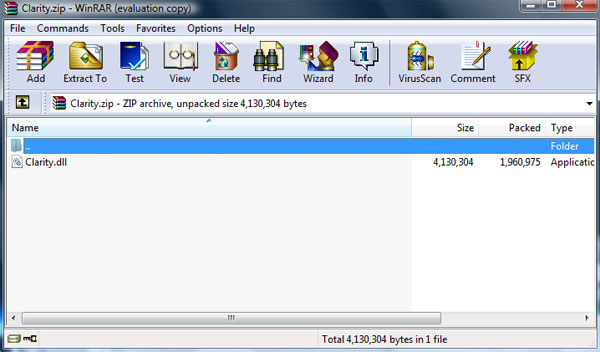
1. To install B. Serrano Radium software, first unzip the downloaded. (for demonstration purposes we're using the Bass Gnomes Clarity)

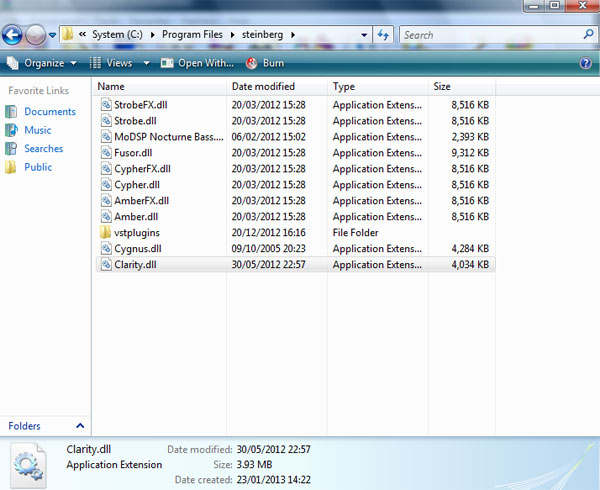
2. Next follow the file directory - Computer / System (C:) / Program Files / Steinberg - and drag the .dll file into the Steinberg folder.

3. Open up your DAW and your software will now be ready to use. 

Plugin Boutique Rewards

Discover the most rewarding loyalty programme among all plugin retailers.

  • Free Loopmasters Samplepacks
  • Discounts on products and courses
  • Extra Virtual Cash claimed immediately at checkout
Find out more

Follow us:

X (Twitter) Facebook YouTube Instagram
Logo Logo

Plugin Boutique Limited, Part of the Beatport Group LLC.

Copyright © 2011-2025 Plugin Boutique. All rights reserved