Log In

Save $19.00 compared to buying products individually
Free gifts available with your purchase
For a limited time only, buy u-he's Diva and receive the Ambient Depths Diva Expansion Pack for FREE!

The Spirit Of Analogue
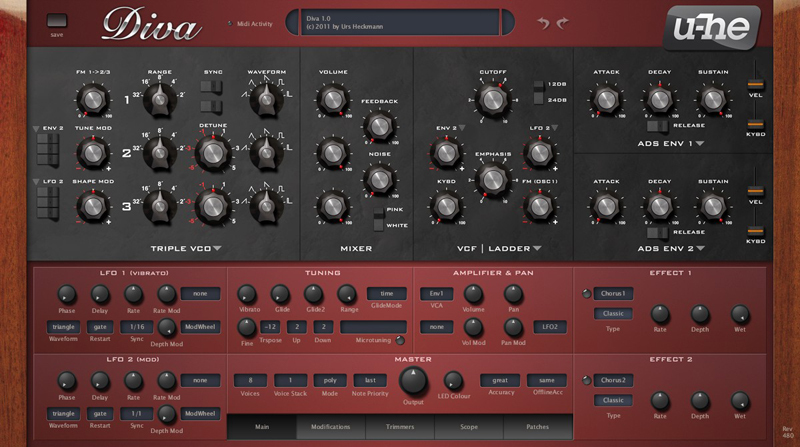
DIVA - Dinosaur Impersonating Virtual Analogue Synthesizer
The oscillators, filters and envelopes closely model components found in some of the great monophonic and polyphonic synthesizers of yesteryear. Modules can be mixed and matched so you can build hybrids, but what sets DIVA apart is the sheer authenticity of the analogue sound. This comes at the cost of quite a high CPU hit, but we think it was worth it.
Diva is the first native software synth that applies methods from industrial circuit simulators (e.g. PSpice) in real-time. The behaviour of zero-delay-feedback filters when pushed to the limit clearly demonstrates the advantages of this groundbreaking approach.
Check out more than 1200 presets. If your computer can handle it, try them in "Divine" mode.
Features
- Authentic, unrivalled analogue sound
- Up to 40% less CPU-hit than version 1.0
- Multithreading support for modern CPUs - more polyphony, less overload
- Even bigger library of gorgeously organic presets
- Resizable editor window, alternative skins available shortly
- The essence of 7 or 8 vintage synths for about 1% of the cost
- ...and so much more!
Diva System Requirements
Mac
- Operating System: Mac OSX 10.7 or newer
- Formats: Audio Units (AU), VST2, VST3, AAX (Pro Tools 10.3.7 or later)
- NKS Ready
- 1GB RAM, more recommended
- 50MB free disk space
- 1000 × 600 or larger display
- Modern CPU (Sandy Bridge or newer recommended)
- Host software
- 32-bit and 64-bit
Windows
- Operating System: Windows 7 or newer
- Formats: VST2, VST3, AAX (Pro Tools 10.3.7 or later)
- NKS Ready
- 1GB RAM, more recommended
- 50MB free disk space
- 1000 × 600 or larger display
- Modern CPU (Sandy Bridge or newer recommended)
- Host software
- 32-bit and 64-bit
Note: Diva is not a standalone product, it requires host software. Diva is compatible with nearly all DAWs.
Learn more about Diva.
Diva Expansion Pack: Ambient Depths
Plugin Boutique presents Diva Expansion Pack: Ambient Depths.
Diva Expansion Pack: Ambient Depths contains 64 expertly crafted presets to allow you to create unique, expressive and colourful shades of ambient music.
This pack will help you build vast epic soundscapes out of evolving pads, earthy basses, chilling keys, spacious arpeggios, powerful leads and cinematic effects.
Features
- 8 Arps
- 12 Basses
- 8 FX
- 10 Keys
- 10 Leads
- 16 Pads
Learn more about Diva Expansion Pack: Ambient Depths.
Awards