


 Log In

Free gifts available with your purchase

The Power Of Digital
Native Instruments has harnessed the power of FM synthesis. The strengths of digital are manifest in FM8’s powerful audio engine which generates breath-taking, brilliantly dynamic FM sound in pristine quality. With its emphasis on ease of use, the FM8 brings a high degree of simplicity to the otherwise intricate process of FM synthesis, delivering unsurpassed depth, brilliance, and dynamism.
A central aspect of FM8 is usability. The "Easy Edit Page" offers a clearly-designed interface with simple controls that adjust more complex parameters automatically, allowing you to take a far more musical approach to FM synthesis. The more detailed editing pages have been improved for easier handling and are all accessible with just one click. FM8 lets you play straight away!
FM8 offers an unprecedented range of features and effects. The classic crystalline bells and keys are perfect for creating melodic and percussive sounds of the highest quality. A unique arpeggiator, a revolutionary sound morphing feature, and a large selection of new, charismatic effects add countless sound-shaping possibilities. The sonic potential of FM8 goes well beyond the confines of conventional FM synthesis.
Enter The Matrix
Frequency modulation is based on the interaction of operators. A minimum of two, known as the modulator and carrier, are always interconnected. The modulator signal modulates the carrier's frequency by a specific amount. The FM8's matrix allows you to quickly connect any two operators, as well as determine the modulation amounts for all connections. The matrix makes handling frequency modulation parameters simple. It also provides a concise overview of all FM connections, so you don’t have to go from page to page to collect every sound's parameter data.
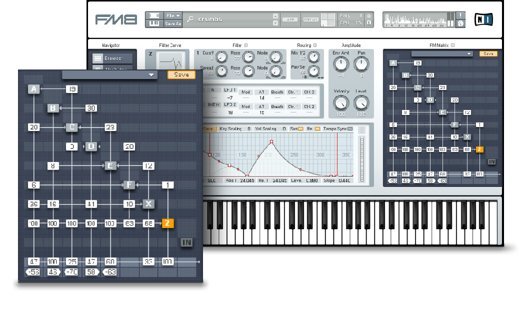
Smooth Operators
Each operator has a detailed editing page where you can adjust all its parameters. Choose different waveforms, select different ways to adjust the operator’s frequency, control responsiveness to MIDI velocity messages, and set panning and amplitude. Several modulation sources or different MIDI values such as aftertouch or mod wheel can be used to modulate the amplitude. The amplitude is shaped by the multi-breakpoint envelope – add and delete breakpoints, set their levels and control their transitions. You can load a template or create your own shapes.
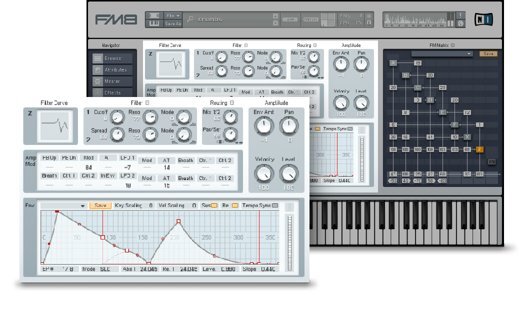
Access All Areas
The Operator Overview Page displays all the operators' most important parameters simultaneously. This offers a very fast and convenient way to set up the basic structure of a sound and customize existing ones. Each individual oscillator also has a dedicated page presenting all its parameters and providing you with the opportunity to fine-tune your sound.
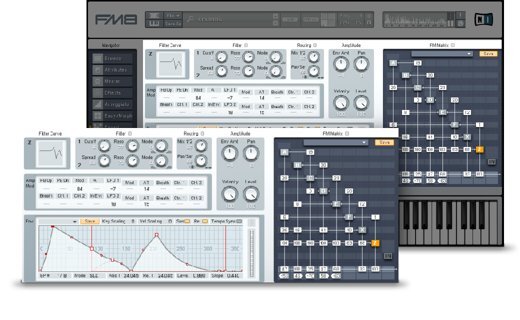
Envelopes At A Glance
The Envelope Expert Page offers the same functionality as the Operator Overview Page. It allows operator envelopes to be viewed simultaneously. Edit one envelope while still being able to see the others at the same time. Edit several simultaneously by linking them in one or more groups. This allows envelopes to share the same structure and can be very useful, for example, to synchronize the amplitude progression of two operators. You can also create one basic shape for several envelopes, unlink them, and then modify each one separately. The page also gives you a graphical overview of all envelopes and thus the overall amplitude response of the complete sound.
Morphing Sounds
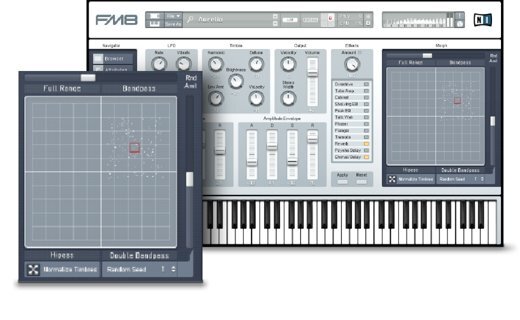
The Morph Square allows you to morph between four different sounds. Each corner represents one timbre. By moving the morph handle you gradually morph one timbre into the other. All of FM8’s presets have four timbres that were selected to deliver maximum expressive variety. Additionally, all movements can be automated via MIDI or a sequencer allowing you to morph the timbres remotely or according to a song’s structure. You can also randomize your sounds with the Morph Square, producing playful, experimental results.
The Arpeggiator
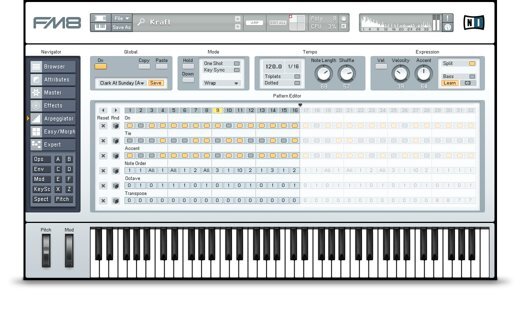
The arpeggiator in FM8 is more than a step sequencer – it transforms your MIDI input into rhythmic lines and melodic patterns. Tie steps to each other and accentuate individual ones. Transpose notes in semitones or octaves. Re-order notes and choose different repeat modes. Or combine all options to achieve truly dynamic results. The arpeggiator is equipped with a list of master controls. Easily change the sequence's tempo and shuffle amount. Adjust note length and velocity. Split your keyboard to trigger arpeggiator patterns with one part of the keyboard while simultaneously playing chords or bass lines with the other. Use one of 48 templates for quickly setting up new and exciting sequences or create and save your own.
Rack 'Em Up!
FM8 contains twelve high-quality effects, offering huge scope. Switch these effects on and off, or crossfade between the wet and dry sound. Add warmth and grit with Overdrive, Tube Amp, and Cabinet. Make your synth speak with Talk Wah. Sculpt your sound with Shelving and Peak EQ, Add motion with Phaser, Flanger, Tremolo, and much more.
The Library
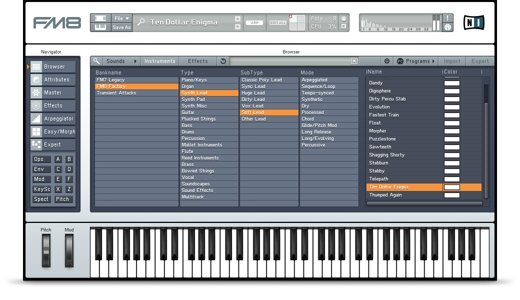
The FM8 library contains over 1200 expertly designed presets. Rich and detailed, they exemplify the strengths of FM synthesis, from dynamic digital pianos to bright, bold brass. Also included are a number of effect racks, sound morphing, and arpeggio presets. Simply search and you will find – instantly.
Windows
- Windows 10 or 11 (latest Service Pack) (64-bit only)
- 4 GB RAM (6 GB recommended)
- VST, AAX
Mac
- macOS 13, 14, or 15 (latest update), Apple Silicon natively supported (64-bit only)
- 4 GB RAM (6 GB recommended)
- VST, AU, AAX
- An Internet connection and a graphics card that supports OpenGL 2.1 or higher are required to download and activate this product.
- Once installed and activated, the product can be used offline.
Reviews Summary
While it aims to provide a helpful overview, it may not capture every perspective or detail. We encourage you to read individual reviews to make an informed decision.
Reviewers widely praise FM8 as a legendary and versatile FM synth plugin that continues to excel for modern music production. It is celebrated for its deep sound-design capabilities, low CPU usage, vast preset library, and distinctive ability to craft aggressive basses, classic bells, and evolving pads. Users appreciate both the beginner-friendly Easy Edit page and the deep modulation matrix, though FM synthesis itself presents a learning curve. The most common criticism is the synth's dated, non-scalable interface, which can be hard to read on modern displays. Overall, it is regarded as an essential, high-value classic, especially at discounted price points.


