/ Synth / Usynth Caramel
UJAM

Usynth Caramel

4.6 (233 Reviews)
$19.00 $49.00

61% off until Dec 07

ujam Usynth Caramel
ujam Usynth Caramel
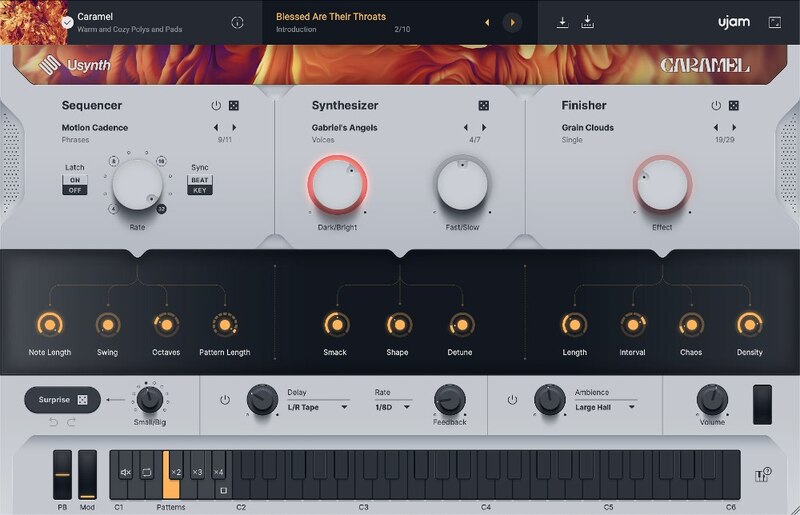
ujam Usynth Caramel - GUI
ujam Instruments presents: Usynth gallery thumbnail
ujam Usynth Caramel - Box
Buy Now
Product information

Buttery, Sweet and Warm

Usynth Caramel comes with all the rich, lush pad sounds you could ever want. Creating dreamy ambient soundscapes is easy, with the heavy lifting done behind the scenes (wavetable selection, unison, effects and far more), meaning less time spent on sound design and more time spent finishing songs!

Features

  • 100 Synth presets
  • 100 Finisher presets
  • 30 Sequencer presets
  • 100 Global presets

What You Get

Quality

Under the hood, Usynth is a very complex synthesizer. Each instance consists of 2 individual layers per voice, with Virtual Analog, Wavetable, FM and Multisample Synthesis, Multi-mode Filter, 5-stage envelopes, LFOs, 12-way modulation matrix and much much more. But why would you care!

Simplicity

Usynth doesn’t require you to know how a synthesizer works in order to find and create inspiring new sounds. Intuitively tweak to your heart’s content. Think Instagram filters, or think steering wheel and two pedals – that’s how you operate Usynth.

Endless Sonic Expressions

Pick and choose global presets in the UJAM App and send them into your instance of Usynth in your DAW. Get inspired for your next song by Usynth presets you don’t own yet, or experience genre fluidity by jumping through presets of all Usynths you own. The UJAM App is at the heart of your sound, offering a new way of making music.
System Requirements

UJAM App

  • Usynth requires the latest version of the UJAM App to run on your computer
  • The OS requirements below apply to the App

Operating Systems

  • Windows 10 or later (64-bit only)
  • macOS 10.14 - macOS 14 (64-bit only)
  • You may have success on earlier versions but UJAM doesn’t support and fully qualify them

For up-to-date info on UJAM products support for VST3, AAX, and Apple Silicon, please refer to the UJAM website.

Minimum Requirements

  • 8 GB of RAM
  • 1.44 GB of free Disk Space
  • 1280 x 768px Display 
  • Internet Connection

Plug-in Formats

  • VST 2, AU 2 
  • AU 2 version only compatible with Logic Pro X and newer

Delivery Format

  • Downloadable Installer File
  • Usynth requires the latest version of the UJAM App to run on your computer
  • With your first Usynth title, the UJAM App will also stealthily install the Usynth plugin which hosts all titles

Authorization

  • E-mail and Password Within the Plug-in

Supported Standards

  • MIDI
Installation Instructions

Important Note: Usynth Euphoria is used as an example.

Mac Installation

1. Visit www.ujam.com/partner-checkout/?partner=pib

2. Enter the 'Redeem Code', which is available within your Plugin Boutique User Account > Click 'Check License'.

3. Click 'Sign up' to create a ujam account or Click 'Login' if you already own an existing account.

4. Enter your email address and password > Click 'Continue' where you will be sent an account set up email by ujam.

5. Click the link in your confirmation email > enter your email and password > Click 'Continue'.

6. Find your newly purchased product > Click 'Download' to install the ujam App.

7. Click the 'UJAM-0.3.1' file and run through the installation process.

8. Open the UJAM App and Click 'Sign In'.

9. Find your newly purchased product and Click 'Download'.

10. Open your DAW and launch 'USYNTH'.

Your product is now installed and ready to use!

Windows Installation

1. Visit www.ujam.com/partner-checkout/?partner=pib

2. Enter the 'Redeem Code', which is available within your Plugin Boutique User Account > Click 'Check License'.

3. Click 'Sign up' to create a ujam account or Click 'Login' if you already own an existing account (if you already have a ujam account, skip to step __.)

4. Enter your email address and password > Click 'Continue' where you will be sent an account set up email by ujam.

5. Click the link in your confirmation email > enter your email and password > Click 'Continue'.

6. Find your newly purchased product > Click 'Download' to install the ujam App.

7. Click the 'UJAM+Setup+0.3.1.exe' file and run through the installation process.

8. Open the UJAM App and Click 'Sign In'.

9. Find your newly purchased product and Click 'Download'.

10. Open your DAW and launch 'USYNTH'.

Your product is now installed and ready to use!

Plugin Boutique Rewards

Discover the most rewarding loyalty programme among all plugin retailers.

  • Free Loopmasters Samplepacks
  • Discounts on products and courses
  • Extra Virtual Cash claimed immediately at checkout
Find out more

Follow us:

X (Twitter) Facebook YouTube Instagram
Logo Logo

Plugin Boutique Limited, Part of the Beatport Group LLC.

Copyright © 2011-2025 Plugin Boutique. All rights reserved