Buy Pipa, get a free gift with purchase:
Expressive Vocal Synth
A singing wavetable and granulating synth with lots of expression
Pipa is a singing vocal synth with a unique and different sound. It is inspired by the expression and flexibility of the human voice but does not aim to cover all the aspects of an actual voice. Instead, it focuses on an organic and musical sound where the user has the possibility to control formants and dynamics seamlessly.
The synth engine is a crossover between a wavetable- and a granulating synthesizer, which results in a very expressive and playable instrument. Instead of using ordinary samples or processing oscillators with formant filters, Pipa uses a large database of thousands of wavetables extracted from real vocal samples. The advantage of the technique being used is that it’s possible to seamlessly morph between wavetables with proper phase alignment. This enables Pipa to continuously make transitions between pitch, formants, and dynamics, which is very useful in a musical context.
Anatomy
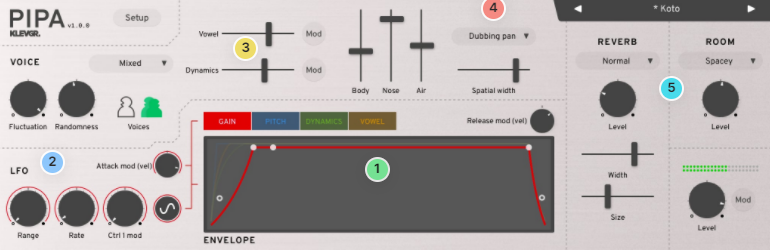
1. Curve your enthusiasm - A lot of Pipa's expression possibilities lies in the refined controls over Gain, Pitch, Dynamics, and Vowel.
2. Swing Low, sweet LFO - A powerful LFO section accompanies every Envelope.
3. Power cords - Fine-tune the characteristics of the vocal instrument.
4. Cheerio Stereo! - Widen your voice if you want, in several different ways.
5. A double room, please - Room ambiance + Reverb gives plenty of quick options.
Features
- Unique crossover between a wavetable- and a granulating synthesizer
- Continuous morphing between formants, dynamics, and pitch
- Features both male and female voices
- Separate envelopes (with linked release time) and LFOs for formant, dynamics, gain, and pitch
- Two MIDI Assignable controllers (Ctrl1 and Ctrl2) for controlling formants, dynamics, pitch, and gain
- Legato mode with control over both pitch glide time and velocity glide time
- Voice spatialization
- Plenty of factory presets
- Room simulation + Reverb algorithm
System Requirements
- macOS 10.10 or higher
- Windows 7 SP1 or higher
- AU, VST-3, AAX

Please Note: Pana is used as the example:
Mac
License Redemption
1. Navigate to https://klevgrand.com/redeem > Paste your 16 digit redemption code found in your Plugin Boutique User Account > Click 'Submit!'.
2. Your redemption code has been accepted > Scroll down to Step 2.
3. Click either 'Sign in' if you already have a Klevgrand account, or 'Create new account' if you do not > Fill in your personal details > Click 'I'm ready'.
4. Your account has now been created.
5. Navigate to your email inbox and locate the activation email that you should have received from Klevgrand > Click 'Let me in!' to activate your account.
6. Create a password for your account > Click 'Enter Klevgrand'.
7. Your software and serial number is now available within your Klevgrand account > Click the Apple logo to download the installer file.
Installation
1. Launch the pana_x_x_x_macOS.dmg installer file.
2. Double click the KLEVGR. logo to launch the installer.
3. Click 'Continue'.
4. Click 'Continue'.
5. Click 'Agree'.
6. Click 'Install'.
7. Enter your system password > Click 'Install Software'.
8. Click 'Close'.
9. Navigate back to your Klevgrand My Account page > Click on the serial number to copy it to your clipboard.
10. Launch your DAW > Create a new audio track > Insert Pana onto the channel > Paste your serial number into the box.
Your software is now activated and ready to use within your DAW
Windows
License Redemption
1. Navigate to https://klevgrand.com/redeem > Paste your 16 digit redemption code found in your Plugin Boutique User Account > Click 'Submit!'.
2. Your redemption code has been accepted > Scroll down to Step 2.
3. Click either 'Sign in' if you already have a Klevgrand account, or 'Create new account' if you do not > Fill in your personal details > Click 'I'm ready'.
4. Your account has now been created.
5. Navigate to your email inbox and locate the activation email that you should have received from Klevgrand > Click 'Let me in!' to activate your account.
6. Create a password for your account > Click 'Enter Klevgrand'.
7. Your software and serial number is now available within your Klevgrand account > Click the Windows logo to download the installer file.
Installation
1. Unpack the pana_x_x_x_win.zip installer file > Launch the pana_x_x_x_win.exe file.
2. Click 'I accept the agreement' > Click 'Next'.
3. Click 'Next'.
4. Click 'Next'.
5. Click 'Next'.
6. Click 'Install'.
7. Click 'Finish'.
8. Navigate back to your Klevgrand My Account page > Click on the serial number to copy it to your clipboard.
9. Launch your DAW > Create a new audio track > Insert Pana onto the channel > Paste your serial number into the box.
Your software is now activated and ready to use within your DAW