Log In

Free gifts available with your purchase
Granular Synthesis from the Future
Granulizer 2 is a granular synthesis software synthesizer intended for creative sound design.
It features a very versatile DSP engine that is able to deliver a wide sound palette, with sounds varying from metallic crunch and grainy fuzziness to smooth reverb-like tones, spectral widening or chaotic soundscapes.
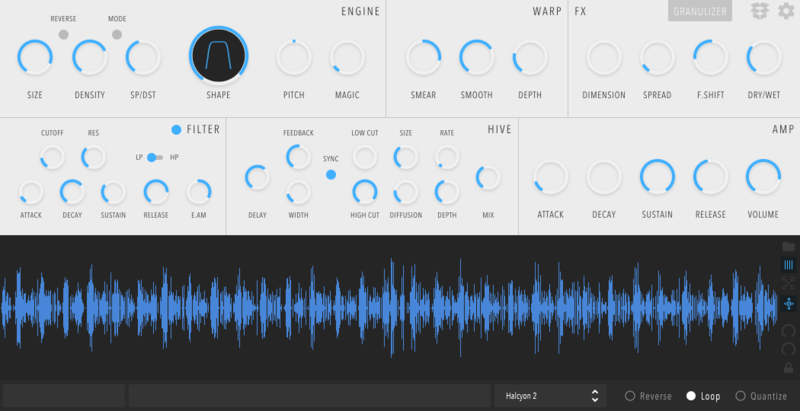
Updated Design Language
Following the steps Inertia Sound Systems took during the INSTINCT development process, they went for a cleaner interface. While 2.1 was pretty sleek, the way the new components are designed gives us more freedom and focus solely on what's important.
This is Massive
In Inertia Sound Systems greatest update yet, this release has been in the making for over a year. It was created from the bottom up, to be used by musicians, sound designers and artists. Inertia Sound Systems want you to be as free as possible when you're in your creative zone.
Everything is Better
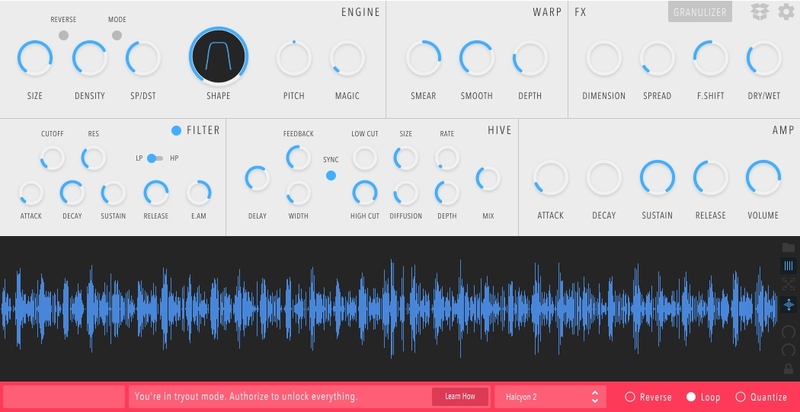
Inertia Sound Systems implemented a newly designed, high-quality granular engine with controls over grain size, density, speed, grain envelope shape, pitch, and timing randomization. You are now able to sync to host option for the delay time parameter and the grain speed.
The Interactive waveform viewer has zoom in/out and loop selection capabilities.
Follow the Grain
Granulizer 2 boasts a grain warping module, featuring a feedback modulation scheme, with controls for smear, smooth and depth, that provides atonal variations or perceptually acts as a second oscillator.
The Grain FX module has spectral processing per grain, manipulating grain sharpness/shape, spread, and frequency shift.
The HIVE
The HIVE section of Granulizer 2 is a high-quality diffusion delay featuring zero-delay feedback analogue modelled filters with subtle soft saturation, infinite feedback, control over diffusion amount, size, and more.
The Preset System
Granulizer 2 comes with custom-built presets, with sounds ranging from ambience, drones, glitches and synths. You can create your own from scratch or build upon the ones that already included. The possibilities are endless.
Themes
For you late night dwellers, Inertia Sound Systems felt that their default theme messed with your low light/chill vibe. So, starting with Granulizer 2.2, they included a dark theme. Moving forward, Inertia Sound Systems will support more options and maybe user styled themes, if users feel the need for it.
Features
- High-quality audio engine that performs time-stretching, pitch-shifting, granular resynthesis and spectrum manipulation
- Diffusion effect for wide droney sounds (think spectral reverb)
- Spectral Shaping
- Frequency shifter for atonal variations
- Grain warping
- Control over subtle randomization of certain internal parameters ("Magic" knob)
- High-quality diffusion delay effect for droney soundscapes
- Waveform view with loop selection, zoom in / out
- A portable and intuitive preset system
- Explanatory on-screen tooltips on mouse hover over the parameters.
- Minimal, clean UI
System Requirements
Mac
- macOS 10.12 - 10.15
- AU / VST & VST3 (64 bit only)
PC
- Windows 10 or later
- VST / VST3 (64 bit only)
Linux
- GLIBC: 2.29
- VST / VST3