


 Log In

Free gifts available with your purchase

Modern Groove Design
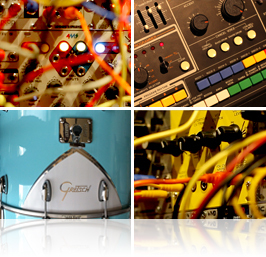
Heavyocity’s DM-307 is a highly-stylized collection of modular synth drums, live percussion, and processed classic analog drum machines. With more than 3,600 unique sounds and loops housed in 1500+ presets, DM-307 introduces innovative ways to quickly and easily create production-ready beats in a variety of contemporary styles; including electronic, hip hop, industrial, ethnic and cinematic.
In addition to the kits and loops, DM-307 showcases 300+ signature multis, allowing users to tweak beats created by Heavyocity and some of today’s top DJ/producers: Kaiserdisco, Martin Eyerer, Mendo, Pirupa and Uner; and notable cinematic composers: Joe Trapanese, Jason Graves and kevin Riepl.
The Grid
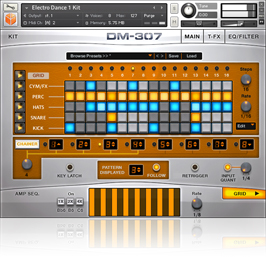
DM-307’s extensive content is complemented by an intuitive user interface featuring the all-new. The Grid™ is an advanced 5 voice drum machine with 8 programmable patterns, allowing you to build grooves by simply clicking on a step.
Expand your beat creation by stacking 5 grid presets in a performance multi and gain unprecedented control over each part with individual FX, modulators and envelopes.
Load one of the 180+ Kit Groove presets or 300 Performance Multis to get a true sense of the power of the Grid, or create your own complex grooves from the thousands of sounds found in the Kits and Multis.
Master Your Beats
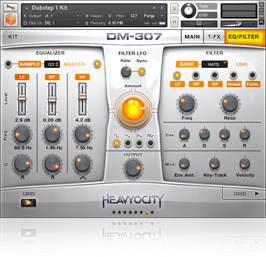
DM-307’s interface was designed for quick and simple groove creation. You can easily create a beat, alter the envelope, and drastically affect the tone of the sounds.
Similar to Damage and AEON, there are 3 levels of effects provided in the instrument. Apply effects globally with the Master effects, tweak individual sounds with the ADSR, filter, EQ, and tune, or engage the signature Advanced Trigger FX™ to quickly modulate and alter the sound.
Tempo sync is automatic, and exporting a loop's MIDI data to your sequencer is simply drag-and-drop. Tweak your grooves quickly with the integrated keyswitches for effects and stutters, and create instant impacts with the unique 'Analog Hits'.
Loops
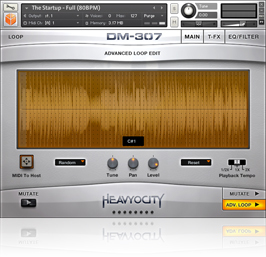
DM-307 provides a host of loop menus and single loop presets. Stocked with over 1200 loops in 5 contemporary styles. , you can quickly mix and match kicks, snares, hits, and other elements to build complex layered rhythms and grooves.
The Loop Menus are intelligently mapped, and formatted into “breakout” presets, allowing you to perform the full loop in a single key, or mix and match the individual layers of different loops, all in one preset. Single Loop presets provide level, pan, and tuning for each slice, and allows you to recompose via midi drag-and-drop.
Kits
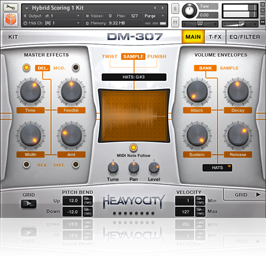
DM-307 offers more than 80 different kits, built from nearly 2,000 unique sounds. These kits combine organic drums with processed classic drum machines and aggressive modular synth sounds to create a one-of-a-kind palette of genre-defying percussion.
The signature ‘Analog Hits’ and ‘Tempo Synced Risers’ are perfect for adding impact and emotion to any track.
Effects
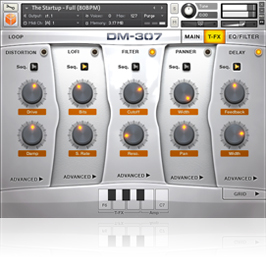
DM-307 offers 3 different levels of effects - apply effects globally with the Master FX (Reverb, Delay, Distortion, Modulation, Twist and Punish), Trigger Performance Effects, or tweak individual sounds.
The Advanced Trigger FX (pictured here) are switchable real-time effects with incredible scope for intuitive and creative sound tweaking. Control the speed at which the effect is engaged and disengaged, or turn on the sequence button, and modulate the effect changes with a 32 step sequencer.
The signature Punish and Twist knobs preside over everything, adding aggressive drive and character to your beats.
Live Percussion
For nearly a year, Heavyocity captured in-depth recordings of a wide array of percussion instruments. Sounds were recorded through an all analog signal chain with gear including API, Grace, and Neve mic pre’s, and Manley EQ’s.
With instruments ranging from congas and bongos, to small metals and triangles, and an arsenal of drum kits, DM-307 provides a vast range of organic timbres at your fingertips.
Classic Analog Drums
DM-307 provides Heavyocity’s signature ‘Music-meets-sound-design’ approach on the highly sought after sounds of classic analog drum machines.
Sounds were captured using pristine analog gear like the Neve, Wunder, and Chandler mic pres, and then processed with outboard gear from UA, Eventide, Dramastic Audio, and Dangerous Audio. The results are punchy, crisp and dynamic, providing serious character to the sounds.
Modular Synth Drums
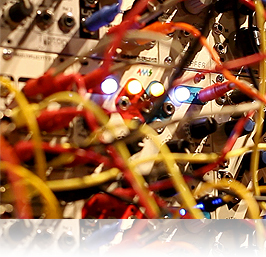
Aggressive, Fat, and In Your Face - DM-307 contains the uncompromising sound of true analog percussion. All of these exceptional sounds stem from using complex synthesis techniques with unique custom modular synth rigs.
Using an array of modules including VCOs, Vactrol Filters, Vacuum Tube Compressors, Vacuum-tube distortion, and Analog Bit Designers, all sound shaping took place completely within the analog synthesis realm, custom designing sounds from the ground up.
Features
- 7.5 GB uncompressed (4.8GB on Disk with NI lossless compression)
- Available as direct download only
- 3,600+ samples
- 1500+ NKIs
- 85 Kits
- 180+ Kit Grooves
- 55 Loop Menus
- 1200+ Single Loop Presets
- 300 Performance Multis
- The Grid™ drum machine for easy beat creation
- Playable Trigger FX™ for real-time control
- Loop Mutator™ for real-time re-composing of loops
- Stand-alone, VST, AU, AAX
System Requirements
- Powered by the Kontakt Engine
- Kontakt 5 (Player) ver 5.5.1.451 or higher, NKS compatible
- Minimum System Requirements
- Mac: OS X 10.7, Intel Core Duo, 2 GB RAM
- PC: Windows 7 (latest Service Pack, 32/64 Bit, Intel Core Duo or AMD Athlon 64 X2, 2GB RAM

Awards


Martin Eyerer
(Buzzin Fly, Great Stuff Recordings, Owner - Kling Klong Records)
'Very cool presets and sounds. It's great for creating loops from another approach. I seriously dig the drum and hi-hat banks. Good stuff!!'
Uner
(Cadenza, Diynamic, Get Physical, Ibiza DJ Awards 2013 Recipient)
"I love it! The bass frequencies sound amazing and the highs have the perfect brightness. Ground-breaking!"
Kaiserdisco
(100% Pure, Drumcode, Owners - KD Music, Terminal M)
'The sound of the DM-307 is awesome! You don´t need to add tons of plugins to get it to sound good. The sounds are ready to use in your productions.'























