


 Log In

Free gifts available with your purchase
Designed To Be Lighter But Retaining Full Sound & Expressive Capabilities
Important note: This software requires the FULL version of Kontakt 5.7.3 or above and will only run in DEMO mode when used in the FREE Kontakt Player engine.
This version features all the 5 mic positions combined in a single audio file. That saves not only 80% of disk size, but also CPU consumption as Kontakt doesn’t have to handle that many voices at a time. We merged all the mic positions with unity gain, the same sound as when you have all mic positions enabled at 0dB on Mercury Pro. With 2x round-robin repetitions, same effects (including Metropolis Plates) and settings as the pro version, this is the best piano library you can find at this price point.
Notes:
- Mercury Lite includes a coupon code for the difference to the full version of Mercury. This is a way of demoing the library before going to the full version, never paying more than the full price.
Freddie Mercury's Fazioli
Mercury is a grand piano sample library for Kontakt Player featuring a Fazioli F228 recorded at Metropolis Studios in London. One year in the making, crafting it piece by piece in order to make it perfect in every possible way.
Fazioli pianos pursuit perfection. They’re sophistically delicate but with a very rich low-end and a lot of body resonance.
Mercury was recorded by Grammy Award-winning Paul B. Norris with 5 mic positions from ultra-close to room sound for maximum versatility. It sounds warm and very emotional. Perfect for intimate low-key tracks, but it’s also very punchy and aggressive on high velocities. A combination that you don’t find usually on piano libraries.
It has been captured with so much detail and depth that you can make it sound in a million different ways and still sound natural, but it will always retain the character. Mercury can be a big monster library or light-weighted since one microphone only uses ~300MB of RAM. With realism in mind and all the possible features that we could think of including soft pedalling, una corda, sostenuto, sympathetic resonance, micro tuning.
Mercury will fit in every situation perfectly, and it will be an honour to know that it has become your go-to piano library.
The Interface
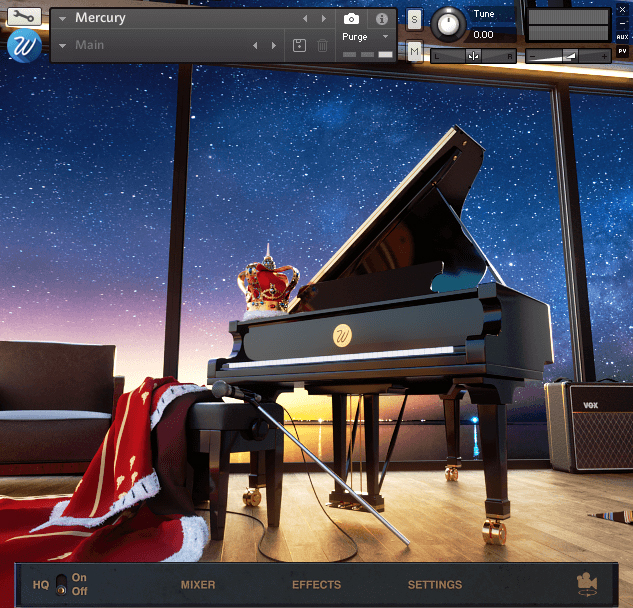
A beautiful and powerful interface rendered in 3D designed to inspire you
- From the mixer, you can control the different mics separately with the usual parameters that you’d normally get on an audio mixer, and with extra features like a new way of mixing that we call “position enhanced”.
- In the effects page, you can add 4 DSP effects to the sound, specially designed for piano. Metropolis Plates which are two EMT140s from Metropolis Studios, compressor, tilt EQ and chorus.
- From the settings panel, you can control basically any parameter that you might ever need. From the round-robin number up to the sympathetic resonance and pedal noises.
Features
- Mic Positions: 1 (All in one)
- Round Robin: 2x. Up to 6x with NB.
- Velocity Layers: 8
- Samples: 4,784
- Size: 3.59 GB
- Presets: 1
- Works with: Kontakt full version
- Download: Regular links
- NKS: Yes

System Requirements

Important notes:
- The FULL version of Native Instruments Kontakt 5.7.3 or above is required to run this software.
- This software will not function in full within the FREE Kontakt Player engine and will only be available in DEMO mode.


