


 Log In

Free gifts available with your purchase
Electric, Acoustic and Bass Harmonics for Kontakt
Important Note: This software requires the FULL version of Kontakt 5.7.3 or above and will only run in DEMO mode when used in the FREE Kontakt Player engine.
Harmonics are most often played by lightly placing a finger on a string at a nodal point of one of the overtones at the moment when the string is driven. The finger immediately damps all overtones that do not have a node near the location touched. The lowest-pitch overtone dominates the resulting sound.
Overview
See how Harmonix can enrich your music creating both melodies and background textures with the different tonal characteristic of the three types included: acoustic, electric and bass harmonics. With the included effects and sequencer, possibilities are endless.
Mixer
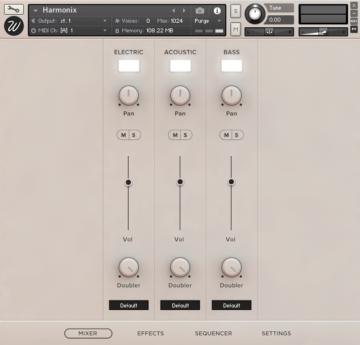
Harmonix features a full mixer with which you can control the three instruments separately:
- Electric: Gibson E-335 electric guitar.
- Acoustic: Alhambra A3 acoustic guitar.
- Bass: Fender Jazz Bass.
With a load/purge switch for each channel, pan, volume, mute/solo, stereo width from 100% stereo to mono, doubler and output selector for mixing the different channels on your DAW.
Effects
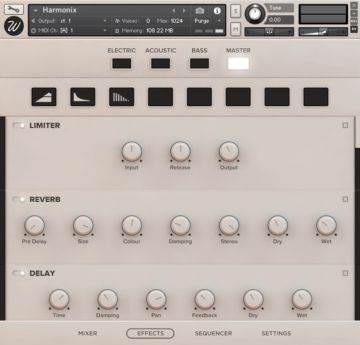
The library features Wavesfactory's advanced effect script that lets you insert any effect chain in any channel separately, including:
- High-Quality EQ.
- Various types of compressors.
- Modulation: chorus, flanger, phaser.
- Distortion / Saturation / Tape
- Algorithmic and convolutional reverb with more than 40 custom impulse responses.
- Amp simulators.
This script boosts exponentially the sonic capabilities of the library, easy to use in a simple and elegant design.
Sequencer
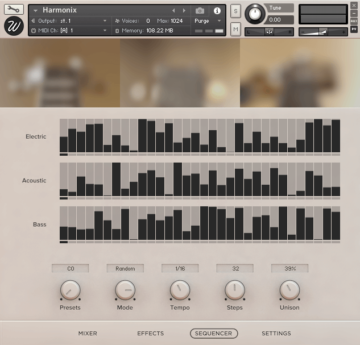
Harmonix features a full sequencer/arpeggiator that includes 7 ready presets.
Adjust the tempo, steps, mode (up, down, random, as played) and create interesting and complex patterns.
Each instrument has its own sequencer table that you can draw, but you can also make them play in Unison by turning the Unison knob all the way to the right.
Settings
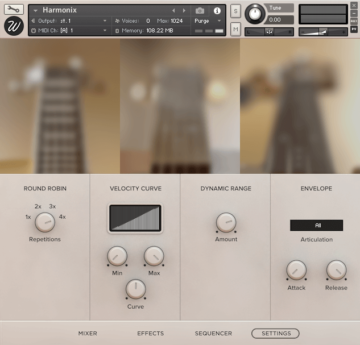
From the settings page, you can control basically any parameter you might ever need. Divided into four sections you can find:
- Round robin: the instrument was sampled with 4 true round-robin repetitions, you can select the number you want and the rest will be purged from memory in order to reduce RAM usage.
- Dynamic range: adjust the difference in volume between the loudest and the softest notes.
- Velocity curve: control how the library reacts to incoming midi notes.
- Envelope: control the attack and release times for each instrument separately.
System Requirements

Important Notes:
- The FULL version of Native Instruments Kontakt 5.7.3 or above is required to run this software.
- This software will not function in full within the FREE Kontakt Player engine and will only be available in DEMO mode.


