


 Log In

Free gifts available with your purchase
Ancient Chinese Instrument
Important note: This software requires the FULL version of Kontakt 5.7.3 or above and will only run in DEMO mode when used in the FREE Kontakt Player engine.
The Guzheng is a Chinese plucked zither, ancestor of several Asian instruments such as the Japanese koto, the Mongolian Yatga and the Korean gayageum. It has 21 strings and movable bridges.
5 articulations: fingers, pick, stick, bow and ebow. Traditional and alternative techniques in order to get the most out of this beautiful instrument with up to 4 round robin and 4 velocity layers.
Realistic tremolo effect where the last played note is re-triggered on release, control the velocity and intensity of the tremolo more naturally and musically. Pitch wheel affects to the last played note in order to create the effect of stretching the string.
Mixer
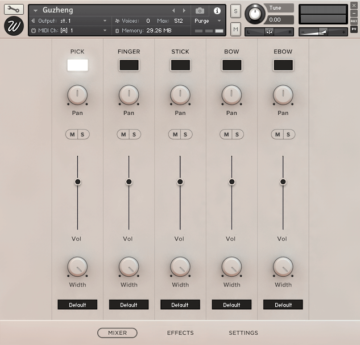
Guzheng was sampled in different ways, all of them controllable in this panel:
- Pick: strings were struck by the special pick that Guzheng players use.
- Finger: directly played with the fingers, more mellow sound.
- Stick: strings were struck by a drum stick for a more percussive sound.
- Bow: strings were bowed using a violin bow.
- E-Bow: strings were stimulated with an electronic bow, which gives an organ-style quality.
With a load/purge switch for each articulation. Pan, volume, mute/solo, stereo width from 100% stereo to mono and output selector for mixing the different channels in your DAW.
Effects
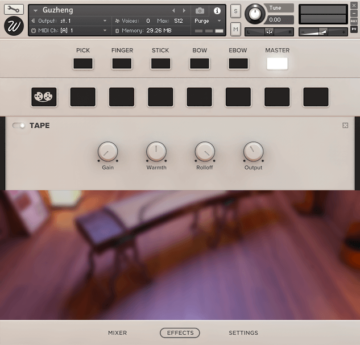
The library features an advanced effect script that lets you insert any effect in any of the 8 available slots for each channel, including:
- High-Quality EQ.
- Various types of compressors.
- Modulation: chorus, flanger, phaser.
- Distortion / Saturation / Tape
- Algorithmic and convolutional reverb with more than 40 custom impulse responses.
- Amp simulators.
This script boosts exponentially the sonic capabilities of the library, easy to use in a simple and elegant design.
Settings
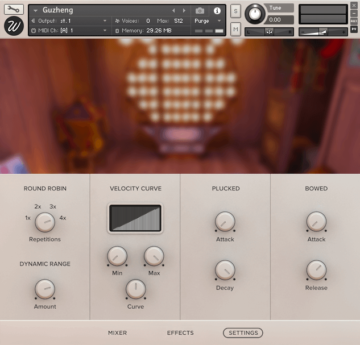
From the settings page you can control basically any parameter you might ever need. Divided in four section you can find:
- Round robin: the instrument was sampled with 4 true round robin repetitions in order to avoid the machine-gun effect.
- Dynamic range: lets you specify the difference between the loudest and the quietest notes.
- Velocity curve: control how the library reacts to incoming midi notes.
- Plucked envelope: control the attack and decay times of just the pick, finger and stick articulations.
- Bowed envelope: control the attack and release times of just the bow and ebow articulations.
Features
- Size: 1.28 GB
- Samples: 711
- Articulations: 5
- Velocity layers: 4
- Round robin: 4
System Requirements

Important notes:
- The FULL version of Native Instruments Kontakt 5.7.3 or above is required to run this software.
- This software will not function in full within the FREE Kontakt Player engine and will only be available in DEMO mode.


