


 Log In
.jpeg)
Free gifts available with your purchase

Introducing ASCEND: Modern Grand, an all-new cinematic grand-piano virtual instrument for Kontakt and Kontakt Player. ASCEND is the incomparable 9-foot Concert D, reimagined. Recorded in stunning detail at a historic NYC studio, the Heavyocity team chose to deeply sample this specific grand piano because of its outstanding warmth, depth, and detail. This is the cinematic composer’s opportunity to play one of the finest pianos Heavyocity has ever heard.
Overview
Starting with one of the finest cinematic pianos in the world, Heavyocity then pushed the grandest of grand pianos even further, exploring new ways of evoking sound from this nine-foot frame. First caputring several prepared performances in intricate detail (brushes, hammers, ebow, chains and twine) and then, developing an all-new engine to bring these extraordinary sounds to life.
Immortal Tone
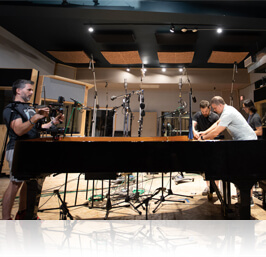
Recorded in stunning detail at a historic NYC studio, this specific grand piano was hand-selected by the Heavyocity team for its outstanding warmth, depth, and detail. Armed with a world-class selection of vintage and modern microphones, the team once again partnered with acclaimed Film Score Mixer Satoshi Noguchi, this time to bring the legendary Steinway sound into your studio. Simply put, ASCEND is your opportunity to play one of the finest cinematic pianos we've ever heard.
ASCEND Engine
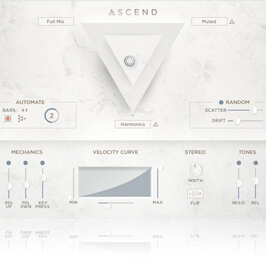
The gorgeous ASCEND engine is a whole new world to explore - complete with a library of rhythmic convolutions and dozens of layerable sources and FX. The highly-flexible Three Point Mixer provides instant inspiration, and the proprietary Echoes feature accompanies your performances with a lush musical randomness. With ASCEND, Heavyocity has crafted a new breed of cinematic grand piano. Your score may never be the same.
What's Included
- Rich Concert D Grand Piano, captured in stunning detail
- Creatively prepared piano articulations including Twine, Ebows, Brushes, and Chains
- Beautiful ppp performance. Captured for emotional cinematic composition
- All-new ASCEND Engine creates a truly inspirational canvas
Features
- 47.8 GB uncompressed (23.3 GB on Disk with NI lossless compression)
- 1 NKI
- 110 Snapshot Presets
- 25 Ascended
- 10 Core Concert D
- 25 Extended
- 25 Rhythmic
- 25 Rhythmic Melodic
- 16 Sound Sources
- Intuitive Sample Browser
- ARP for building complex, rhythmic arpeggios
- Three point mixer for realtime source blending
- Stand-alone, VST, AU, AAX
System Requirements
- Powered by the Kontakt Player 6.1 Engine
- Kontakt 6 (Player) or later
- Komplete Kontrol integrated (NKS-ready)
Mac
- macOS 10.12, 10.13 or 10.14 (latest update)
- i5 processor
PC
- Windows 7, Windows 8, or Windows 10 (latest Service Pack)
- Intel Core i5 or equivalent CPU
- 2 GB RAM



Ramin Djawadi
Composer | Game of Thrones, Iron Man, Pacific Rim, Safehouse, The Great Wall, Westworld.
"Fresh sounding and malleable, ASCEND: Modern Grand is perfect for creating evocative organic piano textures.

Charlie Clouser
Composer | American Horror Story (theme), Dead Silence, Resident Evil: Ex, Saw, Wayward Pines.
"From dark emotional pianos to hypnotic patterns and all the way to subtle atmospheres and evil dronescapes, ASCEND will go there. Highly recommended!"

Kevin Riepl
Composer: ATROPA, Batman Unlimited, Constantine: City of Demons, Higher Power.
"ASCEND is a beautifully-sampled grand piano."























