Log In

Free gifts available with your purchase

Big Fish Audio's Street Percussion is a powerful step sequence library with over 100 unique and deeply-sampled instruments of various pieces of metal, plastic, wood, ethnic drums, and custom drum kits, giving you the ideal sounds to create those classic street percussion grooves. This library goes way beyond your standard percussion sequencer, giving you full control and allowing you to create any beat or groove imaginable. While this library is extremely powerful, it's also simple to use with an innovative and seamless interface. No need to spend tons of time drawing in your beats from scratch; with over 130 unique presets you can have a fully fleshed-out percussion section in seconds! Get started today.
Instruments
With the help of two incredible street performers, Steven Bartashev and Cyzon Griffin, Big Fish Audio captured the sound of a huge array of instruments with seven velocity layers and seven round robins per instrument. Creating authentic street percussion music has never been easier than with this comprehensive collection of surfaces including metal, plastic, wood, ethnic drums, and two custom drum kits.
Sequencer
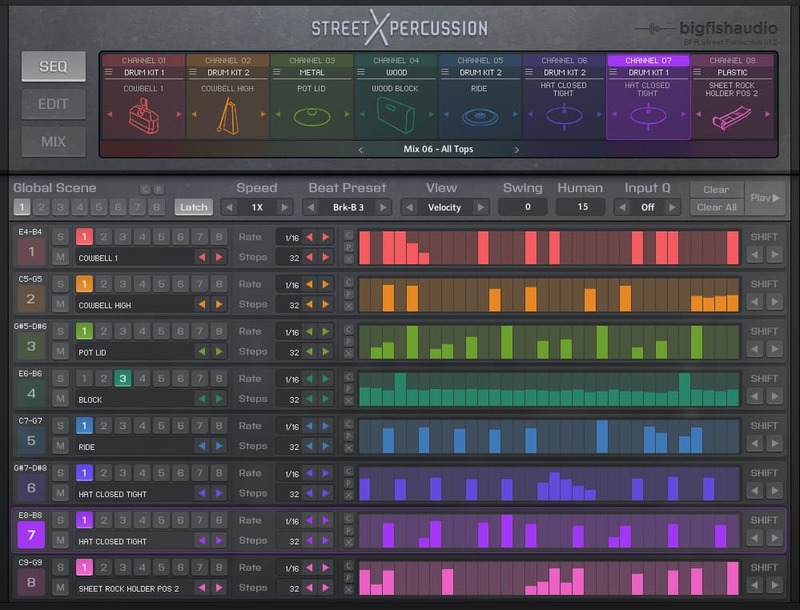
Street Percussion features an incredibly powerful step-sequencer with eight channels. Each channel has independent control over the rate and steps and can even be triggered separately for some truly incredible percussion sections. With step-based control over velocity, length, pan, pitch, reverse, reverb, and delay, the percussive possibilities are endless.
Mixer/Effects
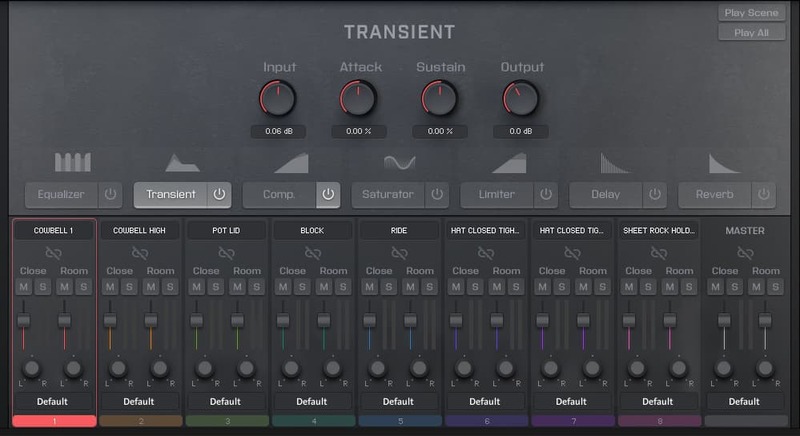
Each channel has its own close and room mic mixers so you can dial in the exact sound you’re looking for. The team at Big Fish Audio have also hand-picked seven of Kontakt’s powerful effects which can be applied on a per-channel basis or globally.
Presets
Never let a lack of inspiration stop you from creating your percussion sections quickly. With over 130 customized presets you can be up and running with killer grooves and fresh sounds just by the click of a button.
Included Instruments
Drum Kit 1
- Hat Closed Loose
- Hat Closed Medium
- Hat Closed Tight
- Hat Foot
- Hat Open
- Plastic Cowbell 1
- Plastic Cowbell 2
- Snare Mute
- Snare Mute Buzz Roll
- Snare Mute Rim Shot
- Snare Mute Side Rim
- Snare Mute Side Stick
- Snare Reg
- Snare Reg Buzz Roll
- Snare Reg Rim Shot
- Snare Reg Side Rim
- Snare Reg Side Stick
- Snare Wallet Buzz Roll
- Snare Wallet Rim Shot
- Snare Wallet Side Rim
- Snare Wallet Side Stick
- Snare Wallet Snare
- Tom
- Wood Block 1
- Wood Block 2
Drum Kit 2
- Crash 1
- Crash 2
- Hat Closed Loose
- Hat Closed Medium
- Hat Closed Tight
- Hat Foot
- Hat Open
- Kick
- Metal Cowbell High
- Metal Cowbell Low
- Ride
- Ride Bell
- Snare Mute
- Snare Mute Buzz Roll
- Snare Mute Rim Shot
- Snare Mute Side Rim
- Snare Mute Side Stick
- Snare Reg
- Snare Reg Buzz Roll
- Snare Reg Rim Shot
- Snare Reg Ringing
- Snare Reg Side Rim
- Snare Reg Side Stick
- Tom
Plastic
- Blue Bucket Large
- Orange Bucket Medium
- White Bucket Medium
- White Bucket Small
- Water Can Pos 1
- Water Can Pos 2
- Gutter Pipe
- Tote Large
- Plastic Piece
- Pot Medium
- Pot Small
- Sheet Rock Holder Pos 1
- Sheet Rock Holder Pos 2
Metal
- Baking Pan
- Baking Pan And Rack Shelf
- Hose Reel
- Air Duct 1 Large
- Air Duct 2 Large
- Metal Bucket Medium
- Metal Bucket Small
- Music Stand
- Paint Roller Pan
- Pan
- Pipe
- Pot Lid
- Pot Small
- Sieve Bottom
- Sieve Side
- Steel Drum Small
- Trash Can
- Trash Can Lid Large
- Trash Can Lid Small
Wood
- 1x1
- 2x4 Pos1
- 2x4 Pos2
- Drumstick
- Hardwood Sheet Pos 1
- Hardwood Sheet Pos 2
- Hardwood Small
- Pine Small Pos 1
- Pine Small Pos 2
- Tube Pos 1
- Tube Pos 2
- Tube Pos 3
- Wood Block
Small Drums
- 70s Kadima Raquet 1
- 70s Kadima Raquet 2
- 70s Kadima Raquet 3
- African Hyde Drum
- Amazon Bongo Large Drum
- Amazon Bongo Small Drum
- Mexican Small Drum
- Pakistani Porcelain Drum
Features
- 102 deeply-sampled instruments
- 54 Customized and filterable Groove Presets
- 50 fully fleshed-out Beat Presets
- 30 curated collections of instruments (Kit Presets)
- Powerful eight-channel step sequencer with independent control of rate and steps
- Step-assignable velocity, length, pan, pitch, reverse, reverb, and delay
- Intuitive and seamless interface
- Close and room mic per channel
- 11,000+ samples
- 7 velocity layers and round robins per instrument
- MIDI drag and drop for easy DAW workflow
- NKS compatible
- Created in Kontakt 5.8.1
System Requirements
- Kontakt 5 or later
- Powered by the Kontakt Player Engine
- Komplete Kontrol integrated (NKS-ready)
Note: This software is compatible with the FREE Kontakt Player.