


 Log In

Free gifts available with your purchase

A Musical Time Machine
Get the Iconic Sound of an Electric Piano Legend
Session Keys Electric W combines authentic sound, flexible operation, and unique controls to make it feel like you’re playing the real thing, producing sounds you wouldn’t imagine were created electronically. To replicate this hit-making electric piano, e-instruments turned every stone for a suitable original, which underwent further specialist restoration to bring it painstakingly back to peak condition.
Pioneering legend
Session Keys Electric W is the sound of some of the most iconic hits over the last few decades. With attention to every detail, the recreation of this classic electric piano offers you all the warmth and dynamic range of the original. The Wurli helped to define the sound characteristics of Fusion, Disco, Funk, and Pop. e-instruments searched obsessively for a perfectly suited original to replicate this hit-making electric piano, followed by weeks of further specialist restoration. You'll get tons of inspiration from the various sounds the electric piano produces at different velocity layers – from Vibraphone-like smoothness to ultra-aggressive, distorted sounds.
Studio and Live
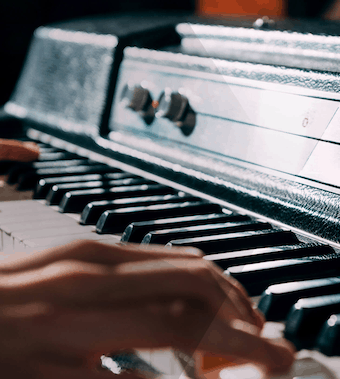
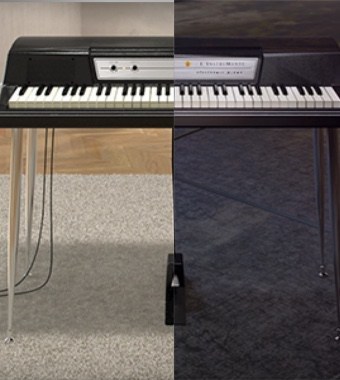
With the Electric W e-instruments invite you to play and feel not only the original, versatile, and assertive sound of a 200A but also two different sample sets, recorded with and without the original speaker. "Studio" delivers the direct unaltered line-out sound, while "Live" captures the sound of the speakers through a comprehensive microphone set-up covering the original speakers including cone-cry and break-up for a most realistic feel.
Both sample sets feature additional recordings of acoustic noise- and resonance elements to expand your sonic possibilities even further.
Pentamorph
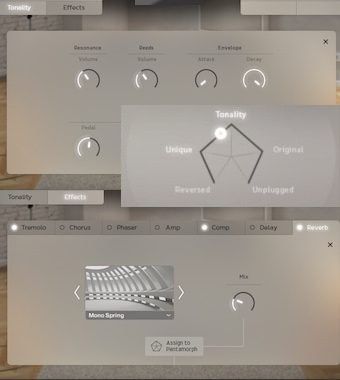
Electric W offers almost boundless sound design options. The Pentamorph enables an unprecedented instant control over the fundamental sound of the Electric W. Move the pentagonal controller to morph from the genuine Wurli sound to various different complex sound textures. The Pentamorph provides atmospheric textures as well as extraordinary percussive sounds with minimal effort.
Manipulate the sound with individual controls for sustain resonance, reeds volume, pedal noise, key noises, release, and reverse samples volume. Experiment with classic electric piano effects such as Tremolo, Chorus, Amp Simulation, Delay and Reverb.
Smart Chord
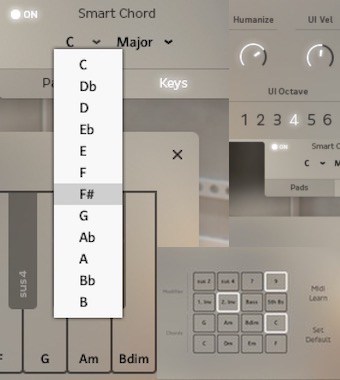
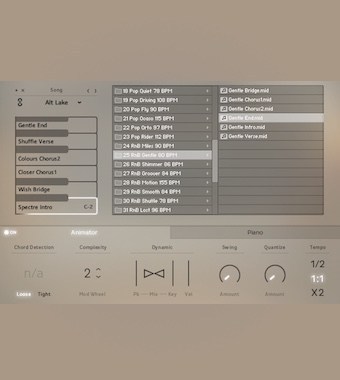
The sophisticated Smart Chord feature is your best friend, whenever you're stuck for ideas and need new chord changes. You can play full chords or Animator riffs either via a pad controller or single keys. Set the key of your song and let Smart Chord create the harmonies for you.
Animator
Sound like a top session player riffing in your studio. You'll find more than 440 ready-to-play licks and phrases in different genres and styles as the engine of the Animator. Get inspired to start or even finish your tracks with a professional flourish in no time, following keys and harmonies with complete control over dynamics and complexity. Try it combined with the Smart Chord function.
Features
- 1974 Electronic Piano.
- Two separate sound banks: Studio and Live.
- Pentamorph control to transform the entire sound with a single knob.
- Animator with more than 440 flexible piano phrases.
- Smart Chord function to create instant piano chords from single keys or pads.
- Effects chain with tremolo / AutoPan, chorus, phaser, amp simulator, compressor and convolution reverb.
- Native Instruments NKS compatible.
- 9 GB / 4.5GB download (lossless sample compression).
- 24-bit/44.1 kHz samples.
System Requirements
PC
- Windows 7/8.1/10 (Latest Service Pack, 32/64-bit).
- VST 2, VST 3 or AAX compatible host application to use as a plugin.
- Intel Core 2 Duo or AMD Athlon 64.
- 4 GB RAM.
-
Requires FREE Kontakt 5 Player or Kontakt 5 Version 5.5.1 or higher.
Mac
- OS X 10.9 or later (Latest Update).
- VST, AAX or AU compatible host application to use as a plugin.
- Intel Core 2 Duo.
- 4 GB RAM.
- Requires FREE Kontakt 5 Player or Kontakt 5 Version 5.5.1 or higher.























