Log In

Free gifts available with your purchase

Evolution: Devastator Warzone is the third chapter of the newest addition to the Evolution Devastator Series which has established itself in the world of professional composers and sound designers.
Evolution: Devastator Warzone is a premium collection of hand-crafted custom Signature Sound effects, Bass and Braams, Signals and Signs, Drum Loops, Pulses, Guns and Recharges, One-Shots, Cinematic loops and Artist Stems.
The library has a modern and aggressive character that can be heard in a lot of trending movies and TV series. The Evolution: Devastator series will definitely be an irreplaceable part of movie and game sound designs, as well as for composing trailers and soundtracks.
Features
- Meticulous futuristic design
- High-quality samples at 48kHz/24bit
- CPU-friendly for fast performance
- 7 GB compressed samples
- Drum Machine
- Rhythm (SEQUENCER)
Wav Folder Including:
Stems:
- 17 Trailer Stems
Drum Kit:
- 38 Modern Kit Sounds
Loops:
- 62 Bass & Braams
- 53 Signals & Signs
- 247 Drums Loops
- 25 Distortion Reverse Pulses
- 108 Classic Pulses
- 63 Hybrid Pulses
- 43 Modern Pulses
- 35 Low Thump Pulses
One-Shots:
Bass:
- 20 Hybrid 808s
- 57 Modern 808s
- 36 Brass & Stabs
- 40 Distortion Basses
- 32 Fundamental Basses
- 73 Modern Bass One-Shots
Drums:
- 34 Claps & Snaps
- 50 Epic Claps
- 27 Massive Claps
- 15 Modern Claps
- 18 Cymbals
- 36 Fills
- 120 Guns & Recharges
- 23 Hi-Hats
- 16 Trap Hats
- 57 Kicks
- 29 Room Kicks
- 6 Rides
- 32 Session Hi-Hats
- 66 Snares
- 25 Live Snares
- 36 Toms
Hits:
- 39 Booms
- 24 Space Hits
- 86 Trailer Hits
Tonal FX:
- 19 Downers
- 35 Reversed FX
- 46 Rises
- 20 Classic Signals
- 35 Ambient Signals
- 16 Amped Signals
- 60 Signs
- 25 Delayed Signs
- 121 Wild Screams
- 60 Wild Screams Delayed
- 28 Whoas
Playable Instruments:
Trailer Drums and Hits:
- Pulse Designer (User Import)
- Trailer Drums (RR)
- 82 Trailer Hits
- 24 Space Hits
- 39 Booms
Drums:
- Drum Machine - Modern Kits
- Drum Machine - Hybrid Kits
- Drums (RR)
- Guns (RR)
- Burial Kit (RR)
- 53 Kicks
- 31 Room Kicks
- 66 Modern Snares
- 25 Live Snares
- 50 Epic Claps
- 27 Massive Claps
- Claps Snap - 34
- 15 Modern Claps
- Thumps (RR)
- 48 Metals
- 16 Trap Hats
- 46 Guns & Recharges
- 42 Modern Drum Fills
- Drum Loops 1
- Drum Loops 2
- Drum Loops 3
Bass:
- 31 Brass & Stabs
- 32 Fundamental Basses
- Bass Pulse (RR)
- 40 Distortion Bass
- 53 Modern 808s
- 20 Hybrid 808s
- 83 Modern Bass One-Shots
- 32 Downers
- 25 Distortion Reverse Pulse Loops
- 63 Bass & Braams Loops
Tonal FX:
- 120 Wild Screams One-Shots
- 108 Wild Screams Delayed
- 28 Wild Screams Whoas
- 46 Lead & Guitar Type Signatures
- 25 Signatures Delayed Signatures
- 23 Other Signatures
- 16 Lead & Distortion Signals
- 20 Classic Signals
- 35 Ambient Signals
- 53 Signal & Signs Loops
- 40 Reversed FX
- 46 Rises
Pulses:
- 35 Thump Pulses - 35
- 108 Classic Pulses
- 63 Hybrid Pulses
- 64 Mid Pulses
- 44 Modern Pulses
Playables:
- 808 Bass
- Modern Bass
- Modern Lead
- Modern Pluck
- Modern Pluck FX
System Requirements
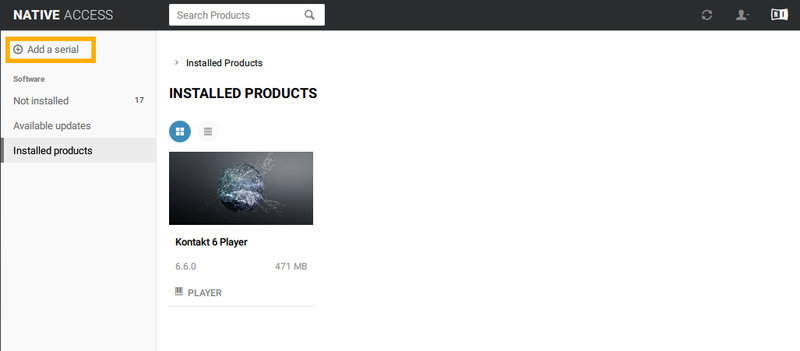
- Kontakt 6.0.2 or newer (Compatible with the FREE Kontakt Player)
Please Note: This product works with the FREE Kontakt Player.