Log In

Free gifts available with your purchase
Zodiac is a unique-sounding Virtual Instrument designed to provide composers and producers with a collection of original sounds and instruments suitable for film or TV scores, video games, and all types of ambient and experimental music.
No synthesizers were used to create the instruments in Zodiac. Instead, all instruments were created from organic sources such as found sounds, sonic manipulations inspired by classic Musique Concrete, Experimental and Avant Garde Music compositions, prepared or heavily processed musical instruments, and audio recordings subjected to extreme sound design techniques.
Zodiac features over 200 patches and Multis (over 8GB of uncompressed wav data), divided into six categories:
- Pads & Atmospheres
- Melodic Instruments
- Bass Instruments
- Percussive Instruments
- Experimental Instruments
- Zodiac Kits
Zodiac's instruments range from beautiful and ethereal soundscapes to wildly inventive percussion and mysterious, haunting, atonal and experimental sounds that defy easy categorization. Search through Zodiac's patch folders, and you won't find anything like a regular bass, guitar, keyboard, or drum set. Instead, you'll find a collection of sounds that are quite unlike those made by any standard instrument.
Not only does Zodiac feature a constellation of ready-to-use instrument patches, it's also a powerful sound-design VI. Use Zodiac's simple but versatile controls to dramatically alter, sculpt, or tweak and customize sounds to fit your individual style. However, you don't even need to touch a single control to get a variety of sounds from Zodiac's preset patches.
Zodiac is made for experimentation: hold down a key on many instrument patches and a sound loops and morphs, revealing surprising musical timbres and harmonic strata. Play an instrument one way and it has a percussive quality; play it another, and the notes expand into a pad or atmosphere. Play a patch in one octave and it sounds dreamy and surreal; play it in another octave and it behaves and sounds quite differently.
No matter what soft synths, sound modules, or VIs you already own, Zodiac will expand the palette of sounds in your sonic tool box and add a unique character to your music.
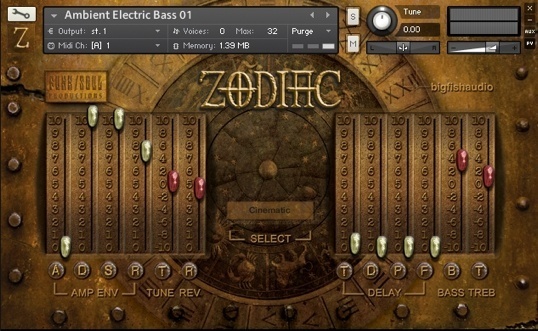
Despite its somewhat enigmatic appearance, Zodiac's Graphic User Interface (GUI) is quite simple to use. Here's the key:
The Control Banks
ON either side of the Zodiac logo is a control bank consisting of SIX levers. Under each lever is a single letter, which stand for the following:
(Lefthand Bank)
AMP ENV - Amp Envelope controls:
- A - Attack
- D - Decay
- S - Sustain
- R - Release
- T - Tuning (Pitch)
- R - Reverb amount
(Righthand Bank)
DELAY - the Delay controls:
- T - Delay Time
- D - Delay Damping
- P - Dealy Panning
- F - Delay Feedback
- B - Bass
- T - Treble
The Levers
Note that the four white-tipped levers on either side represent a grouping of related controls, and have a range of 0 to 10.
Note also that the red-tipped levers represent controls not related to the white groups, and that three of these have a range from -10 to +10.
Use command-click (MAC) or control-click (PC) to return any of the levers to the default setting of zero.
The Reverb Window
The window below the Zodiac logo contains a drop-down menu, with a list of fifteen very different-sounding Convolution Reverb IRs. Click on this window if you'd like to change the type of reverb on the instrument being played. Note that the R(everb) lever to the left of the window controls the amount of reverb.
Zodiac is powered by the industry-leading Kontakt engine. It is compatible with VST, AudioUnit, AAX (Pro Tools 10) and RTAS (Pro Tools 9 & 10) plug-in formats allowing it to work seamlessly within any major sequencer, in addition to standalone use.
- Over 150 different instrument patches and 50 Multis
- Six Categories: Pads & Atmospheres, Melodic Instruments, Bass Instruments, Experimental Instruments and Zodiac Kits
- 4.6 GB (over 8 GB uncompressed)
- Kontakt Player 5.2.1 included
Patch List:
Pads & Atmospheres
- Ambient Electric Bass 01 / Ambient Electric Bass 02 / Ambient Guitar Pad 01a / Ambient Guitar Pad 02 / Ambient Guitar Pad 03 / Ambient Guitar Pad 04 / Ambient Guitar Pad 05 / Ambient Pedal Steel Pad / Amped Glass Harp / Bowed Pedal Steel Pad / Bowed Waterphone Pad 01 / Bowed Waterphone Pad 02 / Bowed Waterphone Pad 03 / Bowed Waterphone Pad 04 / Bubbling Guzheng / Diminishing Guitars / Electric Bass Pad 01 / Electric Bass Pad 02 / Electric Bass Pad 03 / Guitar Pad 01 / Guitar Pad 02 / Guitar Pad 03 / Guitar Pad 04 / Guitar Pad 05 / Guitar Pad 06 / Homemade Mellotron Flutes / Pantam Pad / Pedal Steel Pad 01 / Pedal Steel Pad 02 / Pedal Steel Pad 03 / Pedal Steel Pad 04
Melodic Instruments
- Ambient Glass Harp / Ambient Guitar Harmonics / Bowed Saw / Bowed Waterphone 01 / Bowed Waterphone 02 / Bowed Waterphone 03 / Bowed Waterphone 04 / Bowed Waterphone 05 / Bowed Waterphone 06 / Bowed Wineglass / Chime / Ecquadorian Drum Reamped / Flute Toneholes / Gas Cylinder Bell Sharp / Glass Harp Short / Gong Mallet Small / Guitar Low Harmonics / Guitar Mid Harmonics / Guitar Single Note / Metal Lamp Shade / Muted Guitar Harmonics / Pipe Strike 01 / Pipe Strike 02 / Raga Flute Drone / Tank Drum Tine / Tapped Alto Flute / Water Gong
Bass Instruments
- Aggressive Piano String Strike / Amorphous Brass Drone / Bari Sax Toneholes / Bass Flute Drone / Bass Flute Taps / Boulez Rubber Bands / Bowed Acoustic Guitar / Dumpster Long Drone / Dunun String Pluck Amped / Dunun String Pluck Low / Large Aluminum Bowl / Low Muted Guitar Harmonics / Ominous Drone / Pipe Palm Bass / Rubber Band Amped High / Rubber Band Amped Medium / Rubber Band Medium Amped Lite / Tape Dispenser Bass / Trumpet Muted Pedal Tone / Upright Tap / Wood Tongue Drum Tine
Percussive Instruments
- Asian Gong Mute Hits / Awesome Laundry Door Drum / Bansuri Mallet Percussion / Bertolozzi Bridge / Chappa Brush Hits / Chime Muted / Copper Pot / Dragon Cymbal Brush Hits / Dumpster Bass Steel Drum / Dunun String Percussion / Dunun String Pluck Medium / Gong Flat Hits / Gong Metal Hit Mutes / Gong Pings / Gong Ring Mutes / Guitar Knocks / Hyped Cymbal / Metal Bridge / Metal Hard Hit / Metal Shop Kalimba / Metal Thermos Bell / Metal Thermos Vibraphone / Palm Hit Bamboo / Perky Metal Taps / Piano Strike Low Short / Polyphonic Burmese Drum / Small Metal Bowl / Space Heater Marimba / Waterphone Tube Hits
Zodiac Kits
- Heavy Industry Drum Kit / Industrial Glitch Kit / Industrial Kit / Musique Concrete Kit / Pitch-Shifted Ethnic Drums / Pitch-shifted Metals Kit / Radio Static Kit / Zodiac Drum Kit / Zodiac Glitch Kit
Experimental/Atonal Instruments
- Atonal Tank Drone/ Autoharp Mallets / Bowed Autoharp Multi / Bowed Pedal Steel / Bowed Ruan Psycho Hit / Bowed Waterphone FX 01 / Bowed Waterphone FX 02 / Bowed Waterphones / Bubbling Pantam / Cage 4' 33 / Dripsody Classic Le Caine / Gong Ring Mute Riser / Gu-Quin Scrapes Up & Down / Guzheng Bowed / Guzheng Scrape / Hard Bowed Acoustic Guitar / Harp FX / Harp FX Hits / Harp FX Riser / Harp Gliss Hit / Metal FX Pad 01 / Metal FX Pad 02 / Muted Guitar Harmonic Strum / Pedal Steel FX 01 / Pedal Steel FX 02 / Pedal Steel FX 03 / Pedal Steel FX 04 / Pedal Steel FX 05 / Piano Strange Gliss Pad / Piano String Scratch Low / Reverse Wineglass Hit / Ruan Psycho Hit Riser / Soda Can Wobble / Struck Autoharp / Tank Drum Bottom / Tank Drum Mallet Side / Tankenspiel / Waterphone Tine Hits
System Requirements
- Kontakt Player 5/Plugin downlaod = 5.7GB
- This product is compatible with...AAX / AU / Cubase / Digital Performer / GarageBand / Intel Mac / Kontakt 5 / Live / Logic / Nuendo / PC / Pro Tools 9 / Reaper / RTAS / Sonar / Studio One / VSTi
Awards

Rich in atmosphere, Zodiac offers a more organic approach in what is becoming a very electronic world. Here's a collection inspired by 'musique concrete' - no, don't run away! It's an often misunderstood and pretentiously used term - as is a lot of French, let's face it - and a subject i s...
Read More