/ Reaktor Ensemble / C-Tools
Heavyocity

C-Tools

5.0 (53 Reviews)
$29.50 $59.00

50% off until Dec 12

Capsule User Interface
C-Tools - Trailer gallery thumbnail
Coil User Interface
Clique User Interface
C-Tools - Overview gallery thumbnail
Buy Now
Product information

C-Tools

C-Tools was designed as an homage to a future that never was. Featuring a trinity of retro synths inspired by the 70s and 80s, C-Tools is three distinct instruments: Capsule (drums), Coil (bass) & Clique (pads & keys). From nostalgic strings to archetypal pulsing rhythms, C-Tools is the framework for building the vintage synth sound of yesterday, today.
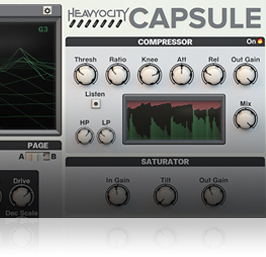
Capsule

Capsule is the C-Tools Drum Machine, featuring eight drum channels and a built-in sequencer. Complete with thumping kicks and kitschy hand claps, Capsule takes a mostly analogue approach to its synthesis engines. Add in an additional effects chain crafted specifically for drums (including a gated reverb), and you can consider the hole in your instrument collection for tweakable vintage synth drums officially filled.
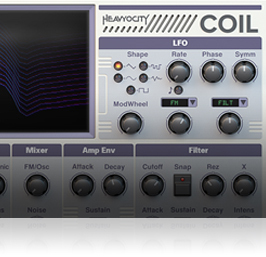
Coil

Coil is a hybrid monosynth designed especially for bass sounds. It uses digital FM and analogue subtractive synthesis techniques to produce a rich sound palette. From biting and percussive, to deep and throbbing - and all spaces in between - Coil lays down the low-end foundation you need for building those synthetic rhythm beds.
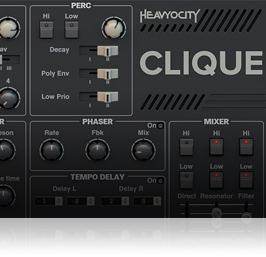
Clique

Clique is a combination of string machine and combo organ - two instruments that used similar frequency division techniques to produce their polyphonic sounds. Whether it be bright and springy or spacey and textural, Clique gives you all the soft synth requirements for writing melodies and harmonies so catchy they will ruin your life. Added is a split keyboard routing mechanism, which allows you to assign different parts of the synthesizer to the upper, lower, or both halves of the keyboard.

Features

  • **Requires the Full version of Reaktor 5 (version 5.9.2 or later)
  • Size: 90.5 MB (on disk)
  • Available as direct download only
  • Total Presets: 149
  • Three Built-in Effects for each instrument.
  • Includes three instruments covering the core of many arrangements:
  • Capsule: Drums and Percussion
  • Coil: Bass
  • Clique: Pads and Key

System Requirements

  • Powered by the Reaktor Engine
  • Requires Reaktor or Reaktor Player (version 6.2 or later)
  • Size: 90.5 MB (on disk)
  • Mac: OS X 10.10, 10.11 or macOS 10.12 (latest update), Intel Core 2 Duo
    PC: Windows 7, Windows 8, or Windows 10 (latest Service Pack, 32/64-bit) Intel Core 2 Duo or AMD Athlon 64 X2
Installation Instructions

Notes: 

  • This product requires a Native Instruments Account and a free copy of Native Instruments Kontakt Player, which you can download here.
  • NOVO Essentials is used as the example.

Mac

Registration

1. Visit https://heavyocity.com/my-account/  and fill out the account registration form > Click 'Register'.

Installation

1. Download the Heavyocity Product Portal Installer from within your Plugin Boutique User Account

2. Double-click the .pkg file to begin the installation > Click 'Continue'.

3. Click 'Continue'.

4. Click 'Agree'.

5. Click 'Install'.

6. Enter your computer Username and Password > Click 'Install Software'.

7. Click 'Close'.

8. Open the Heavyocity Portal and enter your Heavyocity-registered Username (Email Address) and Password > Click 'Login'.

9. Click 'Register Now', located at the bottom of the Product Portal.

10. Complete the form and enter the serial number found in your Plugin Boutique User Account > Click 'Register'.

11. Click 'Install' on the far right of the portal.

12. Select an installation location for your Heavyocity product > Click 'Install'.

Activation

1. Log in to Native Access.

2. Click 'Add a serial' in the top left corner of Native Access.

3. Enter the serial number found in your Plugin Boutique User Account > Click 'Add Serial'.

4. Click 'Close'.

5. Click the 'Not Installed' tab on the left-hand side of Native Access.

6. Locate NOVO Essentials > Click 'Add Library'.

7. Click 'browse' and locate the recently installed product > Click 'Install'.

Your product is now activated and ready to use.

Windows

Registration

1. Visit https://heavyocity.com/my-account/  and fill out the account registration form > Click 'Register'.

Installation

1. Download the Heavyocity Product Portal Installer from within your Plugin Boutique User Account > Double-click the .zip file to extract the contents.

2. Double-click the .exe file to begin the installation > Click 'Next'.

3. Select 'I accept the terms in the license agreement' > Click 'Next'.

4. Click 'Next'.

5. Click 'Install'.

6. Click 'Finish'.

7. Enter your Heavyocity-registered Username (Email Address) and Password > Click 'Login'.

8. Click 'Register Now', located at the bottom of the Product Portal.

9. Complete the form and enter the serial number found in your Plugin Boutique User Account > Click 'Register'.

10. Click 'Install' on the far right of the portal.

11. Select the installation location for your Heavyocity product > Click 'Ok'.

12. Click 'Install'.

Activation

1. Log in to Native Access.

2. Click 'Add a serial' in the top left corner of Native Access.

3. Enter the serial number found in your Plugin Boutique User Account > Click 'Add Serial'.

4. Click 'Close'.

5. Click the 'Not Installed' tab on the left-hand side of Native Access.

6. Locate NOVO Essentials > Click 'Add Library'.

7. Click 'browse' and locate the recently installed product > Click 'Install'.

Your product is now activated and ready to use.

Plugin Boutique Rewards

Discover the most rewarding loyalty programme among all plugin retailers.

  • Free Loopmasters Samplepacks
  • Discounts on products and courses
  • Extra Virtual Cash claimed immediately at checkout
Find out more

Follow us:

X (Twitter) Facebook YouTube Instagram
Logo Logo

Plugin Boutique Limited, Part of the Beatport Group LLC.

Copyright © 2011-2025 Plugin Boutique. All rights reserved














