


 Log In

Free gifts available with your purchase
Please Note: This is an upgrade for owners of Bloom Palette Modular Lite. The full version of Bloom Palette Modular is also available.

Your Gateway to Modular Sound
Experience the raw, electrifying character of modular synthesis with Bloom Palette Modular - a sample-based instrument that captures the essence of premium Eurorack modules from brands such as Mutable Instruments, Make Noise, ALM Busy Circuits, and many more. It offers a gateway to the sound of modular synths, without the complexity.
Bloom Palette Modular distils the movement, unpredictability, and tactile energy of hardware systems into a fluid, expressive instrument that is packed with evolving drones and rhythmic pulses through to glitchy percussive layers and lush harmonic pads.

Modular is the second instalment of Palettes, each designed to combine sounds from multiple sources delivering everything from unique songstarters to detailed ear candy for your music.
As artists such as James Blake, St Vincent and Floating Points turn towards the experimental character of analog modular rigs, Bloom Palette Modular provides everyone access to this sonic world, with the Bloom sequencer at the heart of it. No matter your experience or where you are on your production journey.
What Can Bloom Palette Modular Do?
- Integrate a wide array of modular sounds into your music.
- Provide inspiration with instant song-starters.
- Sequence complex patterns and rhythms with the sequencer.
- Craft compelling soundscapes and textures inspired by euroracks and modular set-ups.
- Utilise the three distinct effects and four unique macros for extensive sound manipulation.
- (New!) Allow you to import your own samples and personalise the instrument.
Sound Sources
Bloom Palette Modular is built from a curated Eurorack system featuring core oscillators and sound generators such as Make Noise DPO, Mutable Instruments Plaits, Pittsburgh Modular Lifeforms Primary Oscillator, Noise Engineering Basimilus Iteritas Alter, and Make Noise Morphagene. These modules provide everything from clean macro-synthesis and analog tones to digital percussion and granular textures.
Modulation
Organic movement and variation was provided by tools like DivKid ochd with the ochd Expander, Make Noise Maths, Malekko Voltage Block, eh2k uO_C, and Expert Sleepers Disting mk4, supplying LFOs, CV sequencing, rhythmic modulation, and multi-function control. Additional shaping and routing from Mutable Instruments Frames, 2hp Mult, and the Victor Alpha 2 stereo mixer support evolving spatial and tonal changes.
Effects
Tonality and contour were shaped using filters and processors including the omsonic RNF, ALM MUM M8, and Make Noise QPAS, alongside rhythmic tools such as Noise Engineering Numeric Repetitor, Tubbutec 6equencer-3U, and Erica Synths Pico Drums to generate pulses, sequences, and percussive layers that add depth and motion to the final sound palette.
How it Works
Stay in the creative flow on the Main Page - trigger individual sounds with white notes and launch phrases or tweak properties with black notes. Four powerful macros, let you shape your sound, while a range of 250 presets get you moving fast.
The Main Page
There are eight banks of sounds to choose from, organised into easy-to-find categories. Swap sounds by loading a new bank or dragging individual samples onto the 14 white notes for instant variation.
Audition and Load Samples & Banks
The Edit Page: Sculpt Your Sound
For those who want to go deeper, programming entire sequences, chopping up hits and loops and using custom samples, it’s all unearthed in the Edit page. Bloom Palette Modular’s Edit Page houses parameters like playback type and direction, attack and release, pitch and panning and everything else you’d expect in a modern sampler.
Sample Edit Section
Import Your Own Samples
Adding your own samples to use as sources in Bloom Palette Modular is perfect for those who want to put their personal stamp on the Bloom engine. Drag and drop an audio file onto the sample display in the Main Page to replace the existing sample.
Sample Import
Unlike traditional sequencers, the Bloom Sequencer is designed for triggering and layering one-shots and looping sequences, allowing for endless rhythmic creation. In the modulation section, automate pitch, volume, and filter settings as well as three effects to add depth and dimension to your music.
Sequencer Section
Sequencer in Fullscreen Mode
In addition to high-pass and low-pass filtering, three effects await you in the Edit page. Noise helps to add layers of crunch and texture to a sound by mixing in a layer of noise. Reverb adds depth to sounds with characterful Plate, Hall, or Spring types and Delay provides rhythmic echoes and stereo width.
Effects Section
Features
- 14 Sample Keys
- 5 Factory Modifiers: Half-time, Double-Time, Reverse, Octave Down, Octave Up
- 5 Custom Modifiers for Triggering Sequences
- 8 Sample Banks / 112 Percussion Samples
- Samples Synced to Host BPM
- Key Selection
- Sample Randomise
- 4 Macros: Surge, Orbit, Corrode, Space
- 5 Main FX Parameters: Noise, Reverb, Delay, Lo-Cut, Hi-Cut
- Global Bypass
- 250 Presets
- Import up to 112 of your own samples (these can be swapped at any time)
- Patches created and recorded by Paul Willard (Loopmasters) and Dan Weatherall (Blind Audio)
Edit Page - Sample Edit
- Waveform Display
- Playback Direction: Forwards, Backwards, Pendulum, Loop
- Playback Modes: Hold, Latch, Relative
- Playback Speed: Normal, Double, Half
- 4 Choke Groups
- Start / End Markers with Snap to Grid, Snap to Transient
- Sample Crossfade, Attack, Release, Pan, Volume
- Sample Pitch, Fine, Formant, Pitch Warp
Edit Page - Sequencer
- Sample Mode for triggering sequences
- FX Modulation: Noise, Reverb, Delay, Lo-Cut, Hi-Cut, Pitch, Volume
- Playback Direction: Forwards, Backwards, Pendulum, Loop
- Sample / Modulation Randomise
- Global / Track Step Rate, Sync, Swing, Steps, Latch, Beat Retrigger controls
- Track Trigger, Velocity, Probability, Attack, Release, Timing and Perform
Edit Page - FX
- 3 Rearrangable Effects: Noise, Reverb, Delay
- 15 Noise Types: Vinyl Crackle, Cassette & Tape Static, Crowd Noise, White Noise, Amp Hiss & more
- Noise Mode: Constant, Dynamic, Ducked
- Noise Parameters: Level, Envelope Threshold / Release, Tone
- Reverb Modes: Plate, Hall, Spring
- Reverb Parameters: Length, Size, Mix, Pre-Delay, Duck, Lo-Cut, Hi-Cut, Input, Output
- Delay Mode: Stereo, Ping Pong
- Delay R/L Time, Sync Time, R/L Link, Mix, Feedback, Duck, Lo-Cut, Hi-Cut, Input, Output
- Speaker Parameters: Size, Mix, Distance, Age, Bass Thru, Tone, Input, Output
- Global Lo-Cut, Hi-Cut, Tone, Dry, Wet
Learn More About Bloom Palette Modular
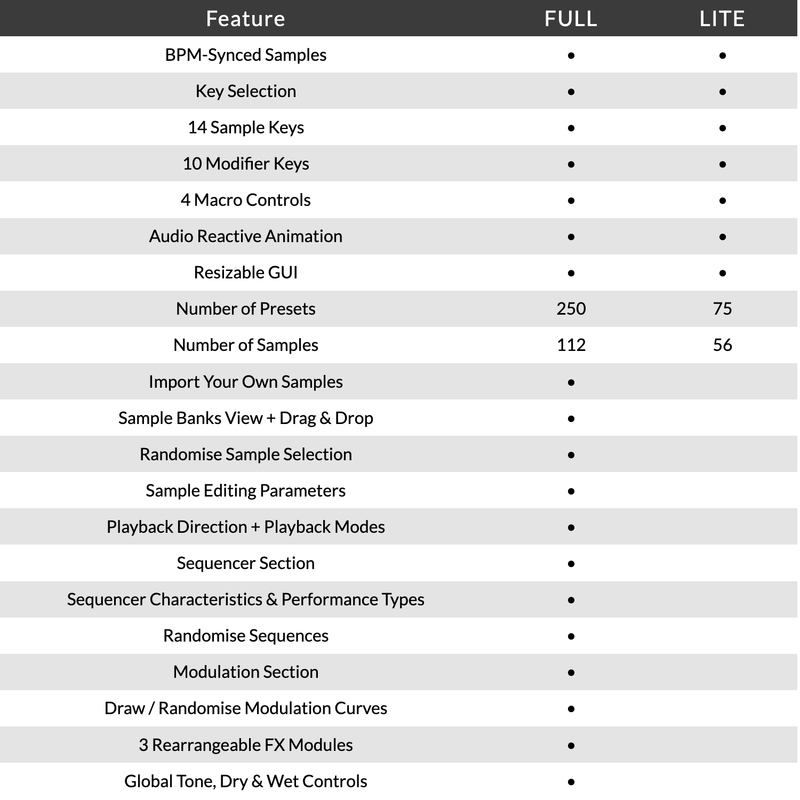
Version Comparison
System Requirements
macOS
- macOS 10.15 or higher (Intel / Native Apple Silicon supported).
- Plugin Formats: VST, VST3, AU, AAX, Standalone.
- DAW's Supported: Ableton Live, Pro Tools, Logic Pro, FL Studio, Cubase, Nuendo, Reaper, Reason + more.
- Compatibility: 64-bit compatible only.
- Recommended Buffer Size: 512 Samples or higher
Windows
- Windows 7 or higher
- Plugin formats: VST, VST3, AAX, Standalone
- DAWs supported: Ableton Live, Pro Tools, FL Studio, Cubase, Nuendo, Reaper, Reason + more.
- Compatibility: 64-bit compatible only.
- Recommended Buffer Size: 512 Samples or higher
Please note: An internet connection is required to authorise this software.
Important note: When accessing this software via a Rent to Own plan or the Beatport Studio membership, it's installed and run through the Beatport Access portal. An internet connection is required every 30 days to validate your license.
.jpg?t=1791849635)
Dokkodo Sounds
Composer, producer and sound designer with releases on Inner Ocean Records, Ninja Tune Music & EMI.
"Bloom Palette Modular's sequencer is a real stand-out feature of the plug-in. The ability to combine multiple chops and phrases makes it an essential tool for so many electronic genres."

Proxima
Proxima is one of Holland’s most exciting electronic music artists of the last decade, with a string of outstanding releases on Shogun Audio, UKF, Hospital and many more.
"The versatile sequencer, ease of use and incredible samples make Bloom Palette Modular a joy to use in the studio."

Mick Schultz
American music producer and songwriter for Rihanna, Jeremih, Zendaya & more.
"This plugin is great. It sounds amazing instantly and I love the double-time feature."
Reviews Summary
While it aims to provide a helpful overview, it may not capture every perspective or detail. We encourage you to read individual reviews to make an informed decision.
Reviewers highly praise this Excite Audio plugin as an essential and high-quality addition to the Bloom line. They highlight its unique sound palette, noting it is especially well-suited for industrial and glitch genres, with many expressing strong brand enthusiasm and recommending the upgraded version over Lite editions.


