Log In

Free gifts available with your purchase

The Ultimate Snare Generator
Unleash the power of 7DeadlySnares – the ultimate snare generator VST plugin that features 7 customizable audio engines, each inspired by one of the seven deadly sins: pride, greed, lust, envy, gluttony, wrath, and sloth.
With its multiple parameters, 7DeadlySnares allows you to quickly explore endless possibilities and create snare sounds for any genre, from old-school boom-bap to modern trap, watery or glitchy snares. Plus, its vast selection of presets covers a wide range of styles, which can be easily customized to create your own unique sound.
And that’s not all – each of the 7 snare generator engines has three variations that can be seamlessly morphed between. Moreover, each engine is equipped with 4 specially designed macros, allowing you to create the perfect snare sound in seconds.
Whether you’re a seasoned producer or a beginner, 7DeadlySnares is the ultimate snare drum plugin for creating professional-quality sounds. Indulge in the seven deadly sins and craft unique, high-quality snare sounds that will elevate your music to the next level.
7 Snare Engines. Pride, Greed, Lust, Envy, Gluttony, Wrath, and Sloth
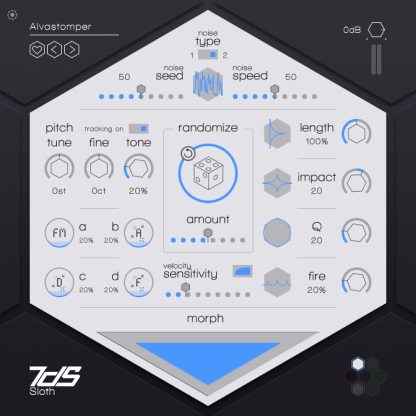
1st Engine / Sloth
Based on classic analogue rhythm box style snares. This snare sound has a distinctive, snappy attack and a long decay that gives it a characteristic “booming” quality. Prized for their warmth, character, and ability to cut through a mix,
Tweak it to your delight with 4 macros. Macro A changes the noise to body fm amount. Macros B/C/D then adjusts the Transient/Decay/Tone brightness.
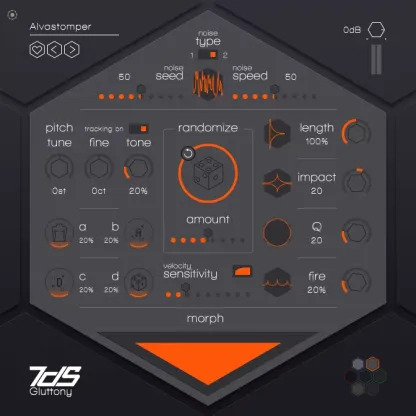
2nd Engine / Gluttony
They created this engine around Foley samples, which are commonly used to add ambient sounds or real-world noises to a track to enhance the sounds. Engine 2 is great for adding depth and texture to your beats.
The macros change the body amount (A), Transient and Decay brightness (B/C) and last Macro D introduces a slight noise change with every hit.
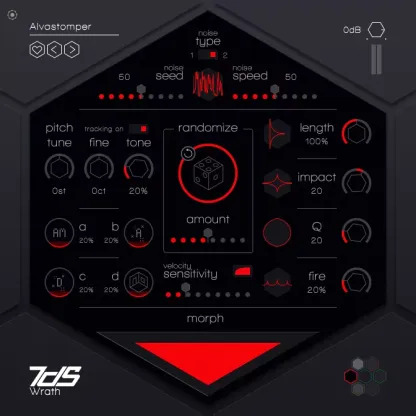
3rd Engine / Wrath
Old school boom bap style snares.
- A = Noise amplitude modulation
- B = Transient brightness
- C = Decay brightness
- D = Room brightness
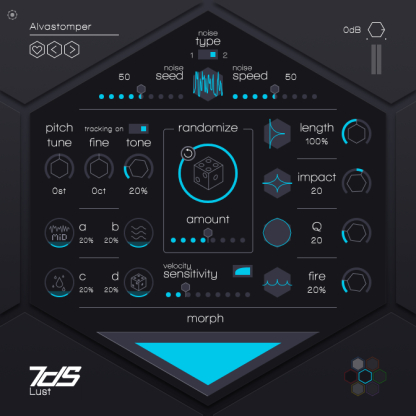
4th Engine / Lust
Water-type snares
- A = Modulates between a long low pass filter and short high pass filter to a short low pass filter ad a long high pass filter.
- B = Water type (river, etc)
- C = Droplet amount – adds more droplet sound after the main hit
- D = Introduces a slight change with every hit.
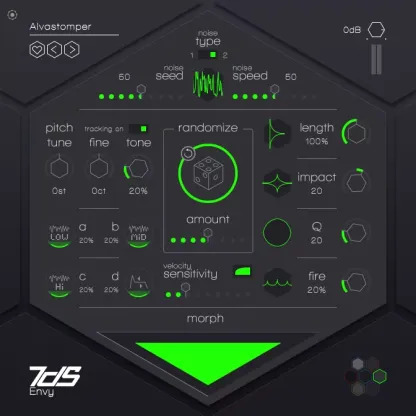
5th Engine / Envy
- A = Low noise
- B = Middle noise
- C = High noise
- D = Sustain
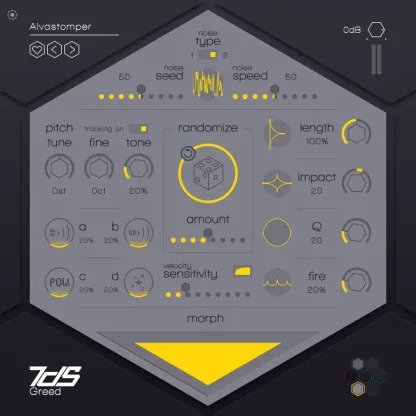
6th Engine / Greed
Melodic snare type
- A = Reverb level
- B = Reverb time
- C = Bright content decay curve
- D = Body decay curve
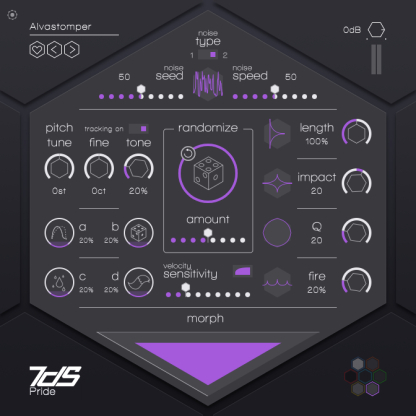
7th Engine / Pride
- A = Amplitude curve distribution
- B = Amplitude stretch
- C = Impact duration (work together with impact knob)
- D = Tail that you can tailor-make and parameterize creating infinite possibilities
Features
- Huge amount of presets that cover a large scope, ready to be quickly tweaked and tuned to match your song.
- All engine comes with three different variation - in the morph section, drag the pointer in the triangle to morph between 3 altered versions of the engine.
- All engines come with 4 macros - specially designed to get the best out of all them
System Requirements
PC
- Windows 7 or later
- 2GHz Pentium IV processor or equivalent
- A host that supports 32-bit or 64-bit VST
- At least 335MB free disk space
- Formats: VST, VST3, AAX
Mac
- macOS 10.15 or later
- Intel or Apple Silicon processor
- A host application that supports 64-bit VST or AudioUnit
- at least 335MB free disk space
- Formats: AU, VST, VST3, AAX
Important note: When accessing this software via a Rent to Own plan or the Beatport Studio membership, it's installed and run through the Beatport Access portal. An internet connection is required every 30 days to validate your license.