Log In
![DopeSONIX: BEAT MACHINE 1.0 VSTi/AU [Hip Hop Boombap Drum Machine] gallery thumbnail](https://www.pluginboutique.com/rails/active_storage/blobs/redirect/eyJfcmFpbHMiOnsibWVzc2FnZSI6IkJBaHBBekY1Qmc9PSIsImV4cCI6bnVsbCwicHVyIjoiYmxvYl9pZCJ9fQ==--5d8310b8d26018819b4e5782bc019ec53c41979e/WEB_Slider_Beat_Machine_1.4_pluginboutique.jpg)
Free gifts available with your purchase

Beat Machine - VST / AU - Hip Hop Drums Plug-In
Beat Machine 1.0 is an innovative authentic raw Hip-Hop VSTi/AU plugin for MAC or PC. This has been specifically designed for Hip Hop producers who require that gritty 90′s Boom Bap sound, notorious for its fat crunchy drums and dusty beats.
This amazing software includes a huge library containing some the finest drum sounds ever heard in Hip Hop, sourced directly from legendary producers responsible for some of the worlds most famous beats and instrumentals.
All 500 kits are already mixed and eq’ed to improve your beatmaking workflow. No more spending hours looking for the perfect Kick, Snare and Hi-Hat combination, with Beat Machine we’ve done all the hard work for you!…buy, download and take your beats to the next level.
Features
- 500 Pre-mixed classic BoomBap drum kits including 100 legendary producer signature kits
- 1000+ Gritty drum samples included, already EQ’ed and treated for instant use
- An unrivalled collection of the Finest USEABLE Hip Hop drum kits ever!
- 50 Classic Boom Bap MIDI drum patterns included, copied from some of Hip Hop’s most famous beats
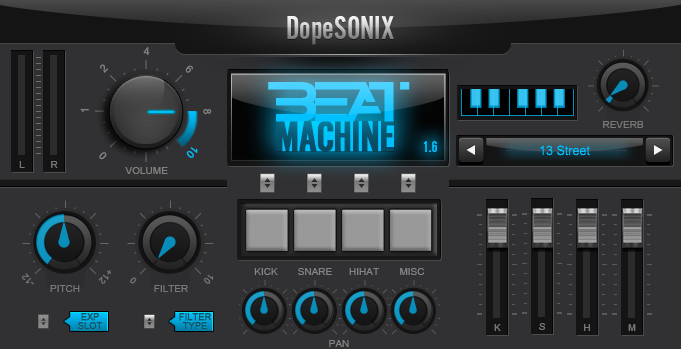
- Easy stereo or more flexible sub-mix output options
- Separate kick, snare, hi-hat & percussion faders
- Built-in flexible pitch and drive controls
- Includes a built-in, analog-style reverb
- Ultra-low CPU usage [perfect if you own a laptop/tablet / low spec PC/MAC]
- Ultra-fast patch loading [flick through patches in lightening quick times]
- Program your drums manually or use a MIDI/USB controller/keyboard/MPD
Available DopeSONIX Beat Machine 1 Expansion Packs:
- Beat Machine Expansion 01: The Knock
- Beat Machine Expansion 02: Live Elements
System Requirements
Mac:
- OS X 10.4 and above (Monterey / Apple Silicon supported)
- 280 MB disk space required
- 2 GB RAM
- Audio Units (AU) or VST DAW compatible host required (64-bit only)
Windows:
- Windows 7 / 8 / 10
- 280 MB disk space required
- 1 GB RAM
- VST compatible DAW host is required (32 or 64-bit)
Optional USBs / MIDI Controllers:
- Native Instruments Maschine
- Behringer
- Novation
- M-Audio
- Arturia
- Line 6
- Alesis
- Korg
- Akai
- and more!
Boom Bap Nation
Boom Bap Nation is a free Hip Hop Network available online and on internet connectable devices.
"If you want quick access to a ton of raw, classic drum kits, this dope collection is something to look into" .
Produccion Hip Hop
Blog made with Videos, Tutorials and Techniques on the Production of HipHop.
"The production quality is very high and I have completely fallen in love with the gritty, vinyl drum sounds".
BBoy Tech Report
The B-Boy Tech Report is the intersection where hip-hop and technology meets.
"Beat Machine is for those that crave that dirty vintage vibe from machines like the SP1200 and MPC3000".
DopeSONIX present their first product, Beat Machine, the authentic “hip-hop” vst/au drum machine. Dope VST describes Beat Machine as “specifically designed for Hip Hop producers who require that gritty 90′s Boom Bap sound, notorious for its fat crunchy drums and dusty beats.” Beat Machine bri...
Read MoreI recently discovered a new piece for my team of musical production that combines the best of Sound Libraries and immediacy of virtual instruments and, curiously, specializes in this type of Drums. Do not let its name fool you unoriginal it hides inside her pure Hip Hop Boom Bap 90's , characteri...
Read MoreCheap doesn't have to mean nasty, and this proved in DopeSONIX's Beat Machine. As the name suggests the Beat Machine is an authentic, raw-sounding hip hop VSTi/AU plug-in for MAC or PC formats and can be used in DAWs or any other software program that accepts VST plug-ins. Beat Machine is a colle...
Read More