Klevgrand

Slammer

4.7 (225 Reviews)
$19.99 $39.99

50% off until Dec 11

Klevgrand Slammer
Klevgrand Slammer
Klevgrand Slammer - GUI
Klevgrand Slammer - Overview Video gallery thumbnail
Klevgrand Slammer - Demo Video gallery thumbnail
Klevgrand Slammer - Example Video gallery thumbnail
Klevgrand Slammer - Live Drumming Demo Video gallery thumbnail
Buy Now
Product information

Drum Instrument

Instantly fun drumming with carefully sampled drums

Slammer is a multi-sampled drum plug-in that contains 30 different instruments made from a large number of carefully recorded and edited samples. Integrated custom-built real-time effects combined with some clever routing makes Slammer a versatile and flexible virtual instrument that is capable of rendering anything from natural acoustic to heavily distorted and compressed drum sounds.

Each sound can be customized with a wide array of settings like pitch, filtering, effect sends, decay time, velocity mapping, and much more.

There’s also a “Dirt” section for distortion and compression, a reverb, and tone control. The amount of “dirt” and reverb can be tweaked individually for each instrument. On top of all, Slammer comes with a set of factory presets, covering anything from light and slick to heavy and gritty.

If you're looking for a drum instrument, giving you 'instant gratification' from the first hit, this is it.

Anatomy

Main View
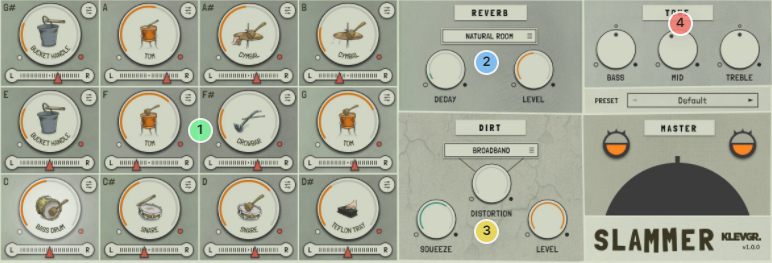
1. A dozen of noises - There are 12 sound slots, each with selectable sounds + lots of individual settings

2. Go to your room! - A very nice built-in reverb module.

3. De-polish - Squeeze & distortion will add lots of character to your kit.

4. Tone in - No-fuss EQ for the final touch

Instrument Details
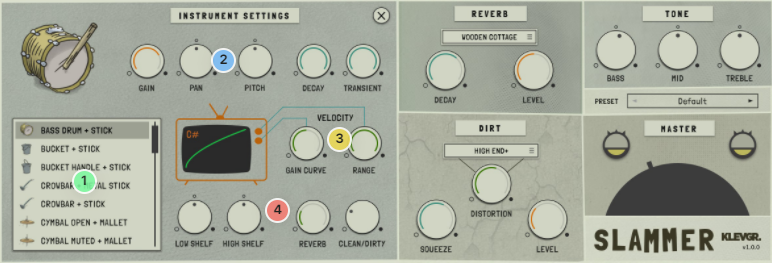
1. The hit list - A well-balanced smörgåsbord of all the sounds you may need.

2. Jet-settings - Individual settings for shaping the gain, pan, pitch, decay, and transient impact.

3. Above the curve - Control the curve that decides how the instrument responds to your key velocity

4. Final touch - Simple EQ + reverb & dirt send control.

Features

  • 30 multi-sampled instruments using more than 2000 samples
  • 12 slots/instrument players with individual tweaking possibilities
  • Compression and Distortion section (dirt) with 8 different dist algorithms
  • Reverb with several presets
  • Plenty of factory presets
  • Global tone control

System Requirements

  • macOS 10.10 or later (optimized for the M1-processor)
  • Windows 7 SP1 or later
  • AU, VST-2, VST-3, AAX

Installation Instructions

Please Note: Pana is used as the example:

Mac

License Redemption

1. Navigate to https://klevgrand.com/redeem > Paste your 16 digit redemption code found in your Plugin Boutique User Account > Click 'Submit!'.

2. Your redemption code has been accepted > Scroll down to Step 2.

3. Click either 'Sign in' if you already have a Klevgrand account, or 'Create new account' if you do not > Fill in your personal details > Click 'I'm ready'.

4. Your account has now been created.

5. Navigate to your email inbox and locate the activation email that you should have received from Klevgrand > Click 'Let me in!' to activate your account.

6. Create a password for your account > Click 'Enter Klevgrand'.

7. Your software and serial number is now available within your Klevgrand account > Click the Apple logo to download the installer file.

Installation

1. Launch the pana_x_x_x_macOS.dmg installer file.

2. Double click the KLEVGR. logo to launch the installer.

3. Click 'Continue'.

4. Click 'Continue'.

5. Click 'Agree'.

6. Click 'Install'.

7. Enter your system password > Click 'Install Software'.

8. Click 'Close'.

9. Navigate back to your Klevgrand My Account page > Click on the serial number to copy it to your clipboard.

10. Launch your DAW > Create a new audio track > Insert Pana onto the channel > Paste your serial number into the box.

Your software is now activated and ready to use within your DAW

Windows

License Redemption

1. Navigate to https://klevgrand.com/redeem > Paste your 16 digit redemption code found in your Plugin Boutique User Account > Click 'Submit!'.

2. Your redemption code has been accepted > Scroll down to Step 2.

3. Click either 'Sign in' if you already have a Klevgrand account, or 'Create new account' if you do not > Fill in your personal details > Click 'I'm ready'.

4. Your account has now been created.

5. Navigate to your email inbox and locate the activation email that you should have received from Klevgrand > Click 'Let me in!' to activate your account.

6. Create a password for your account > Click 'Enter Klevgrand'.

7. Your software and serial number is now available within your Klevgrand account > Click the Windows logo to download the installer file.

Installation

1. Unpack the pana_x_x_x_win.zip installer file > Launch the pana_x_x_x_win.exe file.

2. Click 'I accept the agreement' > Click 'Next'.

3. Click 'Next'.

4. Click 'Next'.

5. Click 'Next'.

6. Click 'Install'.

7. Click 'Finish'.

8. Navigate back to your Klevgrand My Account page > Click on the serial number to copy it to your clipboard.

9. Launch your DAW > Create a new audio track > Insert Pana onto the channel > Paste your serial number into the box.

Your software is now activated and ready to use within your DAW

Bundle & Save

Klevgrand Cyber Week Mega Bundle
$49.99
$229.96 (78% off)

Plugin Boutique Rewards

Discover the most rewarding loyalty programme among all plugin retailers.

  • Free Loopmasters Samplepacks
  • Discounts on products and courses
  • Extra Virtual Cash claimed immediately at checkout
Find out more

Follow us:

X (Twitter) Facebook YouTube Instagram
Logo Logo

Plugin Boutique Limited, Part of the Beatport Group LLC.

Copyright © 2011-2025 Plugin Boutique. All rights reserved