/ Expansion Packs / Hybrid 3 Expansion: Marco Lys
AIR Music Technology

Hybrid 3 Expansion: Marco Lys

4.5 (2795 Reviews)
$9.00 $29.00

68% off until Dec 07

Marco Lys Expansion for Hybrid 3 - Main Image
Buy Now
Product information

​International dance label TOOLROOM and global DJ/House producer Marco Lys deliver a collection of exclusive custom built preset patches for the industry-leading virtual synth Hybrid 3. Instantly load from 64 professional created patches ranging from TechBasses, Sub Basses, Pads, Arpeggiator Sequences, Transition FX drops and much more directly inside Hybrid 3, transforming your house production to the limits.

Marco Lys's reputation has been forged on endless days in the studio perfecting his unique sound of electro tinged house, and demand for his sound has continued to grow with every piece of production that he works his magic on. Marco Lys's career is testament to those who feel that things come too easy for the modern day electronic music producer, but to all those in the industry who have been involved with his work, none are surprised at his success. These custom built patches will add quality and punch to your productions, elevating your tracks to the next level.

System Requirements 

Installation Instructions

Note: Hybrid 3 Expansion: Gravitation is used as the example.

Mac

1. Download the .zip folder from within your Plugin Boutique User Account and double-click it to reveal its contents.

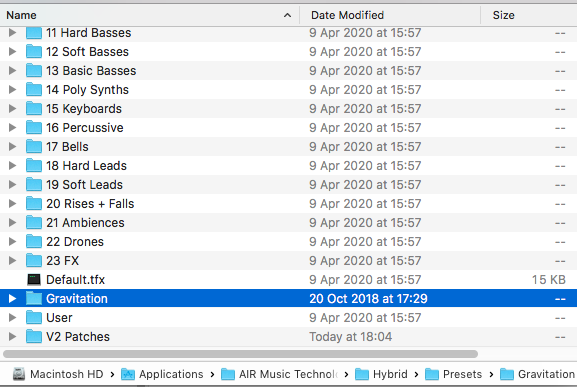
2. Place the contents in the Hybrid 3 Presets folder - Macintosh HD > Applications > AIR Music Technology > Hybrid  > Presets

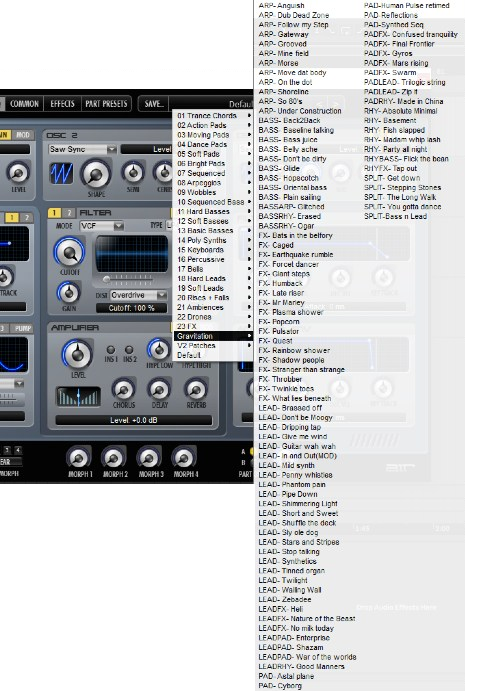
​3. Open Hybrid 3 within your DAW, navigate to presets and you will now be able to browse the Expansion sounds.

Your expansion is now installed and ready to use within Hybrid 3.

Windows

1. Download the .zip folder from within your Plugin Boutique User Account and double-click it to reveal its contents.

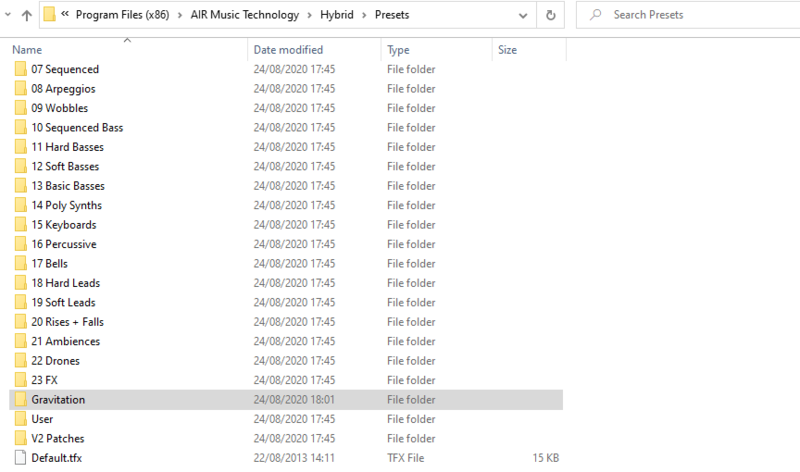
2. Place the contents in the Hybrid 3 Presets folder - Program Files (x86) > AIR Music Technology > Hybrid  > Presets

​3. Open Hybrid 3 within your DAW, navigate to presets and you will now be able to browse the Expansion sounds.

Your expansion is now installed and ready to use within Hybrid 3.

Plugin Boutique Rewards

Discover the most rewarding loyalty programme among all plugin retailers.

  • Free Loopmasters Samplepacks
  • Discounts on products and courses
  • Extra Virtual Cash claimed immediately at checkout
Find out more

Follow us:

X (Twitter) Facebook YouTube Instagram
Logo Logo

Plugin Boutique Limited, Part of the Beatport Group LLC.

Copyright © 2011-2025 Plugin Boutique. All rights reserved