/ Expansion Packs / Hybrid 3 Expansion: Sound of the Underground (Exclusive)
AIR Music Technology

Hybrid 3 Expansion: Sound of the Underground (Exclusive)

4.6 (2044 Reviews)
$9.00 $29.00

68% off until Dec 07

Sound of the Underground - Main Image
Buy Now
Product information

Sample Tools by Cr2 are pleased to present to you ‘Sound Of The Underground (House - Tech - Techno)’, a carefully crafted expansion pack for the Hybrid 3 plugin. This collection features 64 custom built presets, ranging from Arps, Bass, Leads, Pads FX, and much more - and is perfect for those seeking instant inspiration, and a variety of expertly designed sounds for your own studio productions. This pack is designed with an emphasis on those looking to amplify their house, tech-house & techno grooves, but can be used for the spectrum of dance music genres too.

A subsidiary of world-renowned dance music record label Cr2 Records, Sample Tools by Cr2 brings the label’s reputation for quality forward-thinking dance music into the sample pack world. Through the delivery of exceptionally crafted packs from a select team of producers from around the globe, Sample Tools provide electronic music producers cutting edge sounds and producer tools from across the dance music spectrum.

System Requirements 

Installation Instructions

Note: Hybrid 3 Expansion: Gravitation is used as the example

Mac

1. Download the .zip folder from within your Plugin Boutique User Account and double-click it to reveal its contents.

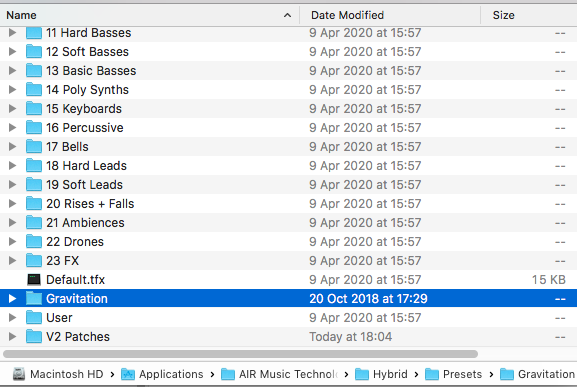
2. Place the contents in the Hybrid 3 Presets folder - Macintosh HD > Applications > AIR Music Technology > Hybrid  > Presets

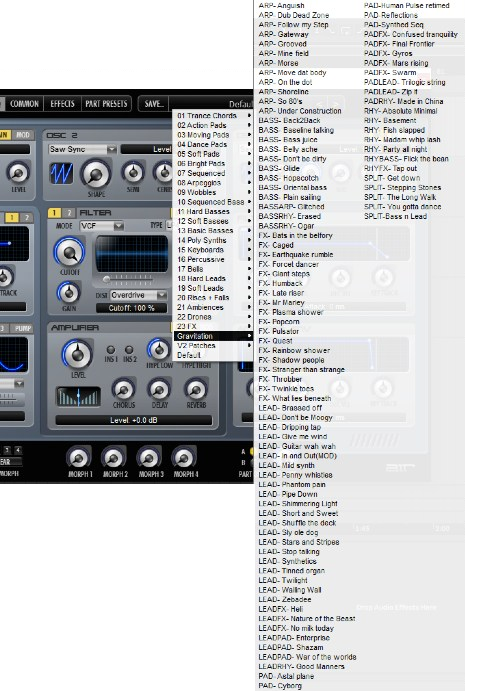
​3. Open Hybrid 3 within your DAW, navigate to presets and you will now be able to browse the Expansion sounds.

Your expansion is now installed and ready to use within Hybrid 3.

Windows

1. Download the .zip folder from within your Plugin Boutique User Account and double-click it to reveal its contents.

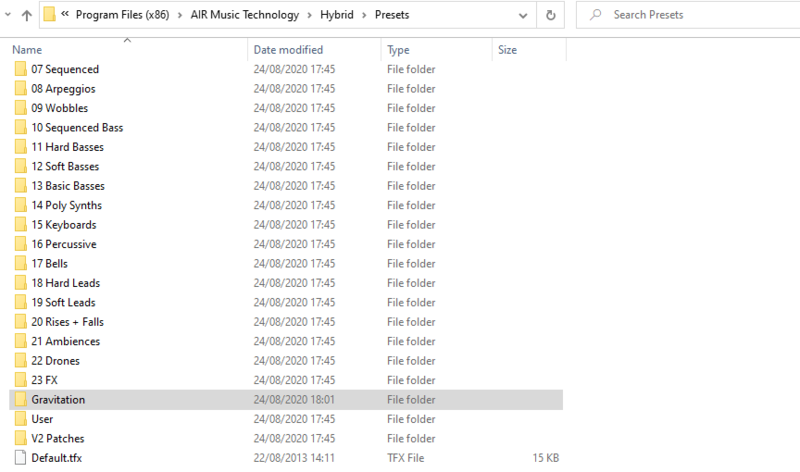
2. Place the contents in the Hybrid 3 Presets folder - Program Files (x86) > AIR Music Technology > Hybrid  > Presets

​3. Open Hybrid 3 within your DAW, navigate to presets and you will now be able to browse the Expansion sounds.

Your expansion is now installed and ready to use within Hybrid 3.

Plugin Boutique Rewards

Discover the most rewarding loyalty programme among all plugin retailers.

  • Free Loopmasters Samplepacks
  • Discounts on products and courses
  • Extra Virtual Cash claimed immediately at checkout
Find out more

Follow us:

X (Twitter) Facebook YouTube Instagram
Logo Logo

Plugin Boutique Limited, Part of the Beatport Group LLC.

Copyright © 2011-2025 Plugin Boutique. All rights reserved