/ Expansion Packs / Vikings Expansion: Metal Cinematic
Keepforest

Vikings Expansion: Metal Cinematic

4.7 (9 Reviews)
$119.00
Keepforest Vikings Expansion: Metal Cinematic - UI
Keepforest Vikings Expansion: Metal Cinematic - Box Shot
Keepforest Vikings Expansion: Metal Cinematic | Overview gallery thumbnail
Buy Now
Product information

Keepforest's Vikings Cinematic Metal Toolkit consists of powerful cinematic metal instruments for your compositions. This expansion is inspired by the DOOM soundtrack written by Mick Gordon.

With the participation of professional musicians, sound designers, sound engineers, Keepforest recorded strings, percussions, guitars, basses and many more instruments. Keepforest literally played and experimented in the world of sounds, creating the library’s uniqueness and signature.

As the name Vikings suggest, the library is inspired by the Scandinavian world and mythology, which have always had an important place in the movie industry, the vibe of which can be heard in Guy Ritchie’s masterpiece 'King Arthur' or in the extremely successful 'Game of Thrones.'

Surprisingly, Keepforest could not find a true and complete samples library on the market, dedicated to this genre. Having a clear vision in their minds, Keepforest decided to take the opportunity and started the recording process of Vikings in January 2017.

Features

  • Brand New Pulse Designer
  • Powerful FX Rack
  • 3 Cinematic Metal Guitars
  • 3 Drum Kits
  • 3 Bass Guitars
  • 30 Metal Riffs
  • Synths
  • Beat Machine

System Requirements

  • Vikings: Cinematic Hybrid Punk Folk Kontakt Instrument
  • 48 kHz / 24-bit .Wav Format
  • 10.7 GB of Hard Drive Space
  • Full version of Kontakt 5.6.8 or newer (NOT compatible with the free Kontakt Player)

Please Note: This product requires the FULL version of Kontakt and is NOT compatible with the free Kontakt Player.

Installation Instructions

Please Note: AizerX - Classic Trailers Toolkit is used as an example.

Mac & Windows Formats

Important Note: This software requires the Full Version of Native Instruments Kontakt to be installed on your system.

Installation

1. Download the Kontakt Instrument from within your Plugin Boutique User Account. Be sure to remember the download location as you will need this when locating your Kontakt Library in step 3.

2. Open Kontakt, either as a standalone application or as a plugin within your DAW.

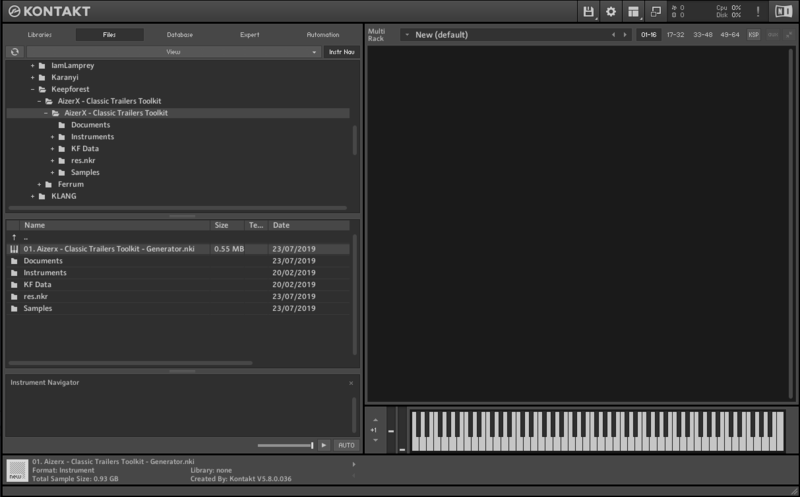
3. Click the 'files' tab at the top of Kontakt > Navigate to the location of your downloaded Kontakt Library from step 1 of the installation instructions.

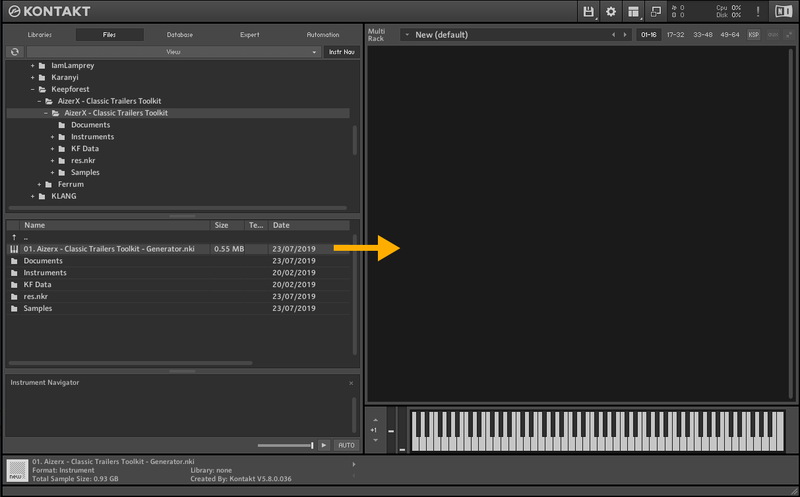
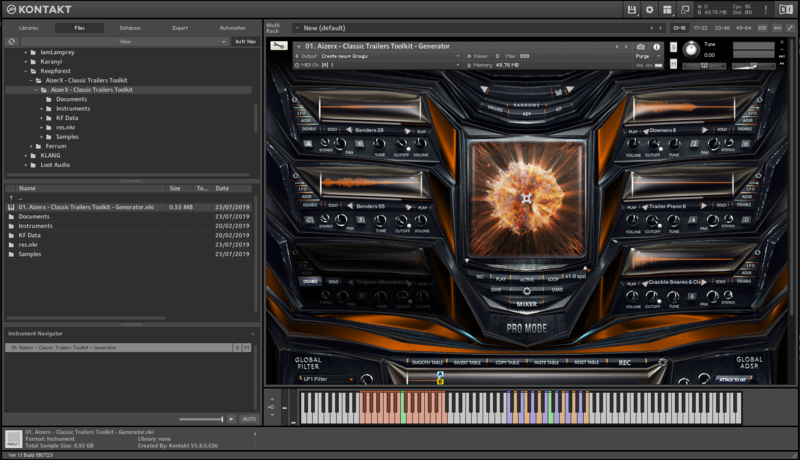
4. Click and drag any .nki file from the left-hand window of Kontakt into the main window of Kontakt to load up a patch.

Note: Additional .nki files can be found in the downloaded 'Instruments' folder.

Your software is now installed and ready to use.

Bundle & Save

Keepforest Ultimate Bundle
$1,449.00
Vikings Bundle
$599.00

Plugin Boutique Rewards

Discover the most rewarding loyalty programme among all plugin retailers.

  • Free Loopmasters Samplepacks
  • Discounts on products and courses
  • Extra Virtual Cash claimed immediately at checkout
Find out more

Follow us:

X (Twitter) Facebook YouTube Instagram
Logo Logo

Plugin Boutique Limited, Part of the Beatport Group LLC.

Copyright © 2011-2025 Plugin Boutique. All rights reserved