/ Delay / SuperTap
Waves

SuperTap

5.0 (1 Reviews)
$24.99 $79.00

68% off until Dec 07

Waves SuperTap
Waves SuperTap
Waves SuperTap
Waves SuperTap gallery thumbnail
Buy Now
Product information

SuperTap

Vintage Tape Echo Effects—Modernized and Redefined

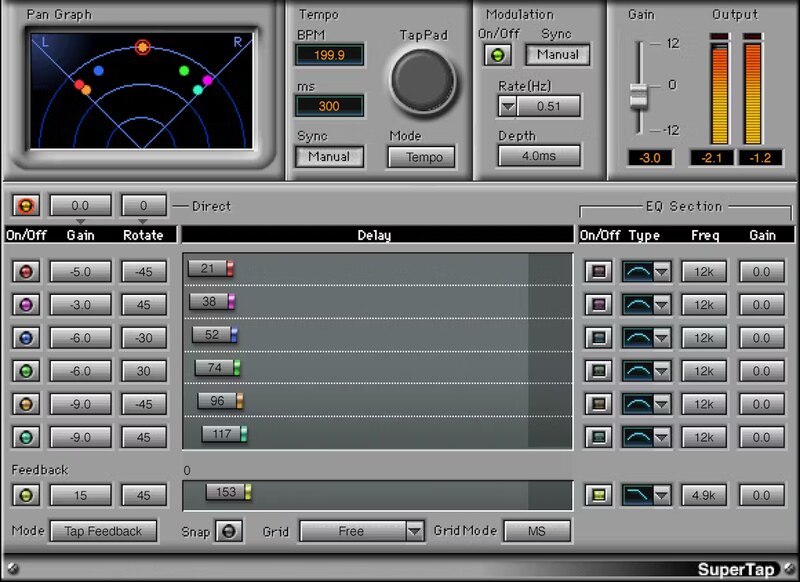
Multi-head tape delays defined the sound of spacey echoes. SuperTap does everything the vintage hardware did, but its 6 independent stereo delay lines deliver far more flexibility.

SuperTap’s modulation, feedback delay, and filtering enhance echoes even more. From evocative solos, to playful polyrhythms, to thick slapback and early reflections, SuperTap is a classic delay powerhouse.

Features

  • Delay times up to 4958 ms, tap delay, or sync to host tempo
  • 6 independent, full-function delay lines
  • Tailor the tone of individual delay lines with 6 filter curves
  • Advanced feedback options, including self-oscillation
  • Add modulation for lush delayed chorusing effects
  • Rotation-based panning preserves right and left channel levels
  • Create polyrhythmic delays with 6x tap tempo button
  • Add rhythmic effects plus analog-style self-oscillating feedback

System Requirements

Mac

  • macOS Monterey 12, Ventura 13, Sonoma 14, Sequoia 15
  • VST / AU / AAX

PC

  • Windows 10+
  • VST / AAX
Installation Instructions

1. Head to https://www.waves.com/create-account

2. Enter your email and choose a password to create an account (if you already have a Waves account, choose Log in, enter your details and head to Step 5) > click 'Submit'

3. Open your email inbox > click the activation link in the email from Waves

4. Click 'Log in here' > Log in to your Waves account

5. Click 'Register New Products'

6. Enter the Serial Number found in your Plugin Boutique user account > click 'Submit'

7. Click download in your Plugin Boutique user account or head to https://www.waves.com/downloads/central > download the Waves Central app for your operating system

8. Install Waves Central > Open Waves Central

9. Click 'Log in' > enter your log in details

10. Click the 'Install Products' tab

11. Tick the blue dot on all products you wish to install or click the top dot to install all products > click 'Install & Activate'

12. Click 'OK'

13. Open your DAW > open the Waves plugin

Your Waves plugins are installed and ready to use, enjoy!

Plugin Boutique Rewards

Discover the most rewarding loyalty programme among all plugin retailers.

  • Free Loopmasters Samplepacks
  • Discounts on products and courses
  • Extra Virtual Cash claimed immediately at checkout
Find out more

Follow us:

X (Twitter) Facebook YouTube Instagram
Logo Logo

Plugin Boutique Limited, Part of the Beatport Group LLC.

Copyright © 2011-2025 Plugin Boutique. All rights reserved