


 Log In

Free gifts available with your purchase
The Original Dub Delay Plugin
Audio Damage’s painstakingly modelled bucket-brigade delay has been the go-to plugin for that sound for over a decade, used in thousands of commercial productions, and with good reason. Dubstation’s intuitive topology brings the mojo of yesteryears' hardware delays to your DAW.
Dubstation 2 takes our most popular product and adds a whole raft of new features. With the addition of LFO and saturation controls, Dubstation 2 now fully emulates a vintage bucket-brigade delay, and the new dual-mode for separate control over the left and right delay times and ping-pong make it a Swiss Army knife for delay effects.
Double Up!
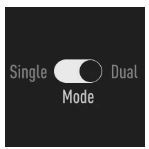
What’s better than one delay line? Two! And for that very reason, Dubstation 2 introduces dual-mode, exposing separate delay time controls for its left and right channels as well as ping-pong mode for tried-and-true cross-feedback effects making your delays alternate between channels.
Degrade!
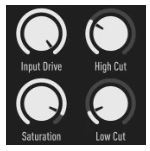
Dubstation 2 features analogue-style saturation as well as low- and high-cut filters inviting you to shape its sound from fuzzy-warm to spiky-bright. True to its bucket-brigade roots, the plugin’s spectral character changes with increasing delay times. Whether you’re looking to add some old-school warmth to your downtempo production or wreak feedback havoc at your next live gig - we got you covered!
Modulate!
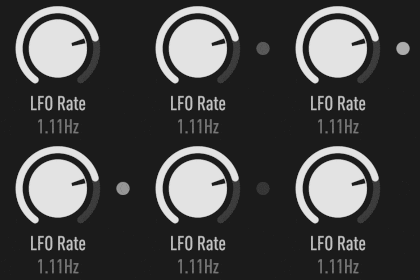
Get things moving with Dubstation’s delay-time modulation. Use the integrated Low-Frequently Oscillator to Introduce subtle chorusing, doubling effects or chirpy pitch sweeps - made possible by Dubstation’s emulation of vintage delay hardware.
Loop!
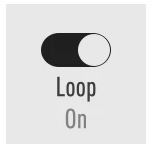
As if Dubstation didn’t give you enough ways to repeat audio, engaging its ‘loop’ switch turns the plugin turns into a squeaky clean digital looper that won’t degrade your signal. Missing some of that dirt? Tweak the filter and saturation controls to find that sweet spot for your next one-person jam session - or leave your audience with a little something for their way out of the venue.
What's New in v2.4
- Tap Tempo with a new Sync Source switch lets you set the delay clock from a three-tap front-panel button instead of host BPM.
- MIDI Tap drives the tap button from any MIDI note or CC, configured in the new Settings panel.
- Mix Lock padlock keeps the current wet/dry balance when you switch presets, so an audition never yanks your mix.
- New shared preset browser matching the rest of the Audio Damage line, with folder navigation, copy and paste of preset state, import and export of zipped folders, and one-click random name generation.
- Default preset support. Save a user preset called Default and every new Dubstation 2 instance opens with your settings instead of the factory state.
- 30 new factory presets covering dub, slapback, ambient, modulated, and experimental territory.
Features
- Classic Delay Algorithm: Dubstation 2 features Audio Damage's renowned model of bucket-brigade delay circuits, a faithful digital recreation of vintage hardware.
- Time Controls: The user can switch between two delay time ranges, encompassing 4 to 2000 milliseconds. Frequency-response characteristics vary with delay time - a fundamental aspect of the sonic personality of analog bucket-brigade delay circuits.
- Low-Frequency Oscillator: Delay time can be periodically altered with an LFO, producing changes in both the time between delayed signals and their apparent pitch.
- Filters: Low-cut and high-cut filters with user-controlled cutoff frequencies in the delay path offer a wide range of timbres
- Saturation: Analogue-style saturation with an amount of control allowing for distortion from the subtle to the extreme.
- Feedback: User-controllable feedback ranging from almost none to full feedback of the delayed signal back into the delay lines' inputs.
- Loop Mode: Causes Dubstation to endlessly play the audio currently in its delay line without alteration. Filter and saturation effects are applied to the output signal in Loop Mode.
- Reverse Mode: The Reverse switch makes Dubstation reverse the current contents of its delay memory and the direction in which it records.
- Mix control: Blend of the processed and the dry input signal.
- Gain Staging Controls: Input and output gain controls range from -80dB to +3dB.
- Cross-Platform Preset Format: Dubstation 2 utilizes an XML-based preset manager. Work between multiple systems without troubles, make a preset on your desktop machine and paste it to the iOS version with Handoff, easily share your creations with your friends, or make a preset bundle to sell.
- Fully Resizable Hi-Dpi/Retina GUI: Dubstation 2's vector-based GUI is resolution-agnostic, and displays the same on every system and resolution. Easily resize the UI (per instance) to match your visual needs, from postage stamp to poster-sized.
Fred Everything
French Canadian DJ/Producer Fred Everything is a key player in the world of House Music with two and a half decades in the music business and a discography of more than 250 releases to his credit.
"This is a great all in one plugin for any Dub lovers out there. The greatest thing about it is the emulation of King Tubby’s HP Step Filter aka the “Big Knob”. This is my new favourite plugin!"
Music Radar
Up to the minute news and reviews for all music makers.
"It sounds fabulously warm and trippy, and at this price is an absolute steal."
Ask Audio
Daily resource covering the latest news, reviews, tutorials and interviews for digital music makers, by digital music makers.
"It’s affordable for every producer to have this sonic gem in their arsenal."
Mac
- macOS 10.13 High Sierra or newer (M1 Apple Silicon supported) (64-bit only)
- VST, VST3, AU, AAX
Windows
- Windows 8.1 or newer (64-bit only)
- VST, VST3, AAX
Linux
- Ubuntu 18 or newer (64-bit only)
- VST, VST3
Important Note: This software is 64-bit compatible ONLY and will NOT function on 32-bit systems.


Reviews Summary
While it aims to provide a helpful overview, it may not capture every perspective or detail. We encourage you to read individual reviews to make an informed decision.
Overall, customers strongly praise this delay pedal for its excellent sound quality, simple user interface, and powerful engine, with most users loving the product while one reviewer felt it was just average and basic.


