


 Log In

Free gifts available with your purchase

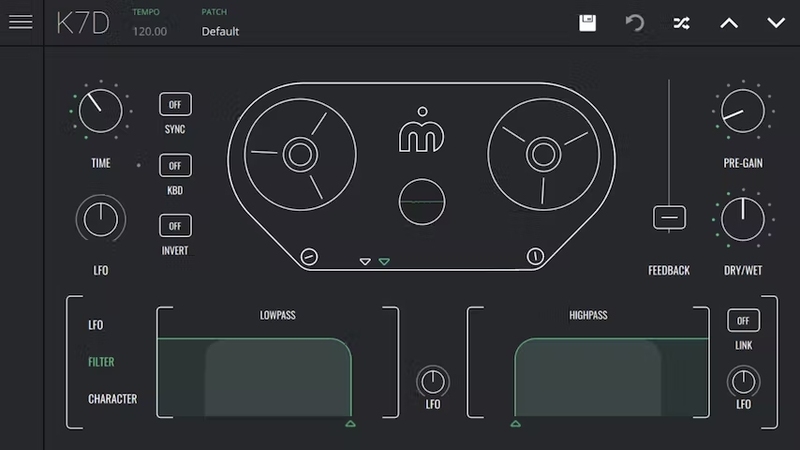
A Vintage Soul with a Futuristic Mind
The Soul of Tape Delay
K7D is a powerful and affordable, vintage tape delay plugin. K7D recreates the vintage tape delay machines using Imaginando’s signature style of obsessive analog emulation, but with an enhanced level of control from a sleek, modern interface. Using this approach allows a whole new world of creative possibilities, while still retaining a warm, full-bodied analog sound, bursting with character and personality.
Vintage Sound, Modern Control
To give K7D it’s distinctive analog flavour, Imaginado studied and analysed the tiny details of what makes classic hardware delays great, and painstakingly recreated every subtle nuance for a fantastically authentic sound. K7D’s combination of features makes it a versatile effects plugin, capable of much more than just standard tape delay.
K7D mixes great quality sound with a great set of controls, for a truly unique experience with distinctive results. From vintage pre-amp/pre-gain saturation to the ability to tune the delay with MIDI pitch information, everything is easy to access via its stylish, intuitive display. Spend less time searching for parameters and more time designing your sound.
To give K7D its distinctive analogue flavour, Imaginando studied and analyzed the tiny details of what makes classic hardware delays great, and painstakingly recreated every subtle nuance for a fantastically authentic sound.
Features
- 1ms to 1 sec. dual playhead analog modelled delay with noise, tape distortion and mechanical vibration models
- Input with pre-amp saturation and optimized gain staging and saturation algorithms for very musical results
- Normal and Ping Pong modes
- Delay time spread between heads and stereo width control
- High pass and Low pass filter on the feedback path
- Powerful LFO bipolar time modulation with multiple waveforms (sine, triangular, saw, square, sample and hold and filtered sample and hold) and the possibility of inverted LFO phase on second play head (for added stereo imaging)
- Delay time syncable with BPM and possibility of delay time modulation via incoming midi notes
- Oscilloscope visualisation of audio and LFO waveforms
- Unlimited time demo
- Includes factory soundbank with 50 presets
- Requires purchasing to save patches and state on your project
- Up to 5 computers per license
- VST, AU, VST3 compatible
System Requirements
Mac
- macOS 12 or higher (64-bit only)
- VST, VST3, AU
- Minimum of 128 MB of Free Disk Space
Windows
- Windows 10 or higher (64-bit only)
- VST, VST3
- Minimum of 128 MB of Free Disk Space
Ask.Audio
The ultimate daily resource covering the latest news, reviews, tutorials and interviews for digital music makers, by digital music makers.
"K7D sounds warmer and more analog in style than a lot of the software echo FX out there and it’s undoubtedly less money than a lot of competitors."


Reviews Summary
While it aims to provide a helpful overview, it may not capture every perspective or detail. We encourage you to read individual reviews to make an informed decision.
Users praise the K7D delay plugin as a high-quality, character-rich alternative to mainstream delays, highlighting its warm, organic tape sound and ability to handle dubby delays, feedback, and sound mangling. While some note that it has a learning curve with parameters and is not an all-in-one delay, it is widely appreciated for its vibe, sound quality, and reliable performance.


