


 Log In

Free gifts available with your purchase

Spread It Around
This is chorus on steroids. Taking inspiration from the thick and wet studio processing of the 1980’s, Orchid is your quick-fix way to solve the problem of thin and weedy audio. Fatten up synths, basses, guitars, vocals or drums and add depth, richness and harmonic structure. Whereas most other chorus plugins only double the signal, Orchid quadruples your audio with four-way chorus processing, taking your productions to the next level.
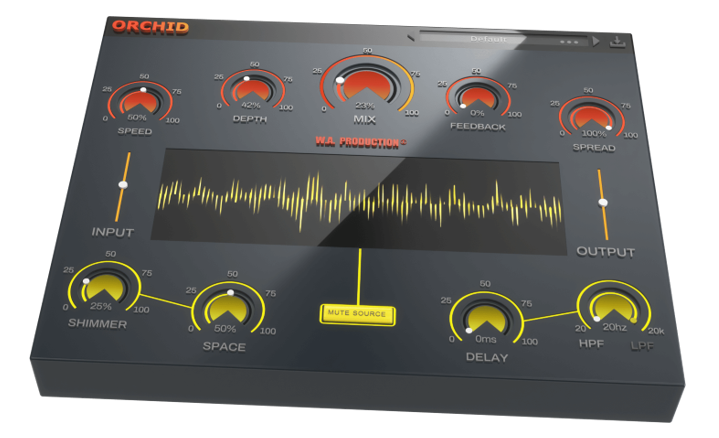
You’ll be familiar with the standard controls for speed and depth but Orchid pushes the envelope for what you should expect from a chorus plugin. Introducing new ways to process feedback with reverb, delay, shimmer, spread and filtering. Some of the changes are applied separately to each of the 4 chorus modules which pushes the sound into phase and comb-filtered territory.
So whether you want to bust out some authentic 80’s synth leads or add a new level of depth to more modern productions, Orchid should be your first choice for chorus processing. It handles basic effects with ease but really shines when the modules are pushed harder to produce head-scrambling audio.
Speed, Depth, Feedback & Spread
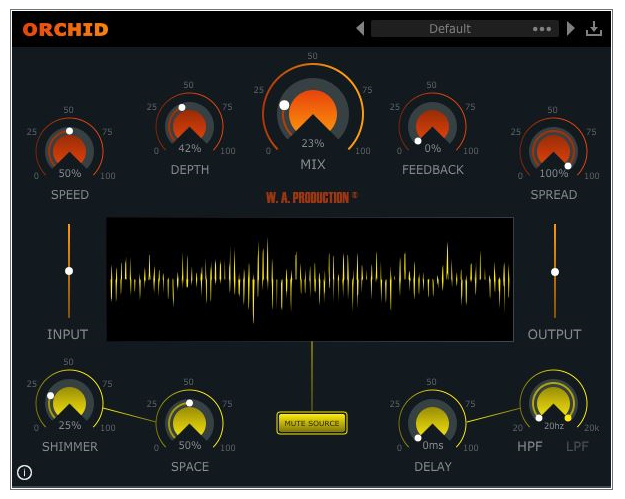
These familiar parameters are the first steps of your chorus adventure. However, instead of just doubling the signal as most other chorus processors do, Orchid duplicates the audio 4 times for maximum depth and thickness. Set up the Speed and Depth of the processing and then dial in Feedback to determine the amount of signal fed back into the input, changing the character and intensity of the effect. Then use the Spread control to smear the sound across the stereo field for brain-bending imaging.
Shimmer & Space
This special Shimmer effect adds up to two octaves above the original audio, generating harmonics and sparkly top end with a slow phasing effect. Use this for brightening the sound and drawing attention to the upper frequencies.
The Space dial adds a little (or a lot) of reverb to each individual chorus effect, glueing them together simultaneously.
Delay & Filter
Delay the processing by up to 100 milliseconds, useful for carving out a space between the original audio and the chorus signal. The high and low pass Filter dials help to define the processed audio, very handy if you only need some bass grunt or top-end sheen.
Mix, Mute Source, Bypass, Input & Output
Choose to combine the chorus signal with your original raw audio via the central Mix ratio control, allowing you to dial down the chorus ratio for parallel processing effects. The bypass control is smoothed to be as click and pop free as possible for unhindered A/B testing when combined with the Input and Output volume sliders. In addition, you can hit the Mute Source button to hear just the processed sound - very useful for monitoring and special effects.
Visual Feedback
The live visual meter at the centre of the interface shows exactly what’s happening to the signal as it travels through each module in real-time. This allows for accurate monitoring at every step of the chain.
Presets
With many included presets, it’s easy to find the perfect starting point for your own chorus exploits. Categorised into distinct instrumentation, these factory options can be used on guitars, bass, drums, synths and vocals. The presets include everything from subtle thickening to more full-on transformation effects. There’s also a range of special FX presets, mimicking comb-filtering and phase processing.
Features
- 4-way chorus processing
- Multiple additional parameters
- Delay, Filtering & Reverb
- Harmonic generation via Shimmer dial
- Visual feedback
- Pop & click free bypass
- Responsive & CPU friendly
- Factory presets
- Full PDF Manual & Tutorial video
- Resizable user interface
System Requirements
Mac
- macOS 10.13 and later (64-bit only)
- VST, VST3, AU, AAX
Windows
- Windows 8 and later (32 / 64-bit)
- VST, VST3, AAX
Important Note for Mac Apple Silicon users: Before purchasing, please review the current compatibility status of this plugin on your system here.
Manene
European DJ & Producer
"Orchid is amazing! It’s so much more than your typical chorus plugin. I love how it can put a unique sheen on my sounds!"
The Samplecast
The show for sample library geeks, plug-in fans and people who love toys that make noise.
"Orchid has replaced my multiple chorus plugins and occasionally my exciter processing too thanks to the sparkly Shimmer control. "
Reviews Summary
While it aims to provide a helpful overview, it may not capture every perspective or detail. We encourage you to read individual reviews to make an informed decision.
Overall, customers highly praise this chorus plugin for its easy-to-use interface, efficient workflow, and great presets. Reviewers note that it offers enough unique features to stand out from other chorus VSTs, making it a joy to use and particularly effective for adding deep depth to vocals.


