


 Log In

Free gifts available with your purchase
Product information
MetaFlanger
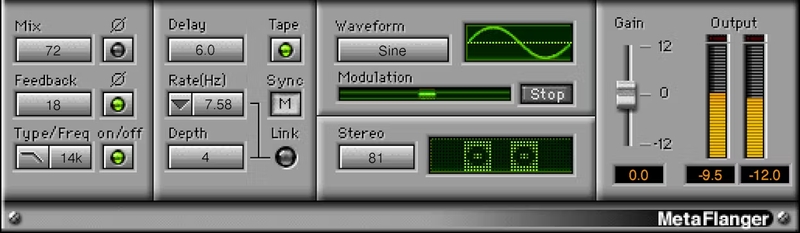
Classic Tape Flanging Effects for Vocals and Beyond
Creating a flanging sound is easy, but creating one that truly captures the sound and feel of tape-reel based, 60s-style flanging is far more difficult. Metaflanger isn’t about producing a flanger sound—it’s about producing the flanger sound, from an extraordinary period in musical history.
It’s all here: psychedelic guitar swirls, ethereal vocals, the sound of flanging an entire mix, crazy special effects, chorusing, doubling, rotating speaker vibes, and much more.
Features
- Thru-zero flanging re-creates the null points of true tape flanging
- Obtain “hollow” and “zinging” flanging sounds by flipping phase
- Delay times from 0 to 50 ms for phasing, flanging, chorusing
- Stereo spread parameter collapses perfectly to mono
- High or lowpass filter modes thin or warm the flanged audio
- Sync to host, or manually (with stop button to freeze the effect)
- Link option causes depth and modulation to work in tandem
- 34 presets, including artist presets from Grammy winners
System Requirements
Mac
- macOS Monterey 12, Ventura 13, Sonoma 14, Sequoia 15
- VST / AU / AAX
PC
- Windows 10+
- VST / AAX
Installation Instructions














