


 Log In
.jpg)
Free gifts available with your purchase

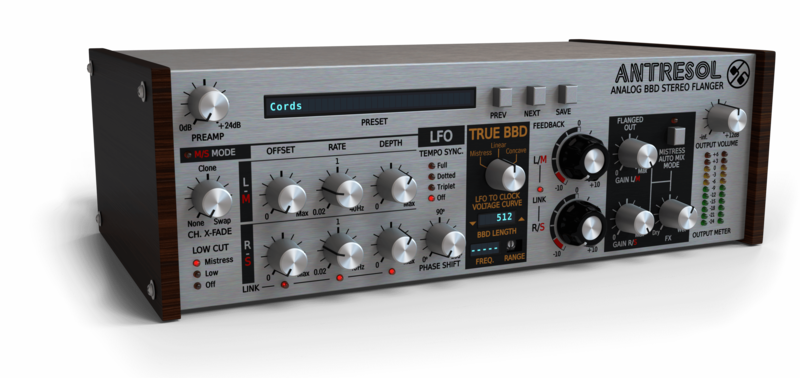
An Incarnation of an Iconic Stompbox you will Surely Appreciate
A Legendary Flanger Resurrected
In bringing the classic stompbox back to life, D16 have created a must-have effect plugin that will appeal not only to performing guitarists but to instrumentalists and producers of virtually any genre: whether it’s rock guitar riffs or melodic synth lines you’re into, you’ll find that the extreme attention to sonic detail coupled with the flexibility afforded by modern technology in Antresol make it the perfect example of what a flanger should be in the modern era. The original, conceived in the mid-70s, quickly became a benchmark for flanger-type effects by offering a uniquely rich character defined by luxuriously harmonious interacting resonances and has been heard ever since on countless classic recordings. That’s why D16 couldn’t resist the opportunity to resurrect the soul of this classic in a thoroughly modern incarnation with Antresol, D16's newest effect in the SilverLine Collection!
Loaded with features way beyond the original
Antresol's users can also enjoy absolute freedom of control over every aspect of the BBD-based delay line (including such nuances as calibration of the linearity of the clocking system or the number of analogue memory cells constituting the backbone of the BBD). Fashioning a flanger sound that is uniquely you yet retains all the richness and warmth afforded by the original, classic circuit design has never been easier!
In addition to the standard parameter knobs found on the face of the original unit, there is also a wide range of deeper parameters available to tweak, such the on-PCB trimpots which would normally be inaccessible without taking the stompbox apart. Some even go far beyond those you could find in common flanger-type effects: a fully controllable LFO (with adjustable phase and rate sync to a host application’s tempo); the ability to delink the stereo channels and control the most important parameters independently for left and right (or mid/side, depending on selected mode), and more. Try the demo today and see where your imagination takes you!
True BBD emulation with Total control
An exceptionally accurate emulation of an impulse-controlled, solid-state analogue delay line (a Bucket Brigade Device) is responsible for the impeccable sonic characteristics found in Antresol. Effects based on high-quality BBD emulations stand out with remarkable, even seductive warmth, and D16 have no doubt that the tremendous success of D16’s first foray into BBD delay line emulation, the chorus plugin Syntorus, has been directly attributable to this approach.
The key element around which Antresol is designed, an analogue BBD integrated circuit, proved to offer some unique challenges for a digital emulation of this type. In particular, the feedback parameter showed some weaknesses in the form of improper shapes of emerging peaks and notches in the frequency response, forcing us back to the drawing board. After much R&D, D16's Eureka moment came in the form of a much-refined BBD emulation using quasi-analog signal representation throughout, guaranteeing behaviour much more akin to the original, physical circuit. While a bit chaotic, it includes all the benefits and subtleties the analogue domain can offer—unlike a deterministic, classically digital algorithm—and all this without any unwanted artefacts such as aliasing (something D16 always take great pains to minimize)… and all with the rock-solid stability only digital can offer!
Spectrum Comparison
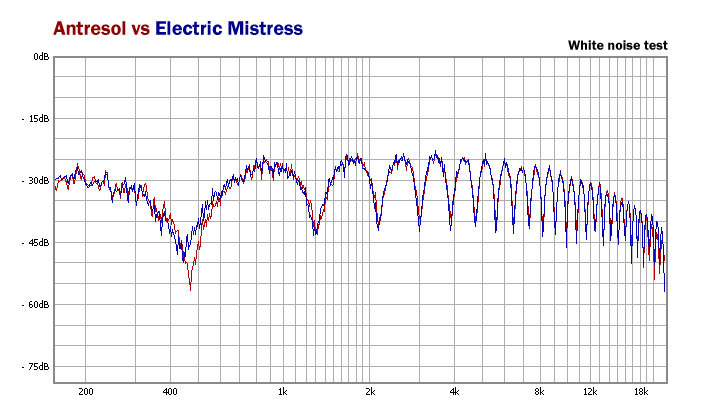
Frequency responses comparison of Electric Mistress stompbox and Antresol for whole variety of feedback values. All tests were performed using white noise as source signal and calibrated spectral analysing software.
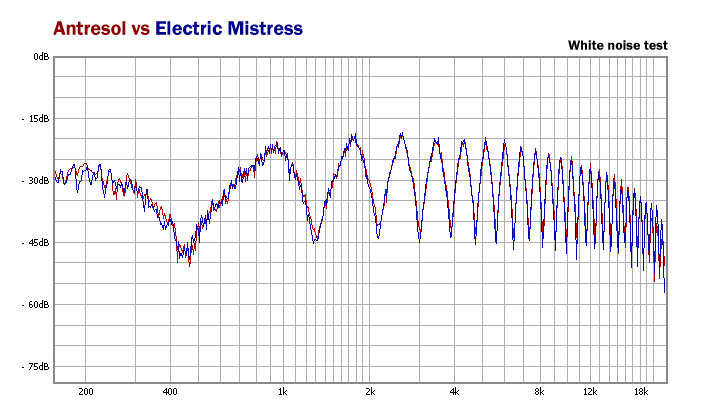
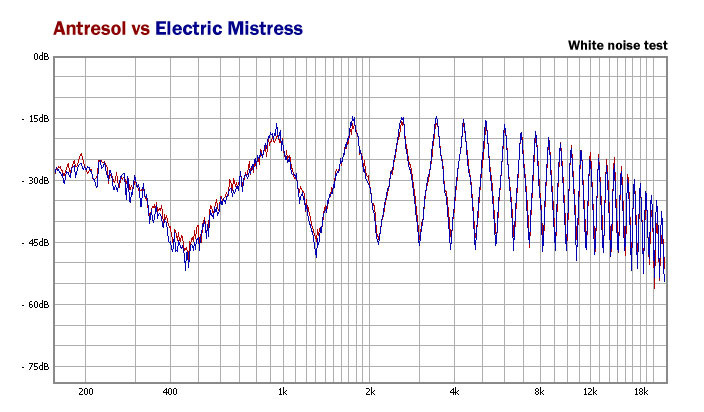
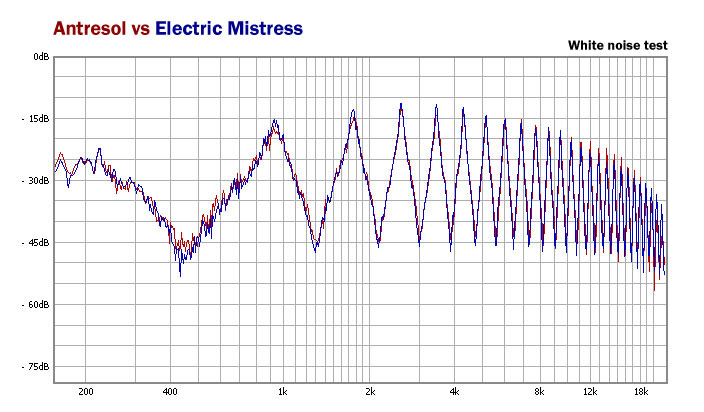
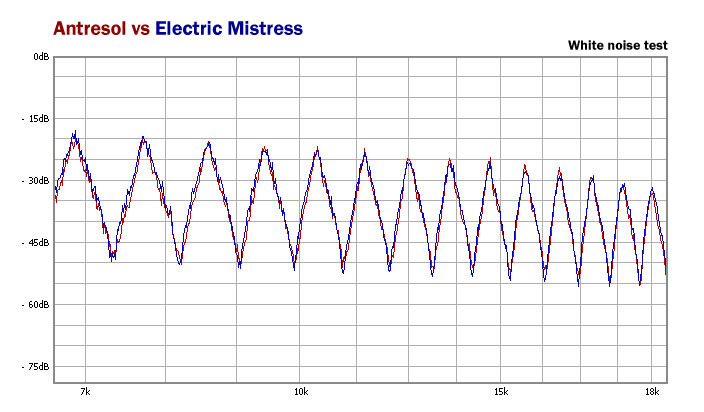
The figure below shows how faithful the emulation is by comparing the upper range of the spectrum, where usually all emulations fail. Look how both responses match even at the highest frequencies. The analysis was done for frequencies from 6 kHz up to a bit above 18 kHz.
Features
- True emulation of BBD based analogue delay line
- Optional independent parameter control for each stereo channel
- Selectable L/R or M/S stereo processing modes
- Mistress mode allows the whole unit to work the same as the classic flanger
- LFO can be synchronized with your host application
- 3 different LFO-to-BBD clock curves
- Ultra-low-aliasing output
- A highly musical and pleasant sound
- Tag-based browser
- Two alternative GUI sizes
- MIDI-learn functionality throughout
- 64bit internal processing
System Requirements
Windows
- Windows 7 - 10 (32 or 64-bit)
- CPU - Single-core 2.0 GHz SSE (Multi-core 2.3 GHz SSE recommended)
- RAM - 8 GB (16 GB Recommended)
- Plugin Formats - VST2, VST3, AAX
Mac
- macOS 10.13 - macOS 12 Monterey (64-bit only)
- CPU - Intel 2.0 GHz / Apple M1 (Intel 2.3 GHz / Apple M1 recommended)
- RAM - 8 GB (16 GB Recommended)
- Plugin Formats - VST2, VST3, AU, AAX
Please Note: This is not a standalone program - a host application (DAW) is required to use it.
Perc
DJ/producer Perc (AKA Alistair "Ali" Wells) be leading a revival? The Guardian recently identified him as belonging to a fresh wave of "bleak but danceable" British industrial music.
"Antresol is without a doubt the best sounding plugin flanger I've ever used "


