/ Drum FX / JJP Drums
Waves

JJP Drums

$27.99 $99.00

71% off until Dec 07

Waves JJP Drums
Waves JJP Drums
Waves JJP Drums
Waves JJP Drums gallery thumbnail
Buy Now
Product information

JJP Drums

Professional Drum Production Made Easy

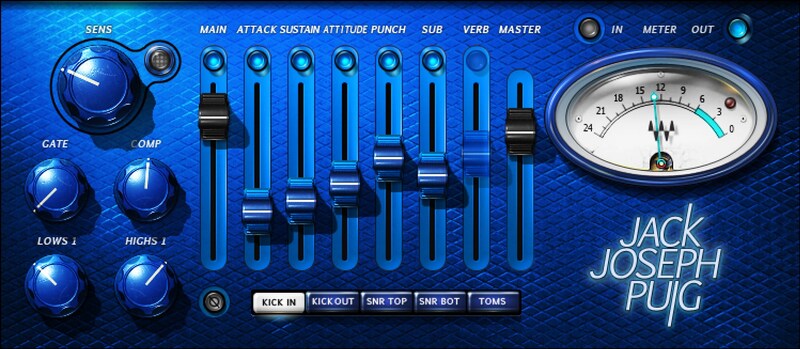
Grammy® winning producer/mixer Jack Joseph Puig (Rolling Stones, U2, John Mayer, Lady Gaga) knows that a good drum sound isn’t just a big kick and a snare that snaps. This innovative, advanced plugin optimizes snare, kick, and toms to create a commanding, pro-level drum sound for any mix.

With its streamlined interface and expertly chosen default settings, JJP Drums is all about dialing in focused, powerful drum sounds in seconds—whether for acoustic, sampled, or synthesized drums.

Features

  • Designed by Grammy winner Jack Joseph Puig (John Mayer, U2)
  • Separate optimizations for top and bottom snare miking
  • Parallel processing enhances sounds while retaining character
  • Round, big, fat tom sounds with tom-friendly reverb
  • Process two kick sounds—close up, or a second, more distant mic
  • Increase kick sustain, and add subharmonic for extra depth
  • Use the gate to cut ringing, or for 80s-style gated drum sound effects
  • Ideal companion to JJP Cymbals and Percussion plugin
  • Kick processing is amazing for EDM and hip-hop kicks
  • 30 presets from JJP cover a wide variety of radio-ready sounds

System Requirements

Mac

  • macOS Monterey 12, Ventura 13, Sonoma 14, Sequoia 15
  • VST / AU / AAX

PC

  • Windows 10+
  • VST / AAX
Installation Instructions

1. Head to https://www.waves.com/create-account

2. Enter your email and choose a password to create an account (if you already have a Waves account, choose Log in, enter your details and head to Step 5) > click 'Submit'

3. Open your email inbox > click the activation link in the email from Waves

4. Click 'Log in here' > Log in to your Waves account

5. Click 'Register New Products'

6. Enter the Serial Number found in your Plugin Boutique user account > click 'Submit'

7. Click download in your Plugin Boutique user account or head to https://www.waves.com/downloads/central > download the Waves Central app for your operating system

8. Install Waves Central > Open Waves Central

9. Click 'Log in' > enter your log in details

10. Click the 'Install Products' tab

11. Tick the blue dot on all products you wish to install or click the top dot to install all products > click 'Install & Activate'

12. Click 'OK'

13. Open your DAW > open the Waves plugin

Your Waves plugins are installed and ready to use, enjoy!

Plugin Boutique Rewards

Discover the most rewarding loyalty programme among all plugin retailers.

  • Free Loopmasters Samplepacks
  • Discounts on products and courses
  • Extra Virtual Cash claimed immediately at checkout
Find out more

Follow us:

X (Twitter) Facebook YouTube Instagram
Logo Logo

Plugin Boutique Limited, Part of the Beatport Group LLC.

Copyright © 2011-2025 Plugin Boutique. All rights reserved