


 Log In
.webp)
Free gifts available with your purchase

The World's First Truly Musical EQ
Following on from the award-winning Scaler music theory plugin, Scaler EQ offers a remarkable new way to EQ with musicality and colour.
By enhancing only note frequencies in key with your song, and reducing only note frequencies that aren’t, Scaler EQ can provide a new spin on working with cuts and boosts, increasing the tonality behind your music and providing new harmonic avenues.

And for when you just want a regular, fully-featured, modern EQ, Scaler EQ has you covered with its familiar workflow, large choice of band types, mid/side operation, dynamic bands, peak limiters, and stereo enhancement. You can easily apply classic mixing and mastering techniques used by professionals, with an extra optional musical edge.
What can Scaler EQ be used for?
- Music Production: Ideal for musicians and producers looking to enhance the musicality of their tracks by ensuring all instruments are in harmony with the chosen scale.
- Audio Editing: Simplify EQ processes by targeting and cleaning up frequency bands to remove audio that doesn’t belong and enhance audio naturally present with the chosen scale.
- Audio Engineering: Dynamically soothe audio by suppressing in-harmonic frequencies or expanding harmonic frequencies using dynamic compression and expansion.
- Mastering: Place on your master channel to broaden your stereo width, focus your bass, increase loudness, and enhance your mix.
- DJing: DJs can use it to ensure that the tracks they mix are in harmony by detecting the key and scale whilst balancing the mix of each track.
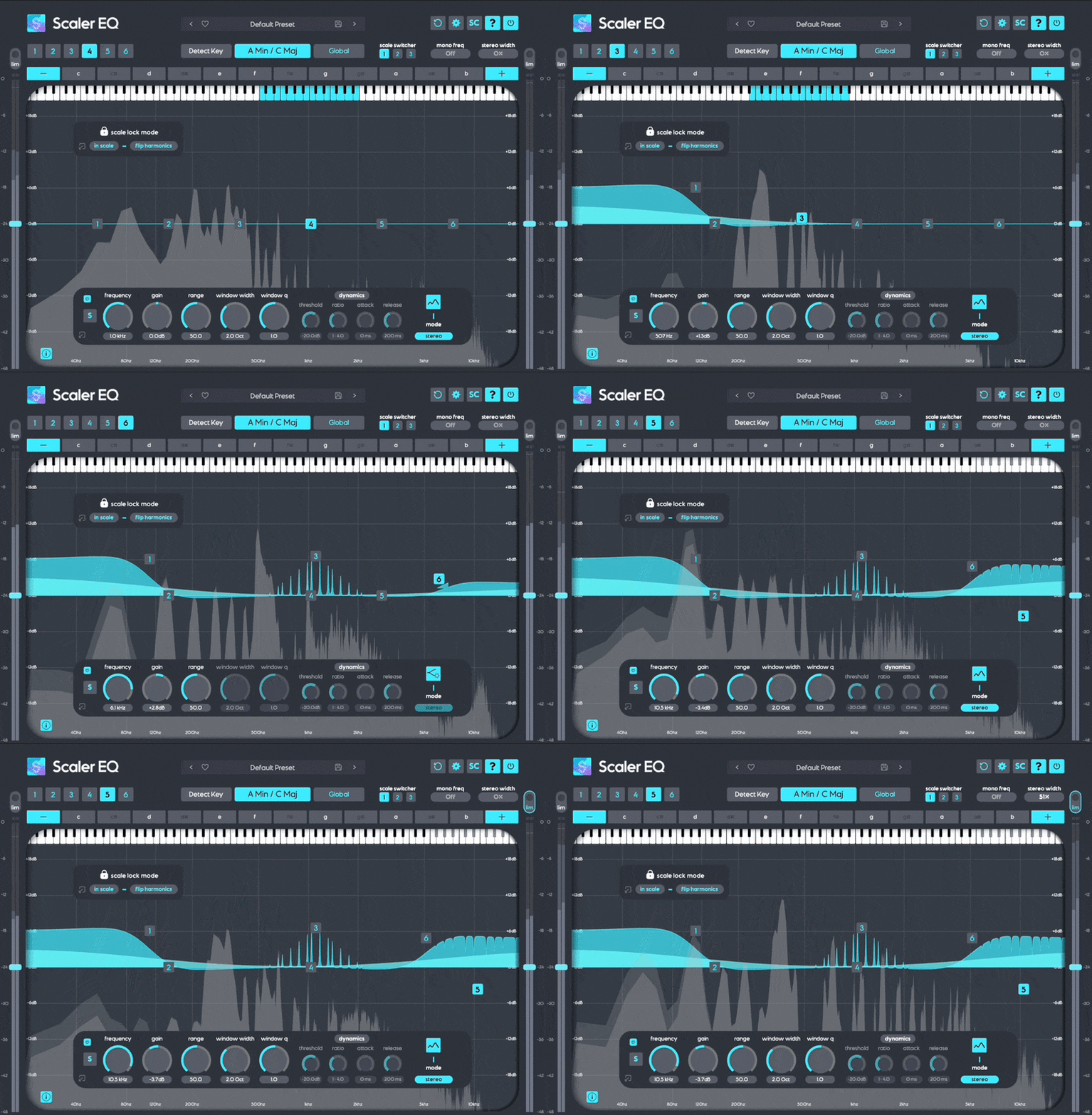
Scaler EQ in Action
The World’s First In-Key EQ
Thanks to its Harmonic Peak and ‘Plus/Minus’ filter types, performing a boost on Scaler EQ means only boosting frequencies that are in-key with the currently set scale. Making a cut with the same band will reduce only the out-of-key frequencies – although it can be set to cut in-key frequencies too, which can be helpful for mixing.
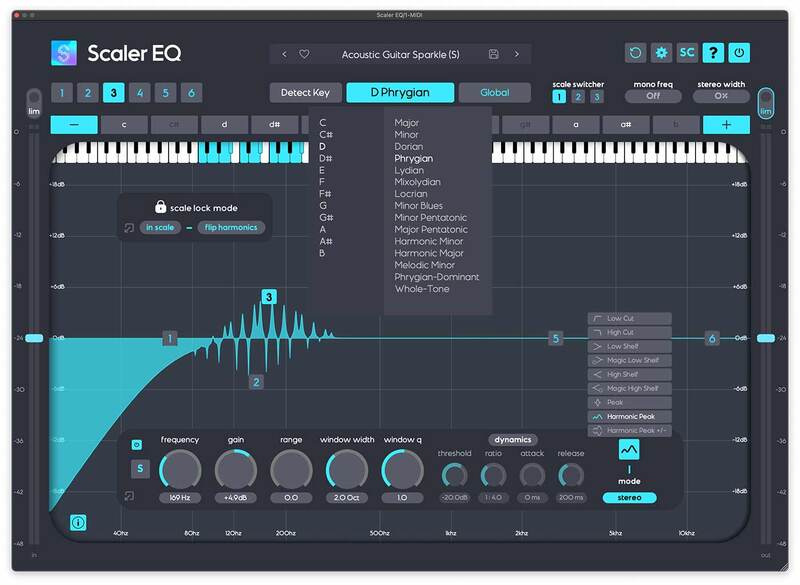
EQ & Key Selection
By using in-key EQ, you’ll get warmer lows and sweeter highs when boosting, while out-of-key cuts will lead to clearer, more focused bass and less harsh highs that retain their musicality.
Simple Key Detection
Key detection lets you automatically capture the key of your music through audio or MIDI, making it quick and simple to set up sweetening, tonal boosts. For a choice of broader or more focused tonal colours, you can add or remove notes in the currently selected scale. Key Switching? No problem, Scaler EQ can assign different scales and keys to ‘Scale Switchers’ that are fully automatable.
Musician- and Producer-Friendly Band Types
Scaler EQ’s harmonic band types aren’t the only option for boosts and cuts. The traditional array of shelves, bells and high-pass/low-pass filters will be instantly familiar and simple to use for every producer, and there’s more to reward creative exploration in Scaler EQ.
The Magic Shelf
Scaler EQ’s proprietary Magic Shelf bands work with stereo properties in mind. Boost a Magic Shelf in the bass region, and it will work harder on the band’s mid signal than it does on its side information. Reduce the level of that bass Magic Shelf to make it a cut, and you’ll cut the side signal more than you cut the mid information.

The Magic Shelf and Master
The high-frequency Magic Shelf works in a complementary way, increasing sides with more strength and reducing mids more heavy-handedly. With its Range control increased, any Magic Shelf band introduces a complementary scoop or bump before its corner frequency.
Mastering Grade Limiters and Meters
Scaler EQ acts as an all in one tool box on your master channel with adjustable input and output levels, Peak and RMS Meters and two safety limiters that can be driven into at input or output stage for increased loudness.
All the Mod EQ Cons
Scaler EQ will fit right beside all your other mixing plugins with its solid workflow for boosting and cutting bands and shelves like a traditional EQ. Each band or shelf can also be set to Dynamic mode, helping to soothe boosts and cuts with dynamic compression and expansion that can be controlled with a sidechain input, set with Threshold, Ratio, Attack and Release controls.
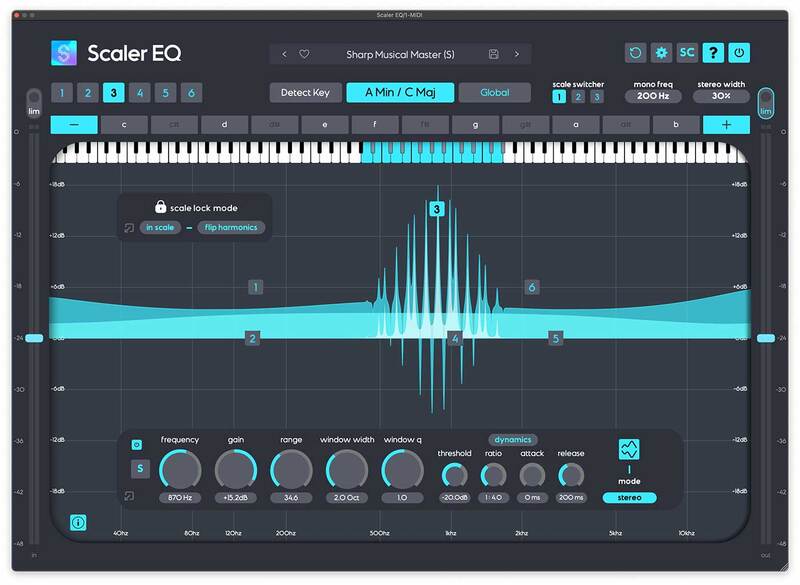
Dynamic EQ Band
Stereo options abound in Scaler EQ as well. With stereo channel selection (mid/side/stereo) for every band, it’s easy to enhance or reduce energy in a particular region of the stereo panorama, and thanks to the Mono Frequency selector, you can quickly and simply make the bass region mono below a frequency of your choosing. The Stereo Width dial offers a frequency-conscious way to enhance stereo width, using proprietary widening DSP.
Features
- Patent pending musical EQ with harmonic band types that boost in-key frequencies and cut out-of-key frequencies
- Familiar EQ controls translate to a regular workflow – but one that adds more colour
- Choice of band types for traditional boost/cut EQ or harmonic EQ
- Magic Shelf bands deliver punchier low end and smoother highs
- Key detection sets the EQ’s target scale
- Scale Switching allows for scale and key changes in your track
- Dial in dynamics for any band (Threshold, Ratio, Attack, Release)
- Control any shape dynamically via sidechain input
- Add or remove scale notes for a specific colour (eg, four-note chords or just fifths)
- Adjustable input and output levels with peak and RMS metering
- Creative unique EQ responses by combining magic shelves, harmonic filters and cuts
- Each band can be set to work on stereo, mid or side channels
- Enhance stereo width and collapse low frequencies to mono
- Minimum phase, zero latency EQ
- Available for Mac and PC in VST2, VST3, AU and AAX formats
What’s new in Scaler 1.1
- Assignable Scale Switches (ability to switch scales for key changes and key modulation)
- Adjustable Input And Output Levels With Peak And RMS Levels
- Input And Output Peak Limiters
- Sidechain Input for Dynamic Compressor
- Closable Panels
- New Master Limiter Presets
- New Sidechain Input Preset
Awards


Lloyd Brown
Lloyd Brown has had a string of hit singles and critically acclaimed albums to his credit, and is hailed as one of the UK’s best ever reggae vocalist/songwriter/producers.
"Scaler EQ has knocked it out of the park, taking musical EQ and sound design to another whole new level."

Christopher Coe
Live electronic artist, one half of Cox and Coe, and label head in partnership with Carl Cox at Awesome Soundwave.
"I love Scaler EQ. Such a practical and useful tool in the mixing process."

24bit Electronic Music Production
The place where electronic music production becomes your playground
‘Scaler EQ is a valuable tool for musicians, producers and audio professionals. It just might be the only EQ you need going forward’
macOS
- macOS 10.14 or higher.
- Natively compatible with Apple Silicon
- Plugin Formats: VST, VST3, AU, AAX, Standalone
- DAW's Supported: Ableton Live, Pro Tools, Logic Pro, FL Studio, Cubase, Nuendo, Reaper, Reason + more.
- Compatibility: 64-bit compatible only.
Windows
- Windows 7 or higher
- Plugin formats: VST, VST3, AAX, Standalone
- DAWs supported: Ableton Live, Pro Tools, FL Studio, Cubase, Nuendo, Reaper, Reason + more.
- Compatibility: 64-bit and 32-bit compatible.
Note: When accessing this software via a Rent to Own plan or the Beatport Studio membership, it's installed and run through the Beatport Access portal. An internet connection is required every 3 days to validate your license.

Reviews Summary
While it aims to provide a helpful overview, it may not capture every perspective or detail. We encourage you to read individual reviews to make an informed decision.
Users generally praise the plugin for its innovative concept, intuitive workflow, and effectiveness in cleaning up tracks and harmonizing elements by filtering frequencies to match a song's key. While widely appreciated for sound design and tonal enhancement, some reviewers note that it is CPU-intensive and may be more of a specialized tool rather than a daily utility for everyone.


