


 Log In
Free gifts available with your purchase
Master EQ 432
World Class High Performance Discrete Mastering Equalizer
The Absolute Reference Mastering EQ
This module is based on what is considered to be the “golden reference”, the absolute standard in mastering equalizers. This piece of hardware was the brainchild of two of the most ingenious minds in music recording technology, true pioneers (whose ideas were key to many other designs) who joined forces to create what was the first parametric EQ ever invented. The design quickly became the basis for most of the following parametric EQs from manufacturers the world over.
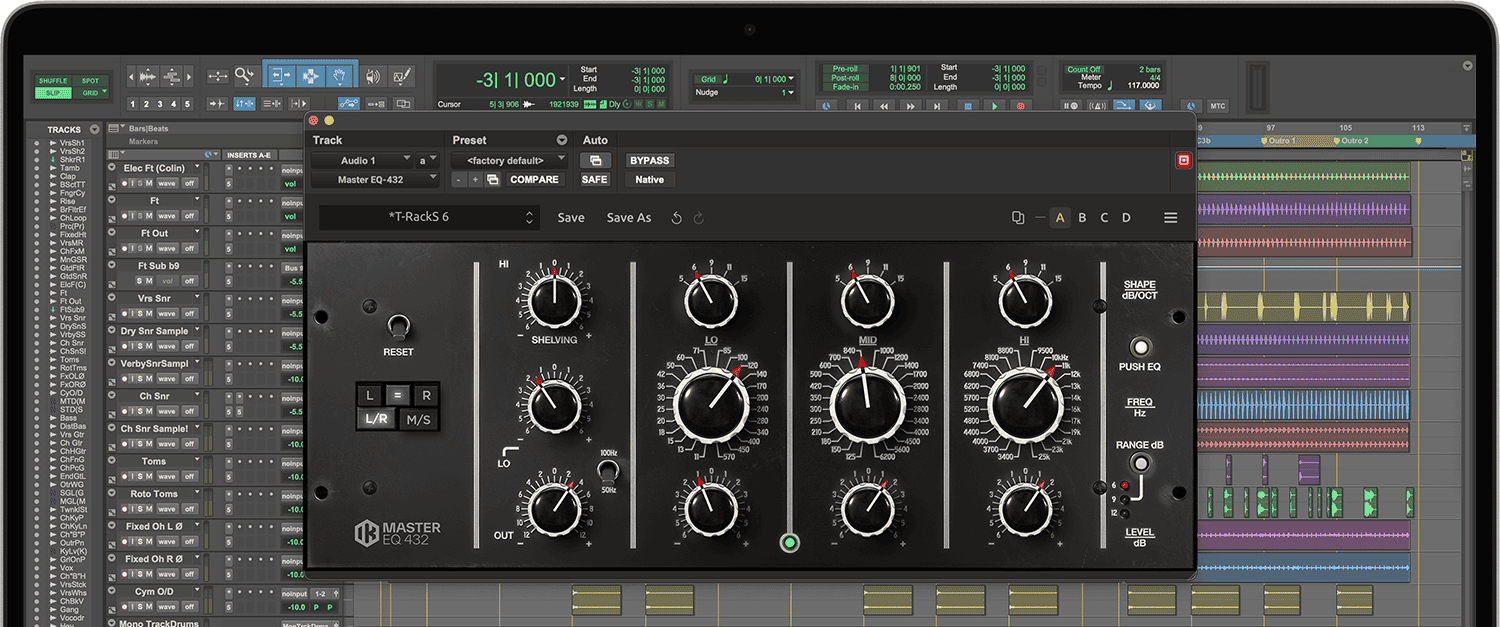
On top of the fully parametric and totally independent bands with almost no interaction (something that was not available until this circuit topology invention), its success derived from its no compromise quality level, based on discrete high-performance custom op-amps and totally transformer-less signal path which made for a transparent and pristine audio quality: this level of sonic excellence, superior transient response, almost non measurable non-linearities and extremely low distortion together with some perceivable "magic" in the circuit design makes it practically ubiquitous in mastering engineers' set of tools, from its origin to present days. The latest and advanced techniques used in the DSP design of this module allowed the perfect rendition of this major league audio quality in the digital DAW format, a level of a sonic sameness that simply wasn't possible before. The instantaneously noticeable result is that the EQ has a pleasing sound of its own, its high transparency notwithstanding, which is far over the standard "digital" EQ called to perform the same tasks.
On top of this, the analog nature of the hardware is empowered by some digital-world handy features like total recall, full automation, and switchable gain ranges, originally available as three different hardware versions, and now included in a single model.
This last feature is particularly powerful as it allows the use of the best resolution of each band's gain range with extreme precision.
Mastering engineers favor some separate channels processing techniques, such as the possibility to switch from L/R over to M/S mode, which is key to equalize Mid (center) content in a different fashion than the Side content of a stereo program: they will feel right at home with this feature instantaneously recallable on the Master EQ 432.
This model really is “as good as it gets”, the secret weapon to give mixes that finishing polish and turn them into master quality tracks, with peerless high end air, a solid low end and all the charming yet detail-revealing rendering in the critical midrange spectrum to perform any mastering EQ task at the best possible quality.
System Requirements
Mac® (64-bits)
- Minimal: Apple M1 or Intel® Core i5 Processor, 8 GB of RAM, macOS® 10.15 or newer. 9 GB of hard drive space.
- Requires an OpenGL 2 compatible graphics adapter.
- Supported Plug-in formats (64-bit): Audio Units, VST 2, VST 3, AAX.
Windows® (64-bits)
- Minimal: Intel® Core i5 Processor or equivalent, 8 GB of RAM, Windows 10 (64 bit) or newer. 9 GB of hard drive space.
- Requires an ASIO compatible sound card.
- Requires an OpenGL 2 compatible graphics adapter.
- Supported Plug-in formats (64-bit): VST 2, VST 3, AAX.
Important note: Internet connection is required as all of the Custom Shop operations are web based.


